Auto-numbering
Generate invoice-style numbers on save with patterns like INV/{yyyy}/{seq:4:yearly}, with daily, monthly or yearly resets.
Make AxisIQ number your records for you, such as INV/2026/0001, AXIS-00004 or ORD-2026-05-0012. The number is created when the record is saved.
Before you start: You need the Business records permission at Full control. Auto-numbering works on
string(text) fields only. It works on built-in fields too, such as an invoice number, and applies to your workspace only.
Steps
- Open the app, click Settings, then the record type's tab.
- Click the text field you want to number (for example the invoice number).
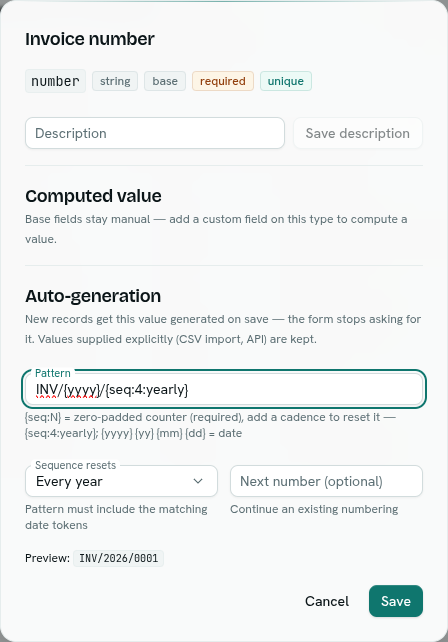
- In the Auto-generation section, type a Pattern, for example
INV/{yyyy}/{seq:4:yearly}. - Pick when the counter restarts in Sequence resets. See the options below.
- Optional: fill in Next number (optional) to continue an existing numbering.
- Check the Preview line under the fields. It shows what the next number will look like.
- Click Save.
You see "<field>" is now auto-generated.
Pattern parts
A pattern is plain text plus these tokens in curly braces. Use exactly one sequence token.
| Token | Becomes |
|---|---|
{seq} |
The running number, no padding: 1, 2, 3 |
{seq:4} |
The running number padded with zeros to 4 digits: 0001 (1 to 10 digits; longer numbers just grow) |
{seq:4:yearly} |
Padded, and the counter restarts at 1 every year |
{yyyy} |
Four-digit year |
{yy} |
Two-digit year |
{mm} |
Two-digit month |
{dd} |
Two-digit day |
Patterns can be up to 100 characters. The order of the parts inside the sequence token does not matter ({seq:4:yearly} and {seq:yearly:4} are the same). Dates are in UTC.
Sequence resets
The Sequence resets drop-down edits the sequence token for you.
| Option | Pattern must contain | Counter |
|---|---|---|
| Never | nothing extra | Never restarts |
| Every day | {yyyy} or {yy}, {mm} and {dd} |
Restarts each day |
| Every month | {yyyy} or {yy}, and {mm} |
Restarts each month |
| Every year | {yyyy} or {yy} |
Restarts each year |
If the pattern lacks the date parts, AxisIQ refuses it, because numbers would repeat.
Examples
| Pattern | First numbers |
|---|---|
AXIS-{seq:5} |
AXIS-00001, AXIS-00002 |
INV/{yyyy}/{seq:4:yearly} |
INV/2026/0001 … then INV/2027/0001 in January |
ORD-{yy}{mm}-{seq:3:monthly} |
ORD-2610-001 |
What happens next
- The field disappears from the New form, because the number is issued on save. On an existing record the number is shown read-only.
- A value you supply yourself, for example from a CSV import, is kept and no number is used. This lets you bring in old invoice numbers.
- The field shows an auto badge in the field table, and the Rules column starts with
auto: <pattern>. - Numbers are never reused. If a save fails after a number was taken, that number is skipped, so you may see gaps.
Continue an existing numbering
Type the next number you want in Next number (optional), for example 4001. The counter moves up to at least that value. It never moves backwards.
Turn it off
Open the field and click Remove. The field becomes a normal text field again and the counter is dropped. You see "<field>" is entered manually again.
Troubleshooting
exactly one {seq} token required
Add one {seq} token to the pattern, and no more than one.
bad token {…} — expected {seq}, {seq:N}, {seq:N:cadence} or a date token You used an unknown token. Use only the tokens in the table above.
a yearly-resetting sequence needs {yyyy} or {yy} in the pattern
Add the date parts the reset needs. Monthly needs a year and {mm}; daily needs year, {mm} and {dd}.
unbalanced braces
Every { needs a matching }.
Available for text (string) fields
Only string fields can be numbered. Other types show this hint instead of the settings.