Share files and folders
Share a Drive folder or file with a teammate or the whole workspace, as view or edit access.
Give a colleague, or everyone in the workspace, access to a folder or file in a space.
Before you start: you can share from your own personal spaces, and from team spaces where you have Full control. The Everyone space has no sharing. Its access comes from roles. The Share button only appears where you can share.
Steps
- Open the folder you want to share. To share a single item, right-click it and choose Share…. To share the folder you are in, click Share in the toolbar.
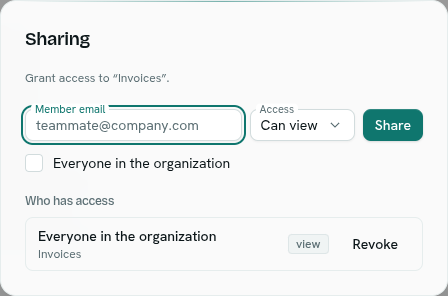
- The dialog Sharing says what you are granting: "Grant access to the whole space" or the folder name.
- Type the Member email of a teammate. Or tick Everyone in the organization.
- Choose Access: Can view or Can edit.
- Click Share. You see "Shared".
What happens next
- The person sees it under Drive › Shared with me with a Can view or Can edit badge. A folder opens the browser at that folder, and a single file opens in the viewer.
- Under Who has access you see each grant: the person (or "Everyone in the organization"), the folder ("Whole space" for the whole space) and the access level.
- Click Revoke to remove a grant. The access level is shown as a small badge reading "view" or "edit".
- If nothing is shared you see "Only you (and org admins) can see this space."
Rules
- Sharing the same folder with the same person again replaces the earlier access level.
- The person must be a member of your workspace. Otherwise you get "no organization member with that email".
- You cannot share with yourself ("the owner already has full access").
- A share on a folder includes everything inside it. Someone with edit access through a share can only move items within the folder you shared.
Tips
- Share a single folder, not the whole space, to keep access narrow.
- Sharing does not change roles. Roles decide access to team and Everyone spaces.
Troubleshooting
no organization member with that email Check the address. Invite the person first from Team.
No Share button You do not own this space, or you lack Full control on it.