Drive
File storage for your workspace: personal drives, team spaces and shared folders.
Drive is file storage for your whole workspace. Keep your own files, set up spaces for teams and projects, and share folders with colleagues.
What you can do
- Understand spaces — personal, team and everyone spaces. Spaces
- Upload files and folders — pick them or drag them in. Upload files
- Organise — new folders, rename, move and delete. Organise files
- Share — give a person, or everyone, view or edit access to a folder or file. Share files
- Preview and download — look at files without leaving Drive. Preview and download
- Find things — search, sort and switch layout. Find files
Before you start
- Your own My Drive is always there. You do not need any permission for it.
- Shared spaces follow roles. On the Roles page the app is called Files: Can view (browse and download), Can edit (upload, move and delete), Full control (also create shared spaces and manage who they are shared with).
- Drive does not appear in Settings › Apps as optional. It is always available.
- Other apps save into Drive too, for example generated PDFs from Templates.
Where to find it
Platform category in the launcher › Drive. The left rail has:
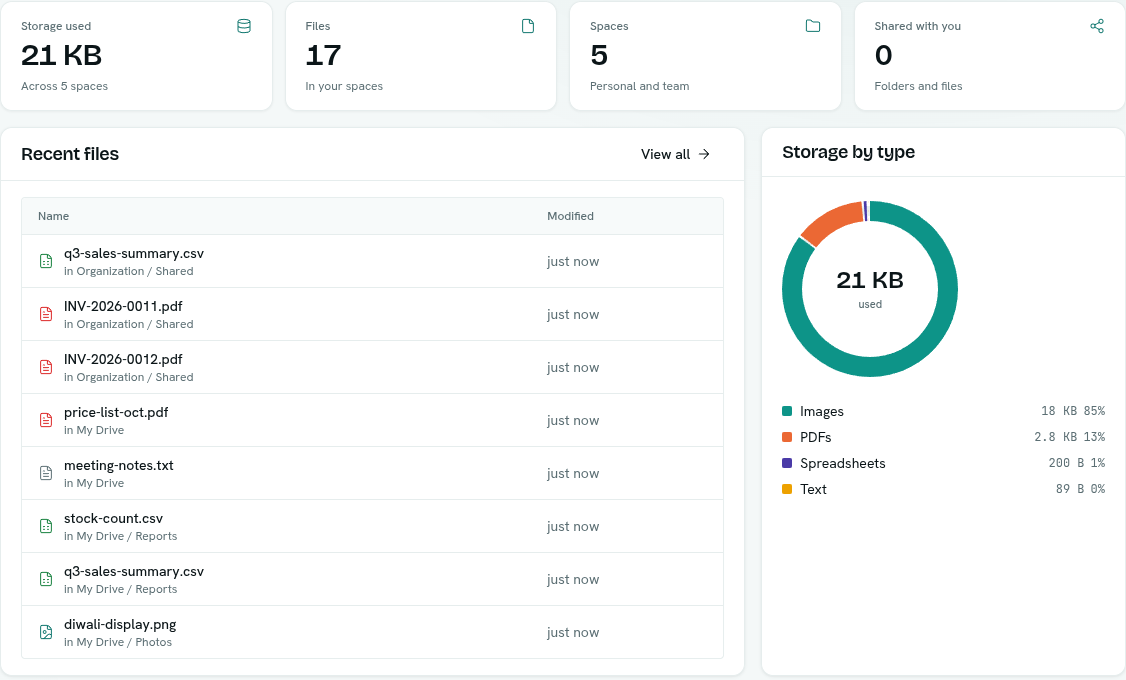
- Home — storage used, files, spaces, shared items, recent files, storage by file type, your spaces and what is shared with you.
- My Drive — your personal space, opened in the file browser.
- Shared with me — folders and files others have shared with you.
- Spaces — every space you can see.
- Recent — the newest files across all your spaces.
Key ideas
| Term | What it means |
|---|---|
| Space | A top-level place where files live. |
| My Drive | Your personal space. Created automatically. It cannot be deleted. |
| Personal space | Private to you until you share a folder from it. You can make extra ones. |
| Team space | A space for a team or project. Access is set by roles, using its short name. |
| Everyone space | One space for the whole workspace. Access comes from roles. |
| Share | Access to one folder or file for one person, or everyone in the workspace, as Can view or Can edit. |
Home page
Four tiles: Storage used, Files, Spaces and Shared with you. Click a tile to go to the matching section. Below are Recent files (with View all), Storage by type, Spaces and Shared with you. With no files you see "No files yet". The header has New space and Open My Drive.