Templates (PDF layouts)
Design PDF layouts for invoices, quotes and any record, then generate documents that save to Drive.
Templates is where you design PDF layouts once, such as invoices, quotes and order slips, and then generate finished documents from your records. Generated files are saved to Drive.
What you can do
- Create a template — write a layout with placeholders for workspace and record data. Create a template
- Pull in record data — use
{{.record}},{{.refs}},{{.org}}and formatting helpers. Template data and helpers - Control the layout — every tag and attribute the layout language accepts. Layout reference
- Generate a document from a record — use the Documents tab on any record. Generate a document
- Duplicate and delete templates — and who is allowed to do what. Manage templates
Before you start
- Who can use it: Document templates on the Roles page. Can view lets you see templates and past documents. Can generate adds producing PDFs from a record. Full control adds writing and editing templates.
- Without at least Can view, the app shows "No access to Templates".
- Templates can be switched off per workspace in Settings › Apps. It must be on to appear.
- A template needs a place to save its files: a shared Drive space (not a personal drive). See Create a template.
Where to find it
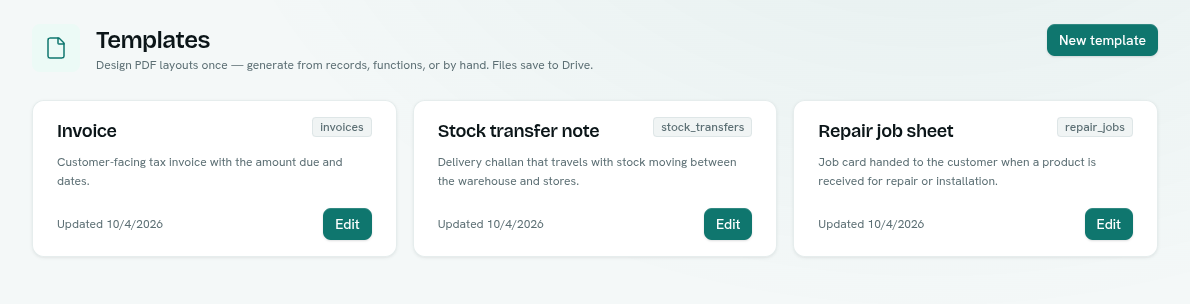
Platform category in the launcher › Templates. The app is one page: a grid of template cards. Each card shows the template name, a badge with its record type (or generic), the description, the last-updated date, and an Edit button if you can manage templates. You can also right-click a card for Edit, Duplicate, Copy ID and Delete.
Key ideas
| Term | What it means |
|---|---|
| Template | A named layout with placeholders, saved in the workspace. |
| Layout | The template body: a small XML-style document with {{placeholders}}. |
| Bound template | A template tied to a record type. It can be generated straight from that type's records. |
| Generic template | A template with no record type ("Generic (data only)"). It only sees workspace data. |
| Generated document | The PDF made from a template. It is saved in Drive; the record keeps a reference to it. |