Generate a document from a record
Use the Documents tab on a record to make a PDF from a template and download it later.
Make a PDF from a record with one click and download it later from the same record.
Before you start: a template must be bound to the record's type (see Create a template). You need Can generate on Document templates, permission to read the record, and permission to add files to the template's Drive space.
Steps
- Open the record (for example an invoice) from its list.
- Click the Documents tab at the top of the record window.
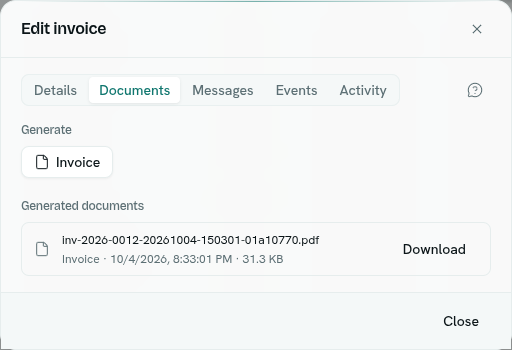
- Under Generate, click the button named after the template.
- Wait for "Document generated". The new file appears under Generated documents.
- Click Download next to a file to save the PDF.
What happens next
- The PDF is saved in the Drive space chosen on the template, in a folder named
generated/<template-name>/. - The file name is built from the template name, a label from the record, and the time. The label is the first of
number,name,title,labeloremailthat has text, otherwise a short code from the record id. A short unique code is added at the end so two documents made in the same second never overwrite each other. - Each generation is listed under Generated documents with the template name, date and time, and size.
- Regenerating makes a new file. Earlier ones stay in the list and in Drive.
Tips
- Only templates bound to this record's type show as buttons.
- The generated file is an ordinary Drive file. Whoever can open that Drive space can open it. See Drive.
- Functions can also generate documents. See the developers section.
Troubleshooting
No document templates No template is bound to this record type yet. Bind one in Templates.
Generation failed The message explains why. Typical causes: the layout has a problem that only shows with this record, or you do not have permission to add files to the Drive space.
Download failed The file may have been removed from Drive. Generate again.
You do not have permission to do that You need Can generate on Document templates, and edit access to the template's Drive space.