Search the knowledge base
Ask a question in plain words and see the best matching passages from AxisIQ, your organization and your personal notes.
You will search across the three knowledge scopes and read the results.
Before you start: you need Can search (or higher) on Knowledge base. Without it the page shows "No access to search".
Steps
- Open Knowledge Base. The Search section is selected.
- Type a question or description into Ask a question or describe what you're looking for….
- Tick the scopes to search: AxisIQ, Organization, Personal. All three are ticked at first. Search needs at least one.
- Press Enter or click Search. You get up to 12 passages.
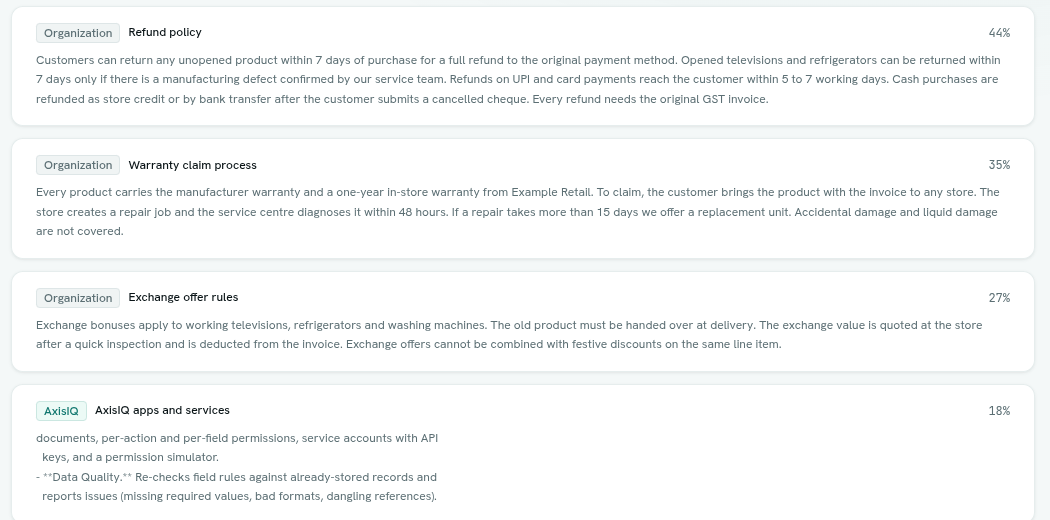
- Each result card shows a scope badge, the source title, the record type for record-based results, a percentage match, and the passage (long passages are cut at 600 characters).
What each scope contains
| Scope | Contents |
|---|---|
| AxisIQ | Product knowledge about AxisIQ for every workspace. |
| Organization | Documents in collections you can read, plus records of the types you have indexed. |
| Personal | Documents only you added. |
What you see
Results are filtered for you. A document needs read access to its collection. A record passage needs permission to read that record, and a passage from a field you may not read is left out.
Tips
- Describe the idea, not the exact words: "how do we handle refunds" finds a "returns" policy.
- Ask Axis uses this same search when you ask it a product or company question. See What Ask Axis can do.
Troubleshooting
No matching passages. Try different words, or check that the content is indexed. Nothing close enough was found. Rephrase, tick more scopes, or check the document status on the Documents page.
Search failed The request failed. Try again. If meaning-based search is not enabled for your platform, searching returns an error.