Intake rules
Add records to a queue automatically when they match a condition, and take them out again when they stop matching.
An intake rule watches a record type and puts records into the queue when they match. For example, every order whose status is "paid" enters Packing without anyone adding it.
Before you start: the queue must be attached to a record type (not Standalone) and you need Full control on Work queues.
Steps
- Open the queue, click Edit.
- Open Intake rule — auto-add matching records. It appears only when the queue has an Object type.
- Switch on Auto-add records that match.
- Click Add condition. Pick a field, an operator and type a value.
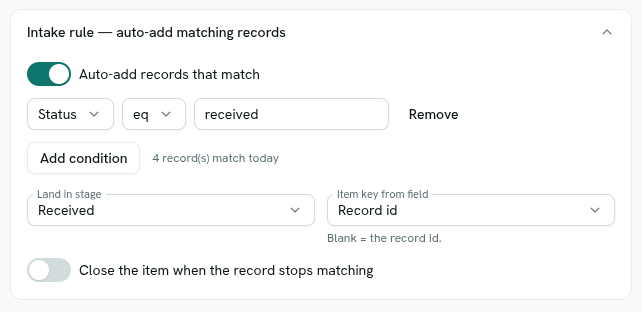
- Add more conditions if needed. All conditions must match. Below, you see "N record(s) match today" so you can check the rule.
- Choose Land in stage. The default is Start stage.
- Choose Item key from field. The default is Record id. Pick a field such as an order number if people will scan or quote it.
- Optional: switch on Close the item when the record stops matching.
- Click Save changes.
Operators
| Shown as | Matches when |
|---|---|
eq |
The field equals the value. |
ne |
The field is empty or not equal to the value. |
contains |
The field's text includes the value. |
gt, gte, lt, lte |
The field is greater than, at least, less than, or at most the value. Numbers and dates compare by size. |
Text comparisons ignore upper and lower case.
What happens next
- When a record of that type is created or changed, it is checked against the rule. A matching record that is not already in the queue gets an item. Its Source is intake.
- Records already in your workspace enter the next time they are saved.
- While a record has an open item, further edits do not add another or move it. After it enters, people move the item.
- If you switch on Close the item when the record stops matching, an open item is cancelled when its record no longer matches. A record that is deleted always leaves the queue.
- Intake does not depend on who edited the record, so it reflects the data, not one person's permissions.
- Items entering by intake are not blocked by a WIP limit.
Tips
- Use a unique field for Item key from field. If two records give the same key, only the first gets an item while its item is open.
- Pair intake with a stage's record update so the record shows where it is, for example status "Packing". See Create a queue.
Troubleshooting
The intake section is missing The queue is Standalone. Choose a record type and save.
A record that matches is not in the queue Intake runs when the record is saved. Open and save it again.
an intake rule needs the queue to be bound to an object type Choose a record type before switching intake on.