Work Queues
Track work through stages — receiving, packing, checks. Load a list of what you expect, scan or move items forward, and see what is late or missing.
A work queue is a pipeline of stages that work moves through. Each unit of work is an item that sits in a stage until someone moves it. Because items stay where you put them, you can always say what is done, what is late, and what never arrived.
What you can do
- Create a queue with stages such as Expected, Received and Done. Create a queue
- Add records automatically with an intake rule. Intake rules
- Load a list of expected items and scan arrivals with a barcode scanner. Manifests and scanning
- Work the board, browse items, and read the Report of what is missing or unexpected. Board, items and report
- Control who can add and who can move work. Queue permissions
Before you start
- Who can use it: the Work queues app on the Roles page. Can view shows the board. Can work the queue scans items in and moves them along. Full control also creates and changes queues. A role can be narrowed to individual queues.
- Work Queues can be switched off in Settings → Apps. It must be on.
- Without view permission you see "No access to Work Queues".
- To attach a queue to records, the record type must exist. A queue can also stand alone, with items that are just codes.
Where to find it
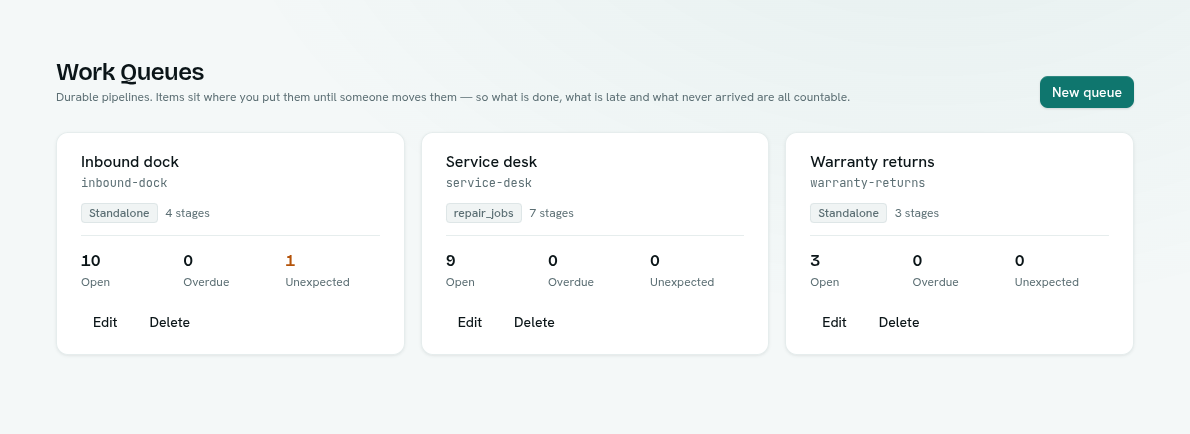
Launcher › Automation › Work Queues. The first page shows one card per queue with its name, key, record type (or Standalone), number of stages, and three counts: Open, Overdue and Unexpected. A Paused badge marks a queue that is switched off. Click a card to open the queue's workspace, with Board, Items and Report views.
Key ideas
| Term | What it means |
|---|---|
| Queue | An ordered list of stages. |
| Stage | One step in the pipeline. It can be a start, a normal step or an end (terminal). |
| Item | One unit of work in a stage. It has a key, such as a barcode, an order number or a SKU. |
| Key | The code you scan or type to find an item. |
| Batch | A name for a group of items, such as one delivery. |
| Standalone | A queue whose items are only codes, with no records behind them. |
| Manifest | The list of keys you expect, loaded into the first stage. |
| Missing | Expected items still sitting in the start stage. |
| Unexpected | Items a scan had to create because they were never listed. |
| Overdue | An item that stayed in a stage longer than the stage's time limit. |