Functions
Write small JavaScript functions that read and change your workspace data, then run them by hand, from flows, queues, forms or a public web address.
Functions are small pieces of JavaScript that you keep in your workspace. Use one when the ready-made blocks are not enough: a custom calculation, a lookup across record types, or a nightly clean-up. A function runs in a sealed sandbox and reaches your data only through permissions.
What you can do
- Write and test a function in the editor, and run it with sample input. Write and run a function
- Give a function a public web address so another system can call it. Expose a function over HTTP
- Run it automatically from a flow (the Run function block), from a work queue stage, or as a form target.
- Know the limits and the permission rules. Limits and permissions
Writing against the axis toolkit (records, analytics and so on) is a developer topic. See Developers.
Before you start
- Who can use it: the Custom code app on the Roles page. Can view lets someone read the code. Can run adds running a function. Full control writes and changes functions. This is a trusted job, because other parts of the workspace can run your code. See Limits and permissions.
- Functions can be switched off for the whole workspace in Settings → Apps. It must be on.
- Without view permission you see "No access to Functions".
Where to find it
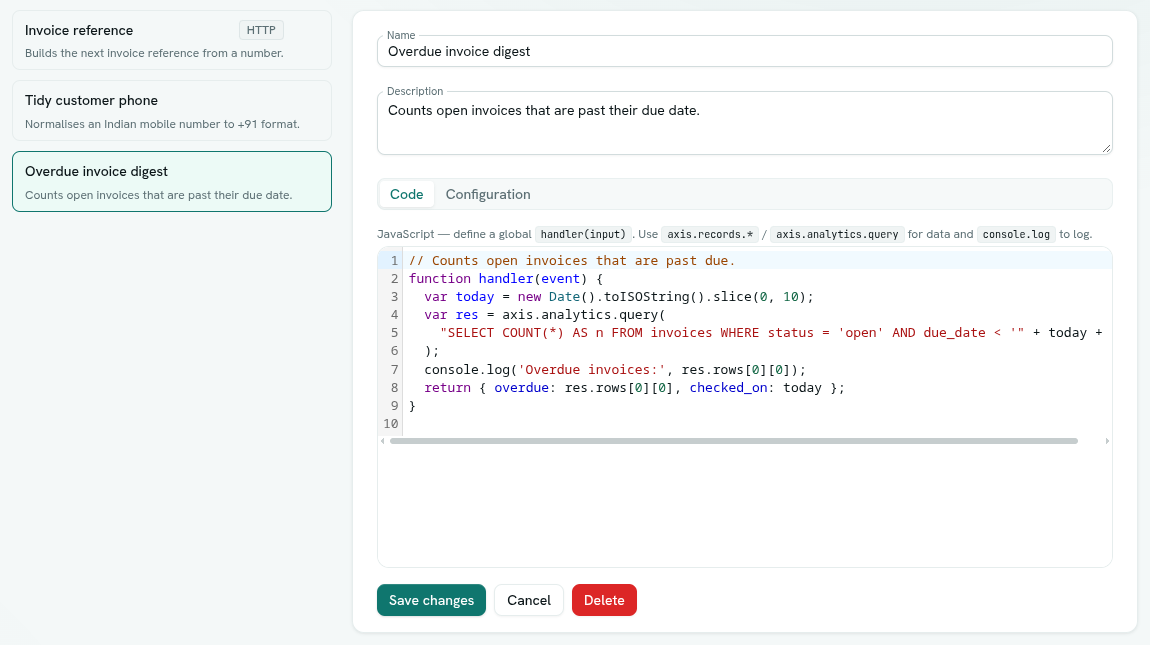
Launcher › Automation › Functions. There are no sub-sections. The left side lists your functions. Each shows its name, its description, and an HTTP badge if it has a public address, or an Off badge if it is disabled.
Key ideas
| Term | What it means |
|---|---|
| Function | A named piece of JavaScript with a handler(input) entry point. |
| Input | The data passed in. You provide it when running by hand. Flows, queues and web requests provide their own. |
| Result | The value your function returns. |
| Timeout | How long a run may take. Default 5000 ms. |
| Enabled | An off function cannot run. |
| Expose over HTTP | Gives the function a public address. |