Expose a function over HTTP
Give a function a public web address so a website or another system can call it, and understand what it can access.
Switch on Expose over HTTP and your function gets a public address. Anyone with the address can call it, with no account.
Important: a public address is open to the internet. By default the function can only compute: it cannot read or change any of your data. It gets exactly the access of your workspace's public role, nothing more. Do not give that role more than the function needs.
Before you start: you need Full control on Custom code (the Roles page). The function must be saved and Enabled.
Steps
- Open Functions and click your function.
- Click Configuration.
- Switch on Expose over HTTP. On a new function the address appears after you click Create function.
- Click Save changes if the switch is part of an unsaved change.
- In the address box, click Copy. You can also right-click the function in the list and choose Copy public URL.
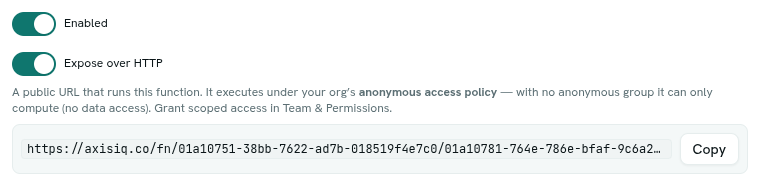
- Call the address. The address looks like
https://axisiq.co/fn/<workspace id>/<function id>.
How a call works
- Use GET or POST.
- Your function receives one input object:
| Field | Value |
|---|---|
method |
GET or POST. |
path |
The request path. |
query |
The query-string values, one value per name. |
body |
The request body. Parsed as JSON when it is valid JSON, otherwise plain text. Empty when there is no body. |
- Whatever your function returns is sent back as the response body, as JSON with status 200.
- Request bodies are limited to 1 MB.
- A caller can make up to 60 calls per minute from one internet address. More returns
RATE_LIMITED(status 429).
Example function:
function handler(input) {
  return { hello: input.query.name || 'world' }
}
Calling …/fn/<workspace id>/<function id>?name=Asha returns {"hello":"Asha"}.
What the caller sees on failure
| Status | When |
|---|---|
| 404 | The function does not exist, is disabled, or is not exposed over HTTP. All three look the same on purpose. |
| 429 | Too many calls from one address. |
| 500 | The function threw an error ("function failed") or ran out of time ("function timed out"). The real error text is not sent to the caller. Test with Run function to see it. |
What the function can access
A public call runs as the public role: the role in Team & Permissions that is marked "This role is for people who are not signed in". The Roles list shows it with a Public visitors badge.
- With no public role, or one with nothing granted, the function can compute but not touch data.
- Grant the public role only what is needed. See Team and permissions.
Tips
- Keep public functions small and validate the input. Treat everything in
inputas untrusted. - Return only what the caller should see.
- For work that needs your data, call the function from a flow or a signed-in session instead, so normal permissions apply.
Troubleshooting
404 even though HTTP is on Check the function is Enabled, the address has your workspace id and function id, and that you saved the change.
500 "function failed" Run the same input in the Run card. The error shows there.
My function cannot read records over HTTP That is by design. A public call has only the public role's access.