Business hours, paused clocks and escalation
Count stage deadlines only in working hours, pause the clock while you wait on someone, and act automatically when an item runs late.
Give a queue a working week so stage deadlines count only office hours, pause an item's clock while you are waiting on a customer, and set escalation rules that alert people, reassign or move an item once it is late.
Before you start: setting business hours and escalation rules needs Full control of the queue under Work queues in Team & Permissions. Pausing and resuming an item needs Can work the queue.
Set business hours
- Open Work Queues, open the queue and press Edit.
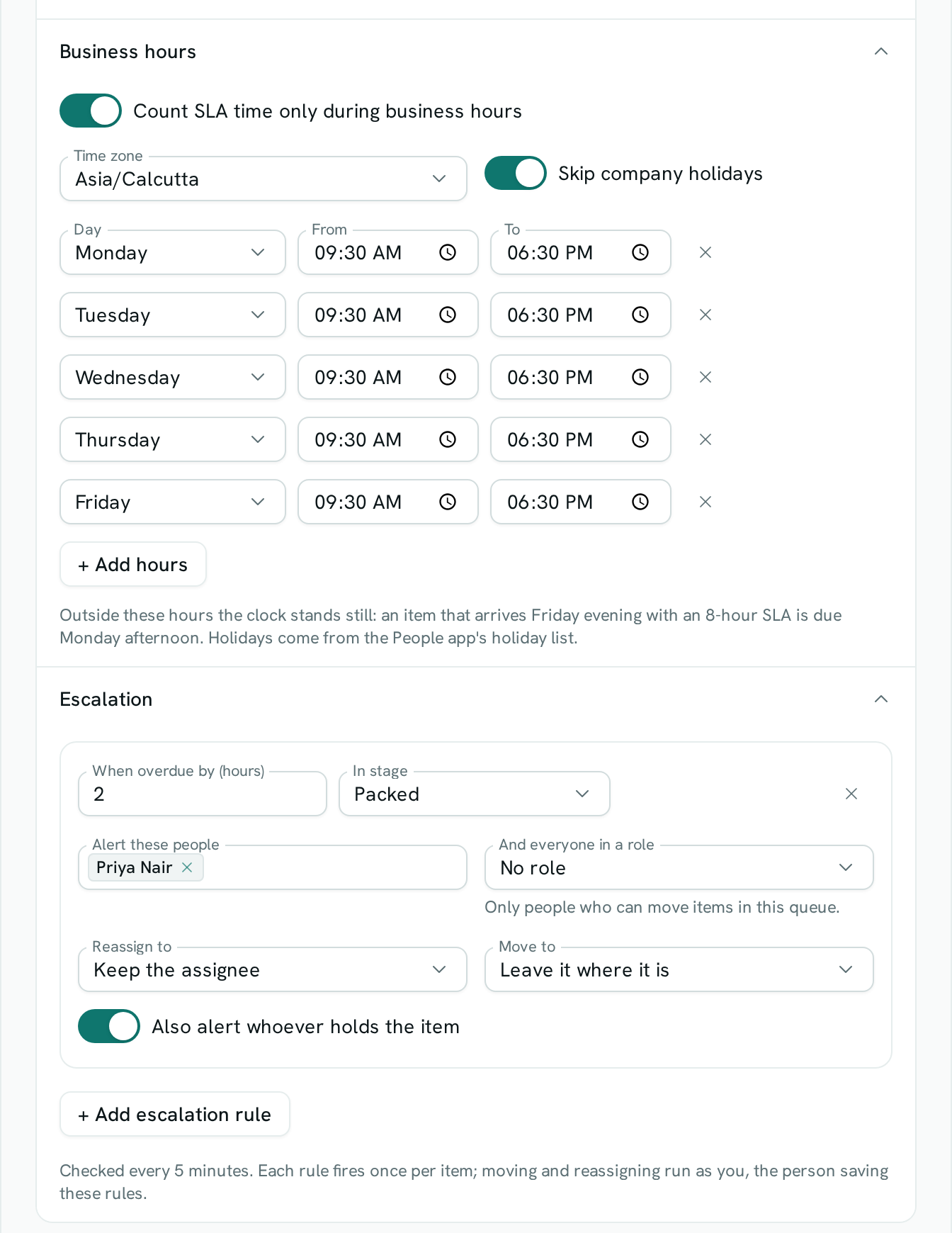
- Open Business hours and turn on Count SLA time only during business hours. It starts with Monday to Friday, 09:00–18:00, in your own time zone.
- Pick the Time zone the hours belong to.
- Change any row's Day, From and To. Press + Add hours for another range — a lunch break is two ranges on the same day, such as 09:00–13:00 and 14:00–18:00.
- Leave Skip company holidays on to stop the clock on the holidays listed in the People app.
- Press Save changes.
From now on every stage's SLA counts working time: an item that arrives Friday evening in a stage with an 8-hour SLA is due Monday afternoon.
Pause an item's clock
- Open the item on the board or in Items.
- Type what you are waiting for in Waiting on (optional), then press Pause clock.
- When the wait is over, press Resume clock.
A paused item shows Paused on its card and is never counted as overdue. On resume it gets back the time it had left. Moving the item to another stage also resumes it, with that stage's own SLA.
Escalate late items
- Open the queue, press Edit and open Escalation.
- Press + Add escalation rule.
- Set When overdue by (hours) and, if the rule is for one stage only, In stage.
- Choose what happens — any mix of:
- Alert these people and And everyone in a role.
- Also alert whoever holds the item.
- Reassign to another person.
- Move to another stage.
- Press Save changes.
Good to know
- Each rule fires once per item, ever. Editing a rule keeps that history.
- Late items are checked every 5 minutes, so an escalation can land a few minutes after the threshold.
- Reassigning and moving run with the permissions of the person who last changed the rules. If they leave the workspace, the rules only send alerts; a move or reassignment that is refused (stage limit, permissions) is noted in the item's history and not retried.
- A role alert reaches only members who can work this queue. Alerts follow each person's notification settings.
- "Overdue by" counts working time when the queue has business hours.
- Holidays more than about a year ahead are not skipped. Without the People app, no holidays are skipped.
- You can't change an item's due date while its clock is paused.
- At most 10 escalation rules per queue.