Board, items and report
Work a queue on its board, find any item in the Items list, and use the Report to see what is missing, overdue or unexpected.
Each queue opens in a workspace with three views: Board, Items and Report. A Batch menu at the top applies to all three.
Before you start: you need at least Can view on Work queues. Moving items needs Can work the queue. Deleting items needs Full control.
The header
- All queues takes you back to the list.
- The name, the key, the record type (or Standalone) and a Paused badge if the queue is off.
- Batch — All batches or one batch. Pick one to see only that delivery or session.
- Refresh reloads. Edit changes the queue. Add items and Scan are described in Manifests and scanning.
- The Board / Items / Report switch.
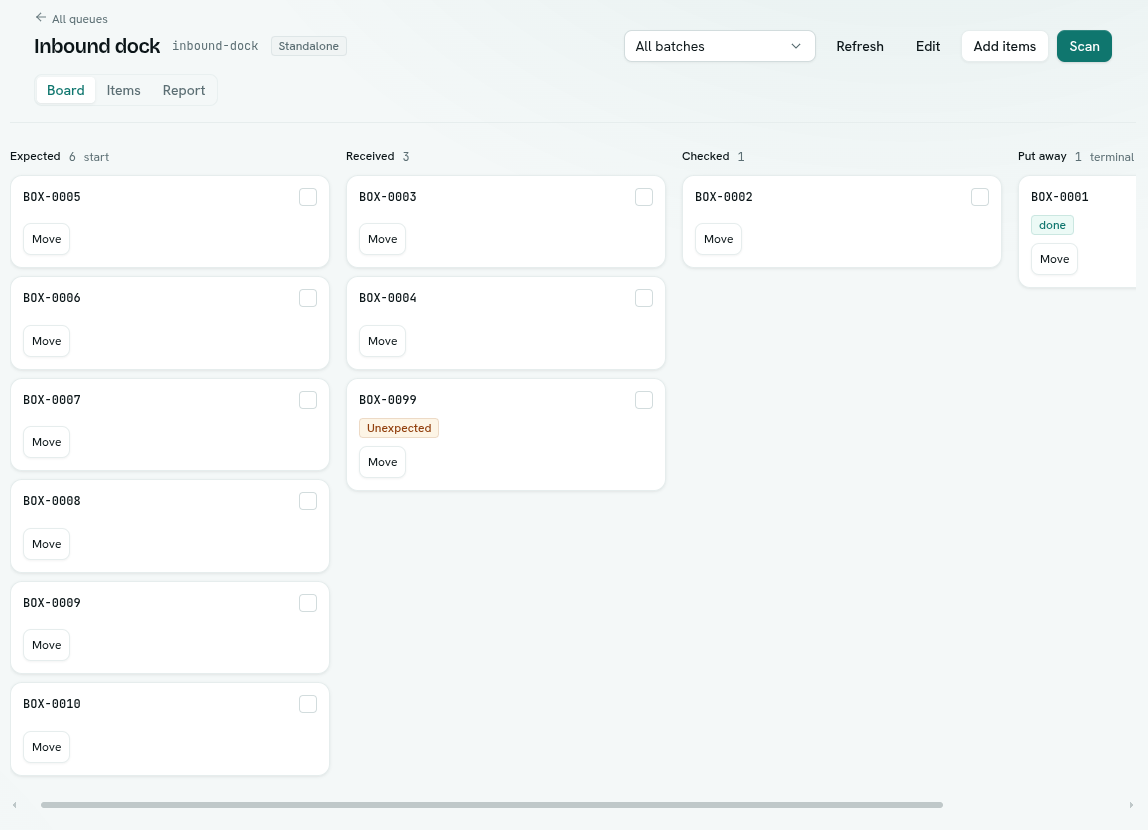
Board
One column (lane) per stage, in order.
- The lane header shows the stage name and its count. A stage with a WIP limit shows a badge like
3/5, in warning colour when full. Start and terminal stages are labelled. A stage with an SLA shows "SLA" and its length. - Each card shows the item's key, up to a couple of fields from its record, and badges: Overdue, Claimed, priority such as
P1, Unexpected (a scan created it), and its status if it is not open. - Click Move on a card and choose a stage. Only stages that accept items from there are listed.
- Stage buttons you defined appear on the card.
- To act on many items, tick the checkboxes. A bar shows "N selected" with Move, the stage's buttons, and Clear.
- Right-click a card for Move to, buttons, Select / Deselect and Copy key.
- A lane shows "Nothing here" when empty, and Load more if it has more than the first 50.
- If a move is refused, the message says why, for example a stage that is full.
Items
A flat, searchable list.
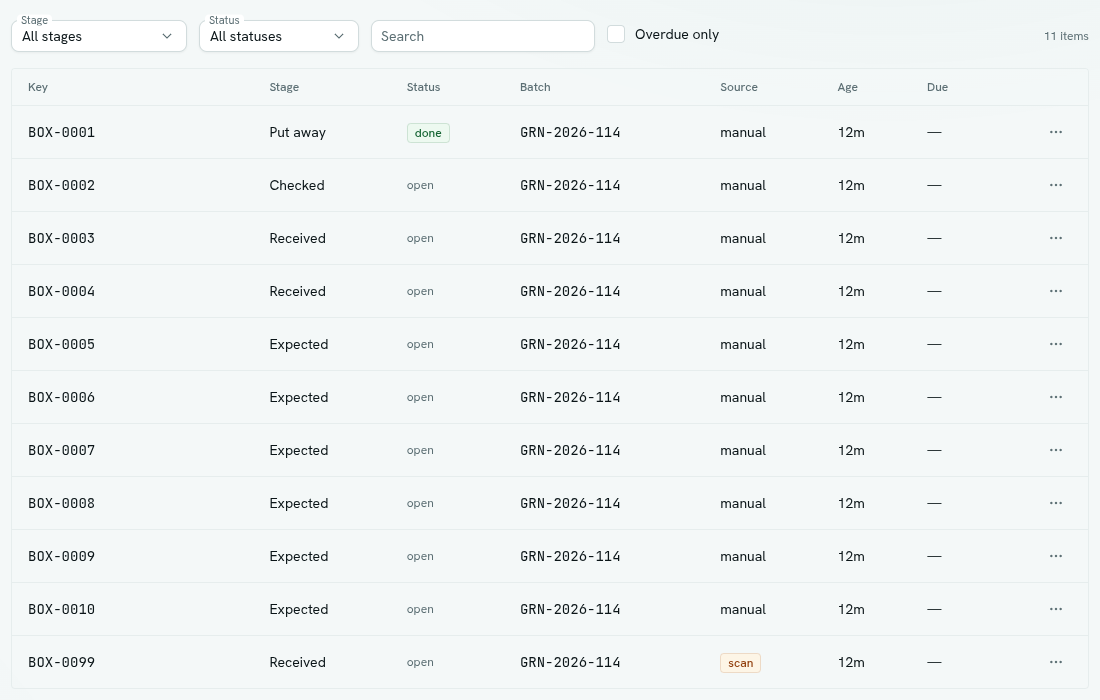
- Filters: Stage (All stages), Status (All statuses, Open, Done, Failed, Cancelled), Search ("key contains…") and Overdue only. The count of items is on the right.
- Columns: Key, Stage, Status, Batch, Source, Age (time in the stage) and Due. A past due date is red.
- Source shows how the item arrived: manual, import (a loaded manifest), intake, function, or scan (unexpected).
- Right-click a row or click ⋯ for Move to , Release claim (only for a claimed item), Copy key and Delete item.
A claimed item is one a worker or system has reserved for itself. The reservation expires on its own after the queue's lease time. Release claim frees it early. Claiming is done by code. See Developers.
Report
The report answers "is this batch finished?"
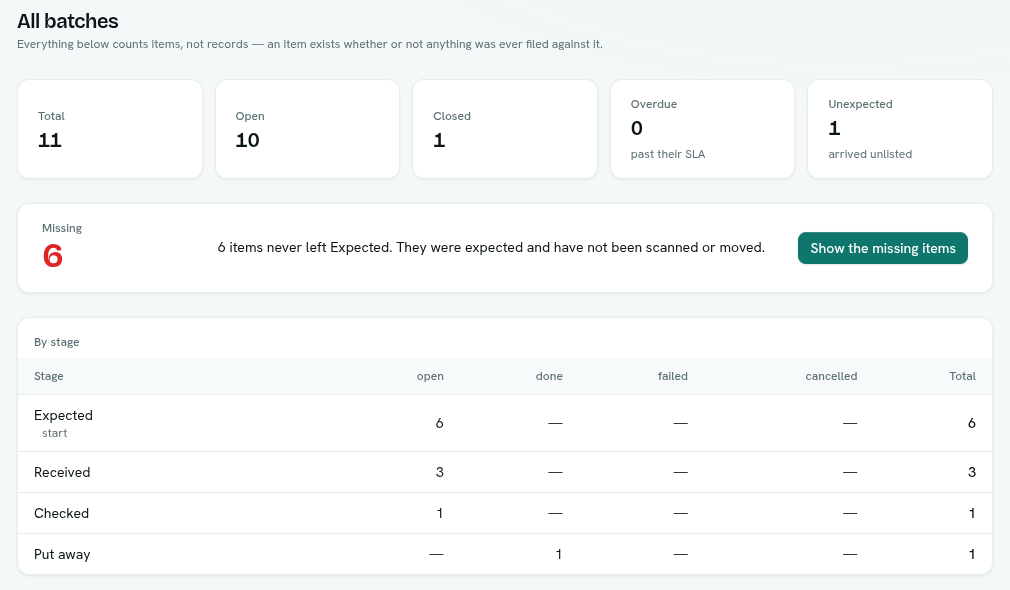
- The title is "Batch " or "All batches".
- Tiles: Total, Open, Closed, Overdue (past their SLA) and Unexpected (arrived unlisted).
- Missing is the number of items still open in the start stage. They were expected, and nobody has scanned or moved them. The text reads "Nothing is left in — everything expected was accounted for." when it is zero. Click Show the missing items to jump to the Items list filtered to them.
- By stage is a table of items per stage, with counts for open, done, failed and cancelled, and a total.
The report counts items, not records. An item exists whether or not a record exists for it.
Tips
- Reconcile a delivery in three steps: load the manifest with a batch name, scan arrivals, open Report with that batch selected.
- Unexpected items are things nobody listed. Use Items with the Source column to review them.
- Use Overdue only to chase late work.
Troubleshooting
The Move menu is empty No stage accepts items from where the item is, or you are in the last stage. Check each stage's Accept from setting.
Missing shows items I already received Items are missing until they leave the start stage. Receive them by scanning or moving them.
No Move button You need Can work the queue.