Work in the grid
Enter data, use typed columns, select, copy and paste, and insert or delete rows in the Sheets grid.
Type in cells, use typed columns, move around with the keyboard, copy and paste, and insert or delete rows.
Before you start: Can edit on Sheets to change anything. With Can view the grid is read-only.
The screen
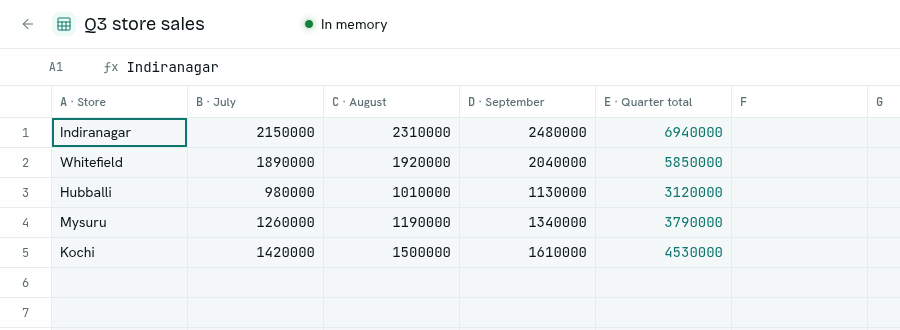
- Top bar: back button, Workbook name (click to rename), a status, collaborator avatars, Export .xlsx.
- Formula bar: shows and edits the contents of the selected cell.
- Grid: columns A, B, C… and numbered rows. A new sheet starts with 26 columns. Extra empty columns fill the screen. They become real text columns when you type in them.
- Tab strip at the bottom.
Status in the top bar
| Label | Meaning |
|---|---|
| In memory | The workbook is loaded for fast editing. |
| Loading into memory… | It is being loaded. You can already work. |
| On disk | Not loaded yet. Everything still works. |
| a message with Retry | Loading failed. Click Retry. |
The workbook loads automatically when you open it. It is released after about 30 minutes without use and reloads when someone opens it again.
Enter data
- Click a cell and start typing, or press
F2orEnterto edit what is there. - Press
Enterto commit and go down,Tabto commit and go right,Escto cancel. - Start with
=to write a formula. See Write formulas.
Column types
Each column has a type that is fixed once the column exists.
| Type | What you can enter |
|---|---|
| Text | Anything. |
| Number | Numbers. Commas are ignored (1,250). Otherwise "not a number". |
| Currency | Same as Number. |
| Date | YYYY-MM-DD, a full timestamp, YYYY-MM-DD HH:MM, or DD/MM/YYYY. Otherwise "not a date (use YYYY-MM-DD)". Editing opens a date picker. |
| Checkbox | true, false, 1, 0, yes, no, y, n, on, off. Press Space or Enter or click to toggle. |
| Select | One of the column's options (a pick list opens). Anything else: "not one of the select options". |
A value that does not fit is refused and the cell is marked.
Select columns you add by hand have no options, so any text is accepted. Columns made from record types carry the field's options.
Select cells
- Drag to select a range.
Shift+ click orShift+ arrows extend.Ctrl/Cmd+ click adds another range. - Click a column letter to select the column.
Ctrl + Aselects everything. - Arrow keys move.
TabandShift + Tabmove right and left. Esccollapses to one cell.
Copy, paste, clear
Ctrl + Ccopies the selected range as tab-separated text, ready for Excel or another app.- Paste tab-separated text from a spreadsheet. You see "Pasted N cells".
DeleteorBackspaceclears every selected cell.
Rows
Click a row number (or right-click it) for Insert row above and Delete row. Inserting or deleting a row moves the rest and updates formulas that point to those rows. A formula pointing at a deleted row shows #REF!.
Troubleshooting
Write failed The change was not saved. Try again.
not a number / not a date / not a checkbox value The text does not fit the column type. See the table above.
Cell marked with an error Hover it to read the message.