Sheets
Spreadsheets in your workspace: formulas, tabs, Excel import, live co-editing and a two-way bridge to your records.
Sheets is a spreadsheet inside your workspace. Build workbooks with tabs and formulas, import Excel files, edit together with your team, and work on your records in a grid.
What you can do
- Create or import a workbook — start blank or bring in an Excel file. Create and import workbooks
- Work in the grid — cells, typed columns, rows, keyboard and paste. Work in the grid
- Use tabs and columns — add, rename and remove. Tabs and columns
- Write formulas — Excel-style formulas, cross-tab references and record lookups. Write formulas
- Look up a function — every supported function. Function reference
- Import and export — CSV per tab, Excel for the whole workbook. Import and export
- Edit together — see who is here and where they are. Edit together
- Edit records in Sheets — export a record type to a grid and push changes back. Edit records in Sheets
- Open a query result in Sheets — from the Analytics query workspace. Open a query in Sheets
- Know the limits — tabs, columns, rows and plan caps. Limits
Before you start
- Who can use it: Sheets on the Roles page. Can view opens workbooks read-only. Can edit changes cells, rows and tabs. Full control also creates, renames and deletes workbooks.
- Sheets can be switched off in Settings › Apps. It must be on to appear.
- Without access you do not see a workbook at all.
Where to find it
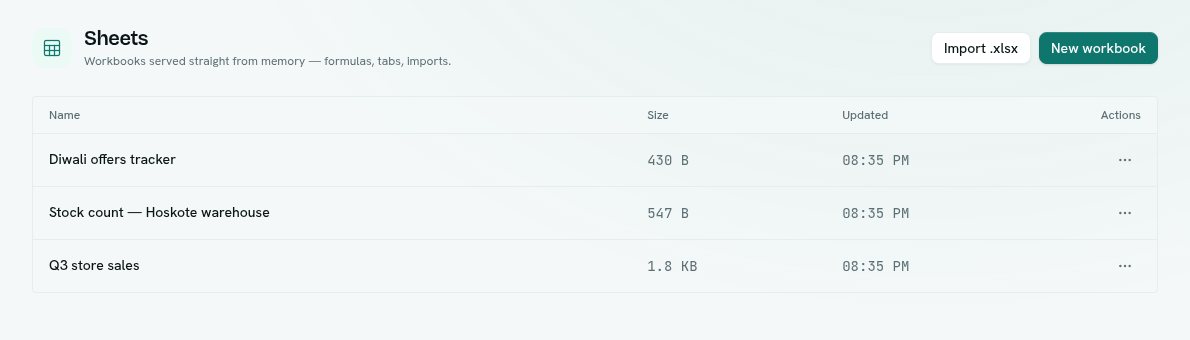
Platform category in the launcher › Sheets. The list shows each workbook's Name, Size and Updated. Click one to open the full-screen editor. The editor has no left rail: a top bar (back button, workbook name, loading status, collaborators, Export .xlsx), a formula bar, the grid, and a tab strip at the bottom.
Key ideas
| Term | What it means |
|---|---|
| Workbook | A file of sheets, like an Excel workbook. |
| Sheet (tab) | One grid inside a workbook, shown in the tab strip. |
| Typed column | A column with a fixed type: Text, Number, Currency, Date, Checkbox or Select. |
| Formula | A cell that starts with =. Its result is calculated for you. |
| Record-linked tab | A tab connected to a record type so edits can flow back to the records. |
| Loaded for fast editing | When a workbook is open it is loaded so edits are quick. It is released automatically after about 30 minutes without use. |