Cash flow statement
See where cash came from and went — operating, investing and financing — checked against your cash and bank balances.
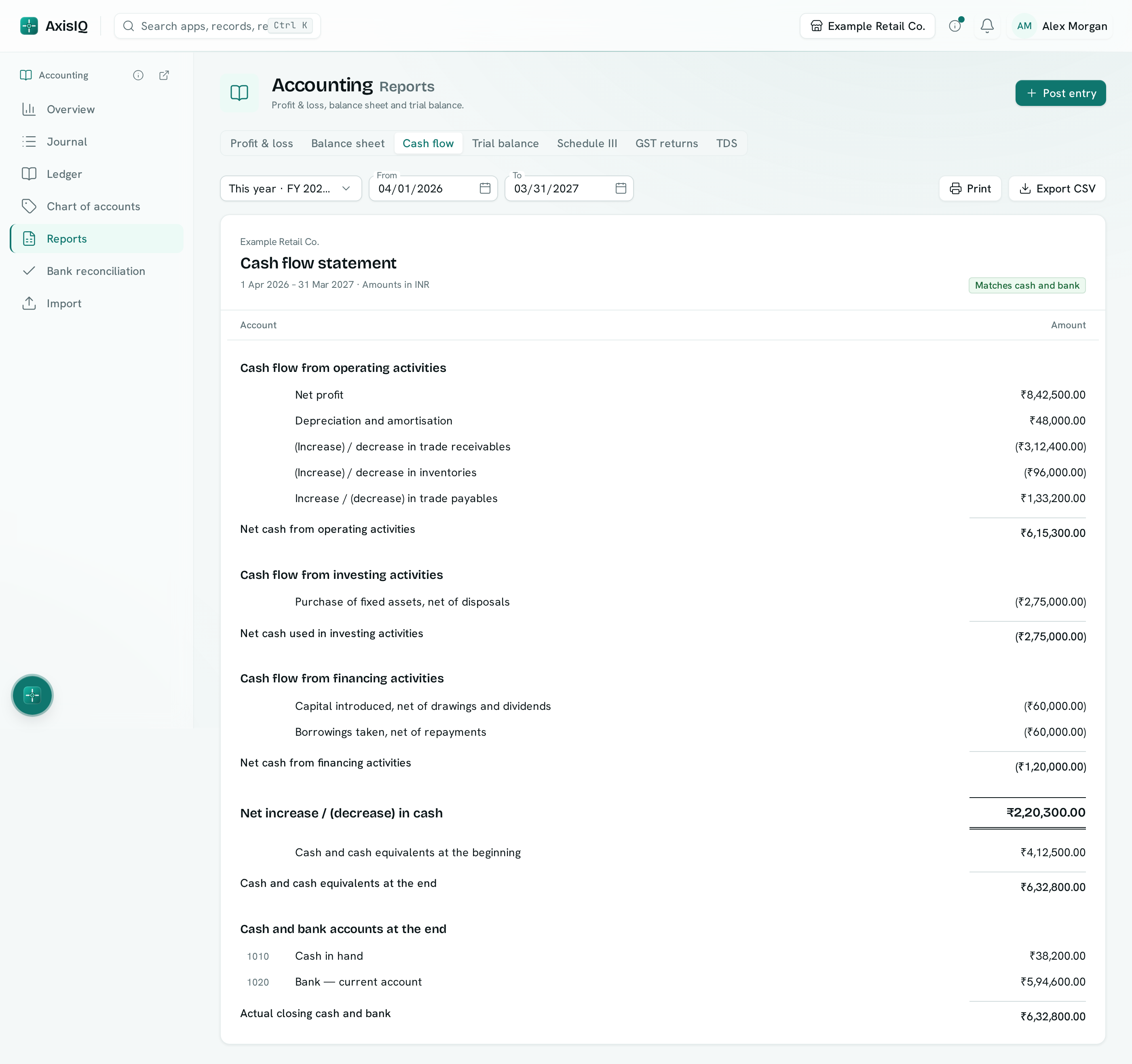
The cash flow statement shows where your cash came from and where it went over a period: from running the business, from buying and selling assets, and from loans and capital. It ends by checking itself against what your cash and bank accounts actually hold.
Before you start: you need Can view under Accounting ledger. The statement reads one currency at a time.
Open it
- Open Accounting › Reports.
- Click Cash flow.
- Pick a period (or set From and To) and, if you keep books in more than one currency, the Currency.
How to read it
The statement uses the indirect method: it starts from profit and adjusts for everything that changed cash differently.
| Section | What is in it |
|---|---|
| Cash flow from operating activities | Net profit, depreciation added back, then the change in trade receivables, inventories, other current assets, trade payables, other current liabilities and provisions, and deferred tax. |
| Cash flow from investing activities | Fixed assets bought (net of disposals), investments, and long-term loans and advances. |
| Cash flow from financing activities | Capital introduced (net of drawings and dividends), borrowings, and other long-term liabilities. |
Amounts in brackets are cash going out. Each section ends with its net cash, and the three add up to Net increase / (decrease) in cash. Then come the opening cash, the closing cash worked out from the statement, and each cash and bank account's actual balance at the end.
The check at the top
- Matches cash and bank — opening cash plus the year's movement equals what your cash and bank accounts hold.
- Does not match cash and bank — a Difference line shows the gap. AxisIQ never adjusts the figures to make it fit.
Which accounts count as cash
An account counts as cash when its name contains cash, bank, petty or wallet, or when its Schedule III line is set to Cash and cash equivalents. If none qualifies, the report says so.
Where each account goes
Accounts are placed the same way as in the Schedule III report, from their kind and name.
- Placed by kind only (yellow) — nothing in the name said which line, so the account went to its kind's usual line. Set its Schedule III line if that is wrong; both reports follow it.
- Unclassified (red) — the account has no kind. Its movement still counts, in an Unclassified line, so the statement adds up. Give it a kind in the chart of accounts.
Click a line to open its ledger when only one account is behind it.
Print and export
- Print gives a clean page for your files.
- Export CSV downloads every line with the accounts behind it.
- The report has its own address,
/apps/accounting/reports/cash-flow, so you can bookmark or share it.
Tips
- Interest and tax paid stay inside operating activities.
- An opening-balance entry dated inside the period appears under financing, as capital introduced. Pick a period that starts after your opening balances.