Connect a platform
Sign in to an ad or email platform so AxisIQ can pull its campaigns and results.
You will connect a platform by signing in to it. AxisIQ never sees your password.
Before you start: you need Full control under Ad campaigns on the Roles page, and you must be able to access the ad account on the platform.
Platforms you can connect
| Platform | Type | Runs on | Change from AxisIQ |
|---|---|---|---|
| Meta Ads | Ads | Facebook · Instagram | Pause, resume, change budget |
| Google Ads | Ads | Search · Display · YouTube · Shopping | Pause, resume, change budget |
| LinkedIn Ads | Ads | Pause, resume, change budget | |
| Reddit Ads | Ads | Pause, resume, change budget | |
| Amazon Ads | Ads | Amazon | Pause, resume, change budget |
| Mailchimp | Pause | ||
| Klaviyo | Email · SMS | Pause |
Resume is also offered on the platforms that allow it, and only the buttons a platform accepts appear. See Change or schedule a campaign.
Note: Amazon Ads and Klaviyo show campaigns and statuses, but their performance figures are not synced. The page says so, so a blank chart is not mistaken for a quiet week.
Steps
- Open Web Campaigns and click Connect platform.
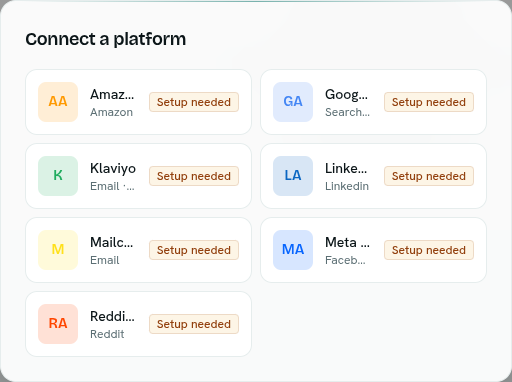
- Choose a platform. Each tile lists what it runs on, for example "Facebook · Instagram". Tiles with a Setup needed badge cannot be connected yet.
- Optionally enter a Connection name. Blank uses the platform name.
- Click Continue to . You go to the platform's own sign-in and consent screen. Approve access.
- You return to AxisIQ with the message "Connected. The first sync is running now."
To change your mind before step 4, click Change next to the platform.
Connect with a token instead
Meta Ads and Klaviyo offer Use a token instead, for system users and service keys. Click it, paste the Access token, then click Connect. The token is checked with the platform before it is stored, and never shown again. Click Sign in instead to go back.
What happens next
- The connection appears under Connections, and the first sync starts at once.
- The platform's ad accounts show under its Ad accounts tab. See Accounts and sync.
- Campaigns and results arrive after the first sync finishes.
Troubleshooting
"That authorization link expired. Start again." You took more than 10 minutes on the platform's screen. Click Connect platform and start again.
"The platform did not grant access." You declined, or your account lacks access. Try again with the right account.
"The platform accepted the sign-in but rejected the connection. Check the app setup." The platform accepted you but the connection check failed. Try again.
A tile says Setup needed and Continue is disabled That platform has not been set up yet, so it cannot be connected.
Your token is refused The error is shown in the dialog. Check the token's permissions and that it has not expired.