Writing style and the AI writer
Describe your house style once, then use the AI tab to draft, rewrite, outline and title pages.
The AI writer works on the open page and shows you its answer. Nothing is applied until you choose.
Before you start: The AI tab appears only if you have Website content at Can write drafts or higher. Setting the house style needs Full control. AI writing counts toward your workspace's AI usage, and shows an error if it has not been set up. The AI writer needs Can write drafts on the site.
Set your house style
- Open Site settings › Writing style.
- Under House style, write the way you would brief a new writer: audience, tone, words to use and avoid, and how to spell your names. The limit is 4000 characters, with a counter.
- Click Save.
Every AI answer for that site follows it. In the AI tab, the Tone dropdown shows House style as its default once you have set one.
Open the AI tab
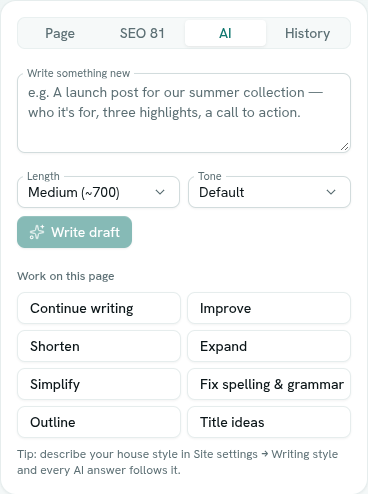
Open a page and choose AI in the inspector.
Write a draft
- Describe the page under What should this page say? (it reads Write something new if the page already has text).
- Choose a Length: Short (~250 words), Medium (~700) or Long (~1500). Length applies to Write draft and Continue writing.
- Optionally choose a Tone.
- Click Write draft.
Work on the page
Under Work on this page, click a task. The rewrite tasks need some text on the page first.
| Task | What it does |
|---|---|
| Continue writing | Picks up where the page ends. |
| Improve | Clearer and tighter, with the same meaning. If you chose a tone, it rewrites in that tone. |
| Shorten | About half the length. |
| Expand | More depth and examples. |
| Simplify | Plain language. |
| Fix spelling & grammar | Changes nothing else. |
| Outline | Section headings with short bullets to write. |
| Title ideas | Six alternative titles. Click one to use it. |
The tones are Professional, Friendly, Confident, Playful, Formal, Persuasive and Empathetic.
A separate task in the SEO tab, Suggest meta with AI, proposes search title, description, keywords and tags. See Search settings.
Use the result
The answer appears in a preview. Choose:
- Append — adds it to the end of the page.
- Replace page — replaces the whole text. AxisIQ first saves a version named "Before AI replace", so you can restore the old text from History.
- Discard — throws it away.
After Append or Replace page, check the text and publish when you are ready. See Version history.
Troubleshooting
content generation is not configured on this server AI writing has not been set up for this workspace. Ask whoever runs your AxisIQ account.
content generation is unavailable right now The AI service did not answer. Try again in a moment.
A plan limit message Your plan's limit has been reached. See your workspace's billing page.