Conditions and lists
Branch a flow on your data with Condition, and work through lists with Filter list, Summarize and For each.
Use a Condition to send a flow down one of two paths, and the list blocks to filter, total up or loop through a list of items.
Before you start: you have a flow with a trigger. See Build a flow. For values to compare, learn the Insert value menu: Insert values.
Branch with a Condition
- In the builder, under Add a block, click Condition.
- Connect the block above it to the Condition.
- Click the Condition. Set Match to All clauses (AND) or Any clause (OR).
- For each clause fill in Left, choose an Operator, and fill in Right. Use the { } button beside a box to insert a value, such as
{{trigger.record.status}}.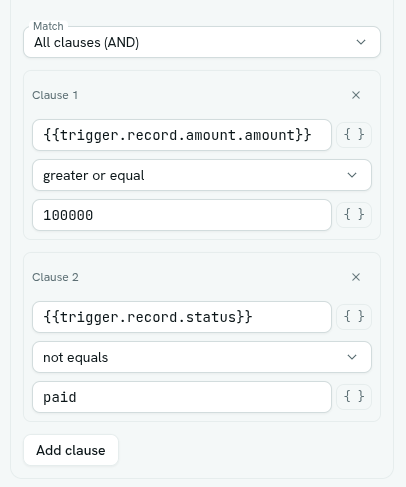
- Click Add clause for more rules. Click the x on a clause card (Remove clause) to delete one.
- Connect the left handle (true) to the blocks that should run when the rule passes. Connect the right handle (false) to the blocks for when it does not.
A Condition needs at least one clause (checked when you save with Enabled on). If you leave a branch unconnected, nothing happens on that side.
Operators
| Operator | Passes when |
|---|---|
| equals | Both sides are equal. If both look like numbers they are compared as numbers (so 1000 equals 1000.0). Otherwise they are compared as text. |
| not equals | The opposite of equals. |
| greater than, greater or equal, less than, less or equal | Both sides are numbers (or dates and times) and the comparison holds. If either side is not, the clause is false. |
| contains | The left side is a list that includes the right value, or the left text includes the right text. |
Values are plain text or numbers. There is no code in conditions.
Keep matching items with Filter list
- Add a Filter list block.
- In List to process, insert a list from an earlier block, for example an HTTP request's body list or a function's result.
- Set Match and add clauses the same way as a Condition. Refer to the current item as
{{item.field}}.
The block's output is the kept items and a count. Later blocks can use Filter list · items (list) and Filter list · kept count.
Total up a list with Summarize
- Add a Summarize block and set List to process.
- Choose Summarize by: Sum, Average, Minimum, Maximum, Count or Join text.
- Except for Count, fill in Field, the name of the field to use from each item. Leave it blank if the list is plain values.
Later blocks can use Summarize · value.
Do something for every item with For each
- Add a For each block and set List to process.
- Connect the left handle (each) to the blocks that should run once per item. Inside them, use
{{loop.item}}for the current item and{{loop.index}}for its position. - Connect the right handle (after) to what should happen once the loop is finished.
Limits: a loop handles up to 500 items. A whole run records at most 2000 steps.
Note: the caption under a For each block reads true / false. The left handle is each and the right handle is after.
Tips
- Put a Condition before an expensive action so it only runs when needed. Example: only update an invoice when
{{trigger.record.status}}equalspaid. - Lists usually come from an HTTP request body or a function result.
- A body block inside a loop keeps only its last pass as its output once the loop ends.
- A block reached by two branches runs once, on the first arrival.
Troubleshooting
Could not save: "condition block needs at least one clause" Add a clause or remove the block. A Filter list block needs at least one clause too.
A greater-than clause is always false One side is not a number. Check the value in a past run's Detail column.
"filter block needs a list to filter" / "for-each block needs a list to iterate" List to process is empty. Insert a value from an earlier block.