Insert values and flow context
Pick values from the trigger, earlier blocks and flow context with the Insert value menu instead of typing references.
Blocks pass data to each other with references that look like {{trigger.record.amount}}. You do not have to type them. The { } button beside every value box inserts one for you.
Before you start: open a flow in the builder and select a block that has value boxes, such as Update record or HTTP request.
Steps
- Click a block on the canvas so its settings open.
- Click the { } button next to a value box. The menu lists everything this block can use.
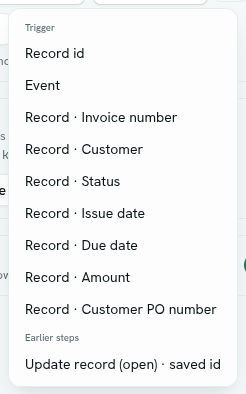
- Choose an item. The reference is added to the end of the box, with a space before it if the box already has text.
- Edit the box by hand if you want to mix text and references, for example
Invoice {{trigger.record.number}} is paid.
If the { } button is missing, no values are available yet. Add a trigger to the canvas first. Results of earlier blocks only appear once those blocks are connected before this one.
What the menu offers
| Group | What it holds |
|---|---|
| Trigger | What started the flow. For a Record event: Record id, Event, and Record · for every field. For a Calendar event: Occurrence start and Event · . For a Schedule: Scheduled time. For Manual: Manual input. |
| Earlier steps | Results of blocks connected before this one, such as Update record · saved id, Create record · saved id, Run function · result, HTTP request · status, HTTP request · body, Filter list · items (list), Filter list · kept count, Summarize · value, Create event · event id. Each is labelled with the block's name and the first four characters of its id. |
| Loop item | Current item and Item index, when the flow contains a For each block. |
| Flow context | Each value you have set for the flow. |
Only blocks that run before the selected block are offered under Earlier steps.
How references behave
- A box that holds just one reference keeps the real type. A number stays a number when written to a record.
- A box that mixes text and references becomes text.
- A reference to something that does not exist becomes empty.
- You can reach inside data with dots, for example
{{node.<id>.output.body.customer.name}}. Numbers pick items from a list, for examplebody.0.amount.
Flow context
Use flow context for values you want to set once and reuse, such as a threshold, a channel name or a URL.
- In the builder's right-hand panel, find Flow context.
- Click Add value.
- Enter a key (for example
threshold) and a value (for example1000).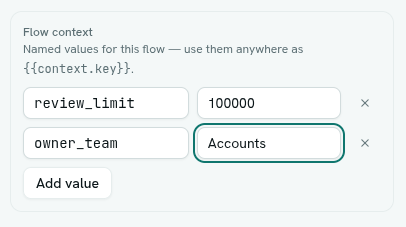
- Use it anywhere as
{{context.threshold}}, or from the { } menu under Flow context. - Click Save.
Rules:
- A key starts with a letter or underscore, and uses only letters, digits and underscores, up to 64 characters.
- A value can be up to 4096 characters.
- A flow can hold up to 50 values.
- Remove a value with the x beside it.
Tips
- Use flow context for a number that business rules change often, such as a discount limit. You edit one value, not every block.
- To test a value, run the flow and look at the block's Detail on the run.
Troubleshooting
Could not save: "context key must be letters, digits or underscore" Rename the key. Spaces and dashes are not allowed.
My reference came out empty The path does not match anything. Check the spelling, and check that the block you are reading from is connected before this one.