Run a flow when a field changes
Start a flow only when an update changes a field you pick — optionally from one value to another — and use the old value in later steps.
A record trigger can watch specific fields, so a flow runs only when an update really changes them — for example, only when an invoice's Status goes from Open to Paid.
Before you start: you need Full control on Automations on the Roles page. The flow runs as the person who last edited it, so they must be able to see the fields it watches.
Watch a field
- Open Flows and open a flow, or click New flow.
- Click the trigger block. If the flow has none yet, add a Record event block.
- Pick the Object type, then set Event to Updated.
- In Only when these fields change, pick up to 10 fields. The flow runs when an update changes any of them. Leave it empty to run on every update.
- Save the flow and switch it on.
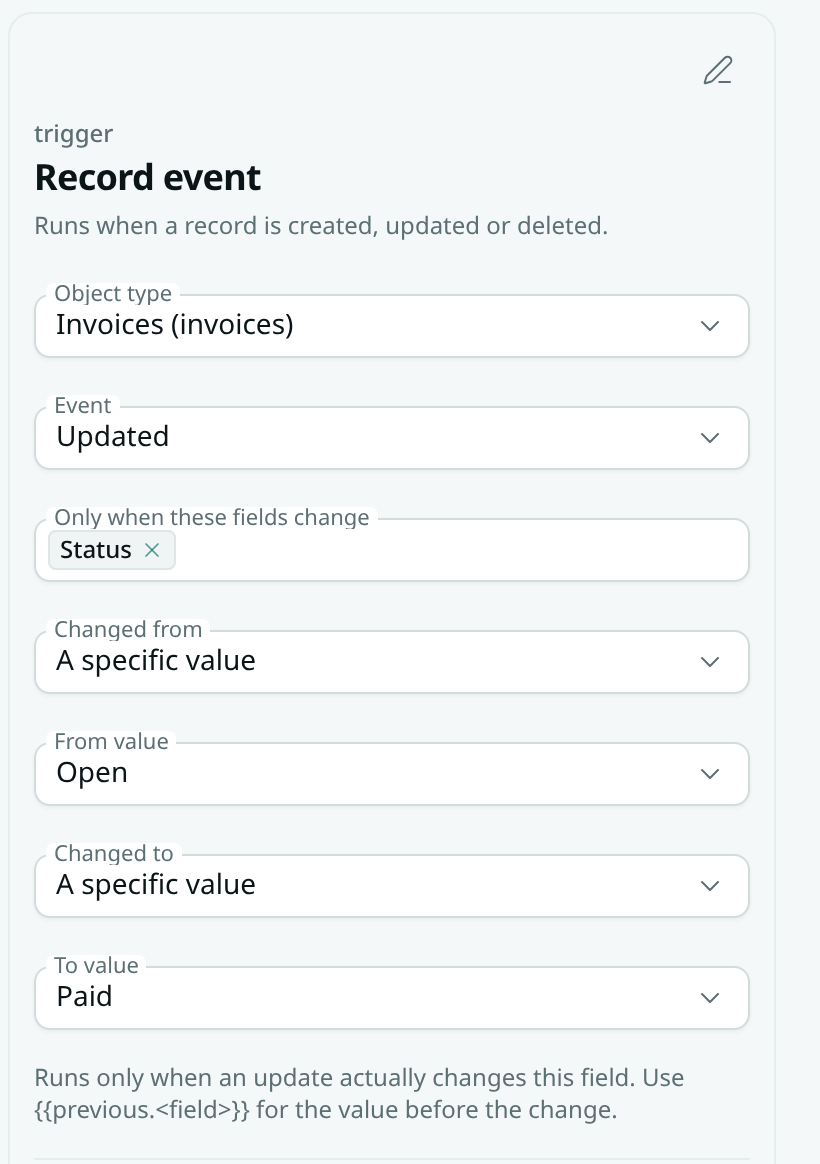
Run only on a specific change
When you watch exactly one field, two more settings appear:
- Set Changed from to Any value, Empty or A specific value.
- Set Changed to the same way.
- For A specific value, a From value or To value box appears: pick or type the value. For a dropdown field, pick one of its options.
For example: watch Status, Changed from = Open, Changed to = Paid — the flow runs when an invoice is marked paid, and not when it is edited for any other reason.
Use the old value
Later blocks can read what a field held before the update:
{{previous.status}}— the value before this update (use any field key).{{trigger.record.status}}— the value now.{{trigger.changed}}— the list of fields this update changed.
Pick them from the Insert value menu under Before · and Changed fields (shown when the Event is Updated).
Test it
Click Test, pick a Sample record and click Run test. The test uses that record's most recent update for the old values and tells you whether that update would have started the flow. Nothing is saved or sent.
Good to know
- Saving a record without changing the watched field does not run the flow, even if other fields changed.
- From/to values are matched ignoring upper and lower case; numbers must match exactly.
- If the person the flow runs as can't see a watched field, the flow does not run for changes to it, and old values they can't see are left out.
- Two updates to the same record within a moment of each other may both be judged on the later one.
- Watching fields works with Updated only. Created and deleted triggers run every time.