Test a flow
Run a flow on sample data and see what every action would do, without sending or changing anything.
Try a flow on real data before it touches a customer. A test run goes through every block on the canvas using a sample, and shows you exactly what each action would do: who a message would go to and what it would say, which fields a record update would change, which web address would be called. Nothing is performed — no message is sent, no record changes, nothing is queued and nothing is added to the run history.
Before you start: you need Can run (or Full control) on the Automations app on the Roles page — the same permission as the Run button.
Run a test
- Open the flow on the canvas. You do not need to save first: the test uses the blocks as they are on screen now.
- Click Test in the top bar.
- Choose the sample:
- Record event trigger: pick a Sample record, or leave it blank to use the newest record you can see. Under Change fields for this test you can type different values, for example
{"status": "paid"}, to see what happens when a record is marked paid without changing the record. - Manual trigger: type the run input as JSON (optional).
- Webhook trigger: paste a sample request body as JSON.
- Schedule trigger: nothing to choose — the test runs as if the schedule fired now.
- Calendar event and People event triggers run without a sample event, so blocks that read the event see empty values.
- Record event trigger: pick a Sample record, or leave it blank to use the newest record you can see. Under Change fields for this test you can type different values, for example
- Click Run test.
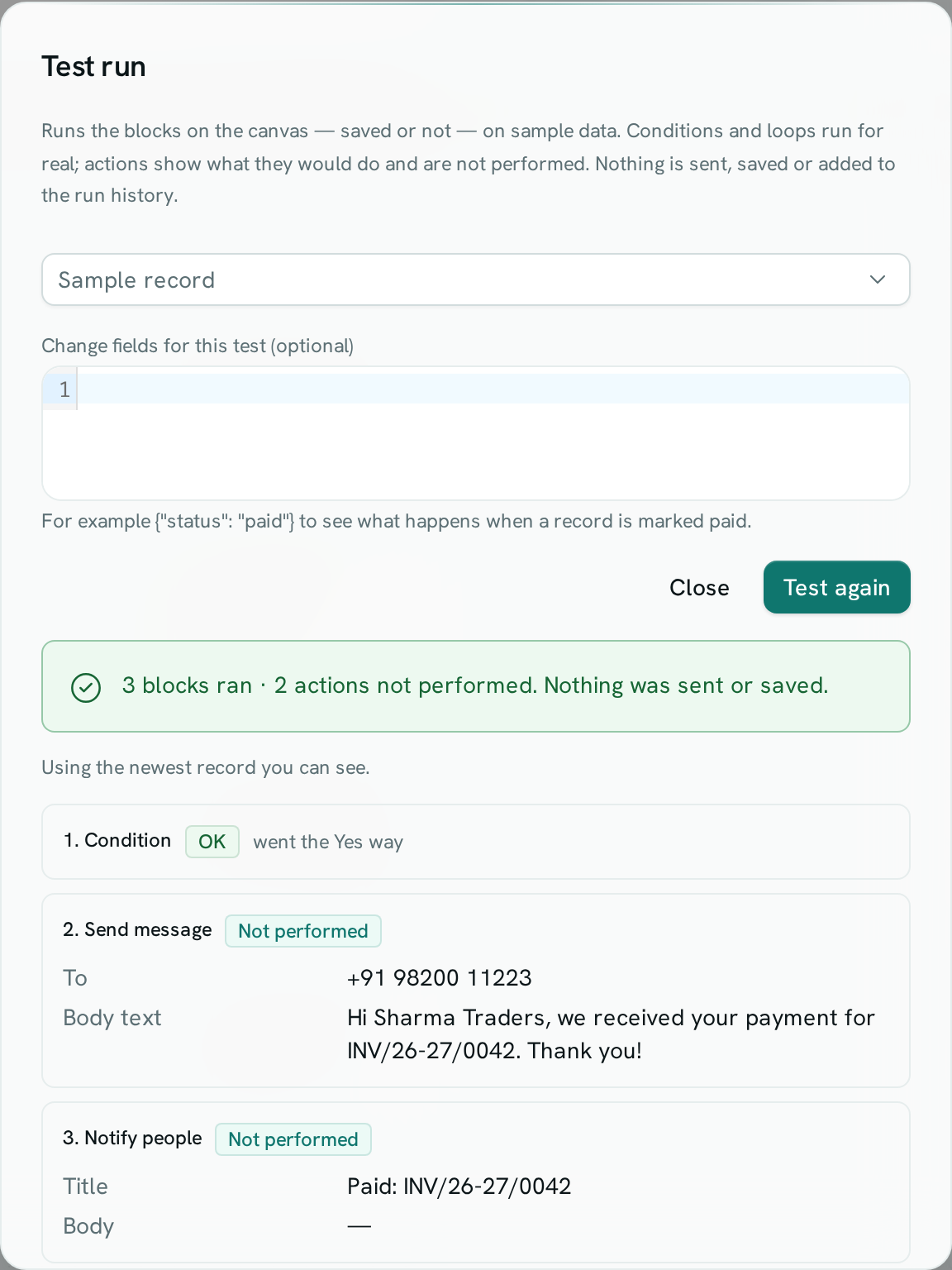
Read the result
- The banner says how many blocks ran and how many actions were not performed.
- Conditions, filters, summaries and For each loops run for real on the sample, so you see which way each condition went ("went the Yes way").
- Each action shows Not performed and the values it would use, with every inserted value already filled in.
- An input came out empty is a warning: an inserted value had nothing in it — for example the customer has no phone number, so a real run would fail or send a blank message. Fix the block or the data, then click Test again.
- Approval blocks are treated as approved and Wait blocks do not wait, so you see the whole path in one go.
- Later blocks still get something to work with: an action that was not performed passes along a stand-in result (a test id, or "not sent") so the rest of the flow can be followed.
- Open Sample data the test used to see the trigger data exactly as the blocks saw it.
Good to know
- A test runs with your permissions, so the sample is only what you can see. A real run uses the permissions of whoever last changed the flow — see Who a flow runs as.
- Tests are not stored and do not count as runs. Use Run when you want a real run that appears under Runs.
- A test stops after 20 seconds.