Send responses to a URL
Send each form response to your own server as signed JSON, verify the signature, and see and retry failed sends.
Send every response a form receives to your own server as well, the moment it arrives. Each one is signed so your server can check it came from your workspace.
Before you start: you need Full control on the form, and an
httpsaddress on a server that accepts aPOSTwith a JSON body.
Turn it on
- Open the form and go to the Settings tab.
- Under Send responses to a URL, type your URL.
- Click Generate a secret, or type your own Signing secret of at least 16 characters. Click the eye icon to see it and copy it now — it is never shown again.
- Click Save.
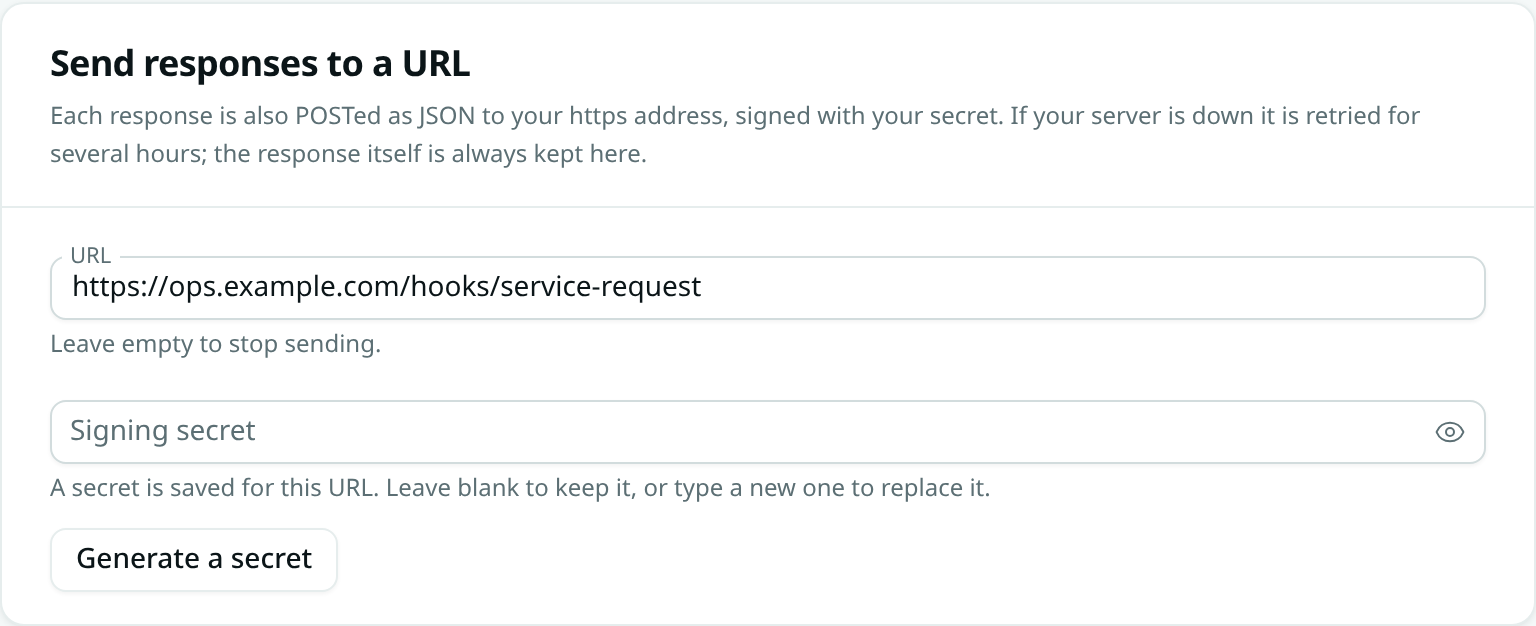
From now on, every response is stored in the form first and then sent to your address.
Change or turn it off
- New secret: type or generate one and save. Leaving the box blank keeps the saved secret.
- New address: change the URL and enter the secret again — a saved secret only stays with the address it was saved for.
- Turn off: clear the URL and save.
Duplicating a form does not copy its URL or secret.
What your server receives
A POST with Content-Type: application/json:
{
  "event": "form.response",
  "form": "service-request",
  "form_id": "0190f400-…",
  "form_name": "Service request",
  "submission_id": "0190f512-…",
  "record_id": "0190f513-…",
  "submitted_at": "2026-10-15T08:27:00Z",
  "values": { "name": "Priya Nair", "phone": "+91 98000 00002", "notes": "AC not cooling" }
}
values holds the answers by question key. record_id is the record the response created, or null.
| Header | Holds |
|---|---|
X-Axis-Signature |
t=<unix seconds>,v1=<signature> |
X-Axis-Delivery |
The response's id. The same response can arrive more than once, so ignore an id you have already handled. |
X-Axis-Event |
form.response |
Answer with any 2xx status within 15 seconds. Anything else counts as a failure.
Check the signature
The signature is an HMAC-SHA256, in hex, of the timestamp, a dot, and the raw request body, keyed with your secret. Compute it over the body exactly as received, before parsing it.
Node.js (Express):
const crypto = require('crypto')
app.post('/axis-form', express.raw({ type: 'application/json' }), (req, res) => {
  const parts = Object.fromEntries(req.get('X-Axis-Signature').split(',').map((p) => p.split('=')))
  const expected = crypto.createHmac('sha256', process.env.FORM_SECRET)
    .update(parts.t + '.').update(req.body).digest('hex')
  const ok = expected.length === parts.v1.length &&
    crypto.timingSafeEqual(Buffer.from(expected), Buffer.from(parts.v1))
  if (!ok || Date.now() / 1000 - Number(parts.t) > 300) return res.sendStatus(400)
  const response = JSON.parse(req.body)
  // … handle response.values, once per X-Axis-Delivery …
  res.sendStatus(204)
})
Python:
import hashlib, hmac, time

def verify(secret: str, header: str, body: bytes) -> bool:
    parts = dict(p.split("=", 1) for p in header.split(","))
    expected = hmac.new(secret.encode(), (parts["t"] + ".").encode() + body, hashlib.sha256).hexdigest()
    return hmac.compare_digest(expected, parts["v1"]) and time.time() - int(parts["t"]) < 300
Refusing old timestamps, as both examples do, stops someone replaying a request they captured.
When your server is down
A failed send is tried again after 1 minute, 5 minutes, 30 minutes, 2 hours and 6 hours — six tries over about eight and a half hours. The response is always kept in the form either way, and the record or function step is not affected.
In Responses, a response that could not be sent shows a URL failed badge. Open it to see the last error and how many tries were made, then click Retry to send it again now.
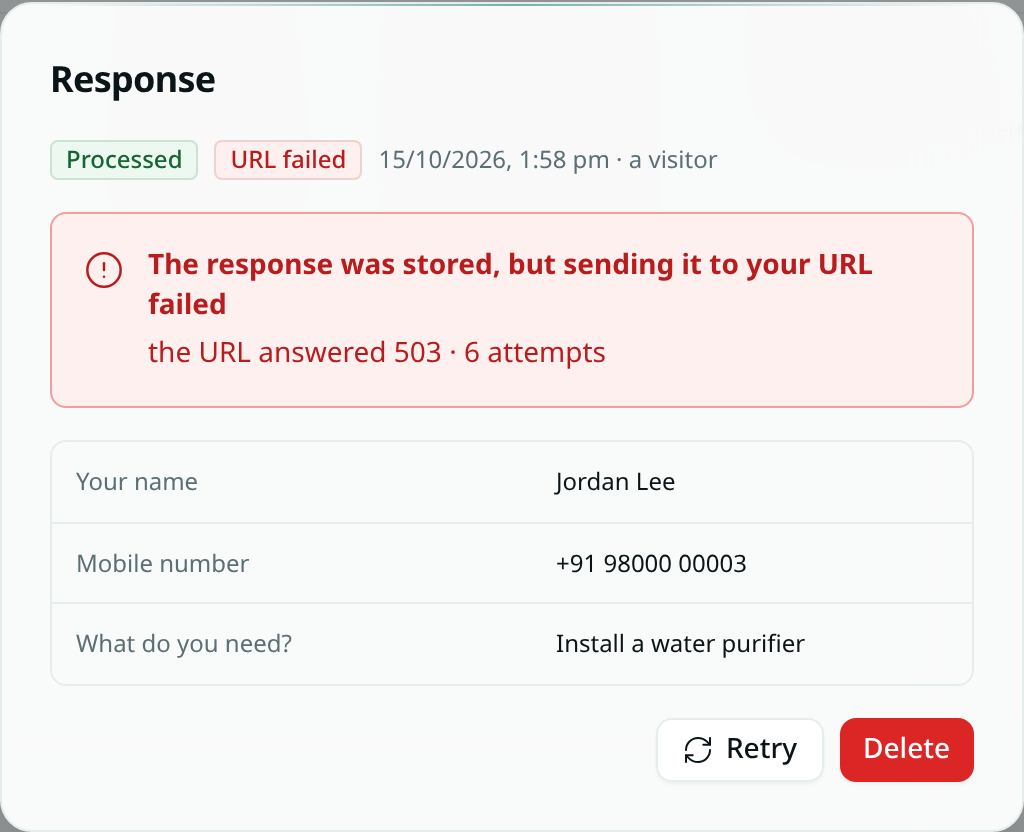
Retries go to the form's current URL, so if you fix the address, waiting and retried responses go to the new one.
Good to know
- Only
httpsaddresses on the public internet are accepted. Addresses inside a private network are refused. - There is no test button. Submit a response yourself to try it.