Where responses go
Choose whether each response creates a record, runs a function, or is only stored in the response log.
Every response is stored. You can also have each one create a record, run a function, or both.
Before you start: to save or publish a form that creates records of a type, you need permission to create records of that type. Without it you get a permission error. A function target needs an existing function. See Functions.
Steps
- Open your form and stay on the Build tab.
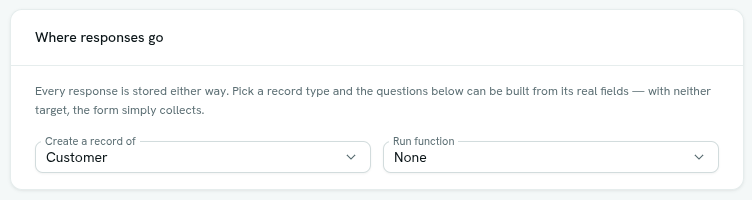
- In Where responses go, choose Create a record of and pick a record type. The default is Nothing — collect only.
- Optional: choose a function under Run function. The default is None.
- Build the questions from the record type's own fields. Use Add from … or Build from . See Build a form.
- Click Save.
Leaving both empty is a valid choice. The form then simply collects answers.
What happens when someone submits
- The response is stored first. Whatever happens next never un-stores it.
- If you chose a record type, a new record is created from the answers.
- If you chose a function, it runs with the answers.
- The response gets a status: Received (stored, nothing else configured), Processed or Failed.
If the record or function step fails, the response stays in the log marked Failed, and the person who filled in the form still sees the normal success message. Their answers were valid, and they have no use for your internal error. Hover over Failed in the Responses tab to read the reason.
Public forms
When a stranger submits a public form:
- The record is created even though they are not signed in. The published form is the permission, and it covers only that record type, only the questions on the form, and only creating. No other field can be set. The record is created by no one, and the audit trail shows "system".
- The function runs as the public role, not as you, so it can touch only what the public role is allowed to. See Limits and permissions.
When a signed-in person submits the form from inside Axis (for example from a report), both the record and the function use their permissions. A form can never let someone write data they could not write otherwise.
Tips
- Match each question's key to a field key on the record type. The builder warns you when a key does not match.
- Required fields on the record type that are not on the form can make the record fail to create. Include them as questions.
- To react to a new response with more than one step, use a flow with a Record event trigger on the type, event Created. You get conditions, notifications and more.
- Use Run function only for forms that do not create records.
Troubleshooting
Responses are saved but no record appears Open Responses. A Failed badge with a reason tells you why. Common causes are a key that is not a field on the type, or a required field the form does not ask for.
You do not have permission to do that You lack permission to create records of the chosen type, or Full control of the form.