Read responses
Open the response log of a form, read every answer, and see which responses created records or failed.
The Responses tab lists everything people have submitted to a form, newest first.
Before you start: you need Can read answers (or Full control) on the Forms app. Without it the Responses tab is not shown. Can fill in deliberately does not include reading other people's answers.
Steps
- Open Forms and click a form.
- Click Responses at the top.
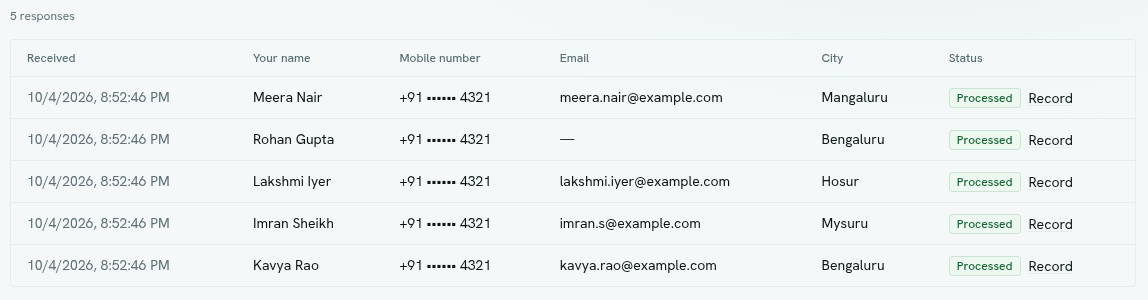
- Read the count above the table, for example "12 responses".
- Scroll the table. Each row is one response.
- Click Load more at the bottom to see older responses. Each page holds 50.
The table
| Column | Shows |
|---|---|
| Received | When the response arrived, in your local time. |
| One column per question | The answer, formatted for its type. |
| Status | Received, Processed or Failed, and a Record link when a record was created. |
Status
| Status | Meaning |
|---|---|
| Received | Stored. The form has no record type or function to run. |
| Processed | Stored, and the record was created or the function ran. |
| Failed | Stored, but the record or function step failed. Hover over the badge to read why. The person who submitted still saw a success message. |
The Record link opens that record type's list.
Empty and error states
- "No responses yet", with "Publish the form to start collecting." for a draft, or "Share the form and answers land here." for a live form.
- "Responses could not be loaded." appears if something went wrong. Reload the page.
Tips
- To react to responses, use a flow on the record type the form creates. See Where responses go.
- For analysis, point the form at a record type. Records can be filtered, reported on and queried like any other data. See Analytics.
- A response with status Failed is still stored. Fix the cause, then add the data by hand or ask the person to submit again.
Troubleshooting
I do not see the Responses tab You do not have Can read answers on this form.
Some responses say Failed Check that each question's key matches a field on the record type, and that required record fields are on the form. See Where responses go.