Save and finish later, and the form funnel
Let visitors save a long form and come back to it, and see how many people view, start and submit your form.
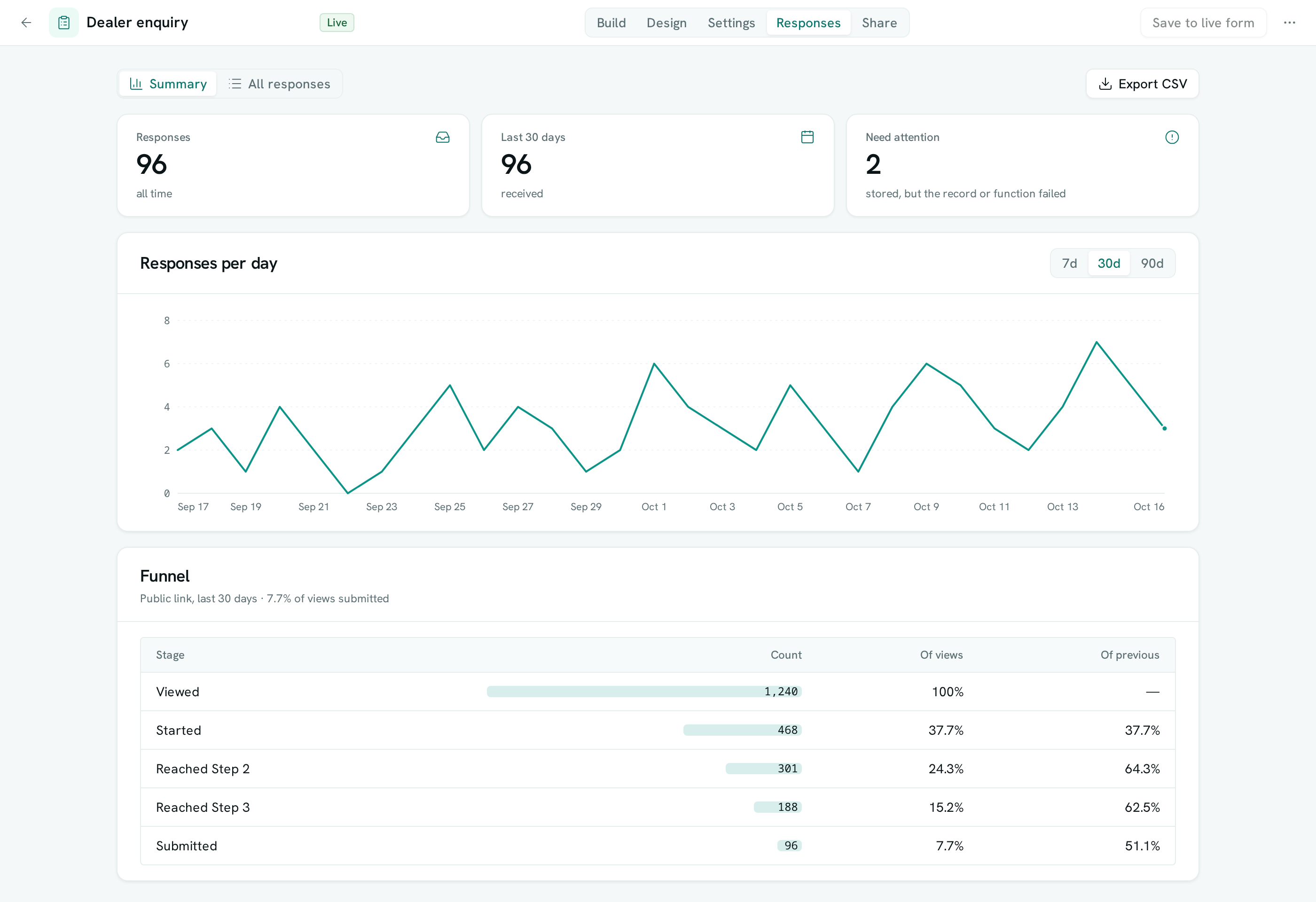
Long forms lose people halfway. Turn on Let people save and finish later and visitors on your public link get a private link that brings back their answers, right where they stopped. The Summary of every form also shows a funnel: how many people opened it, started it, reached each step and submitted.
Before you start: changing a form's settings needs Full control of the form under Forms in Team & Permissions. Reading the funnel needs Can read answers.
Turn on save and finish later
- Open Forms and open the form.
- Go to the Settings tab.
- Under After someone submits, turn on Let people save and finish later.
- Press Save (or Save to live form if it is already published).
Visitors now see Save and finish later next to Next and Submit. When they press it they get a link to copy, which works for 30 days from their last save.
Let visitors email the link to themselves
- On the same Settings tab, open Receipt to the respondent and turn on Send a receipt.
- Pick the email question and the email channel the receipt goes through, then save.
After saving, visitors also see Email me the link. It goes only to the address they typed into that email question, and contains the link — never their answers.
What visitors see when they come back
- They open their link.
- The form opens with their answers filled in and a Welcome back note, on the step where they stopped.
- They finish and press Submit as usual.
Once submitted, the saved link stops working.
Read the funnel
- Open the form and go to the Responses tab.
- Stay on Summary. The Funnel card lists Viewed, Started, Reached each step (for a form with page breaks) and Submitted.
- Each stage shows a count, its share of views and its share of the stage before. Use the 7d, 30d and 90d switch above the daily chart to change the period.
A big drop between two steps tells you which page to shorten.
Good to know
- Saved answers are not responses. They don't appear under All responses, don't count toward a response limit, and never create a record, run a function, send to your URL, notify anyone or send a receipt — only a submit does.
- Attached files are not saved. Visitors who come back add their files again before submitting.
- Anyone who has the link can see and change the saved answers, so visitors should keep it to themselves.
- A saved link expires 30 days after the visitor's last save. A form that has closed, reached its response limit or been unpublished can't be resumed.
- Save and finish later is for the public link. Members filling in the form inside AxisIQ don't see it.
- The funnel counts visits to the public link only. Previews and members filling the form in inside AxisIQ aren't counted. A view or start is counted once per page load, and no cookies or personal details are used to count them.
- Submitted is the number of public responses received in the period. Deleting a response removes it from the funnel too.
- Views, starts and steps are counted from the day this feature reached your workspace, so a period reaching further back shows submissions without views.