Call routing
Decide what callers hear and who rings: greeting, language, opening hours, a phone menu, ring groups, voicemail, recording and transcripts.
Call routing decides what happens when someone calls one of your phone lines. Open Phone & Messages › Channels, choose the line, then the Call routing tab.
Before you start: changing call routing needs Full control on Phone & Messages. Anyone who can view the app can read it.
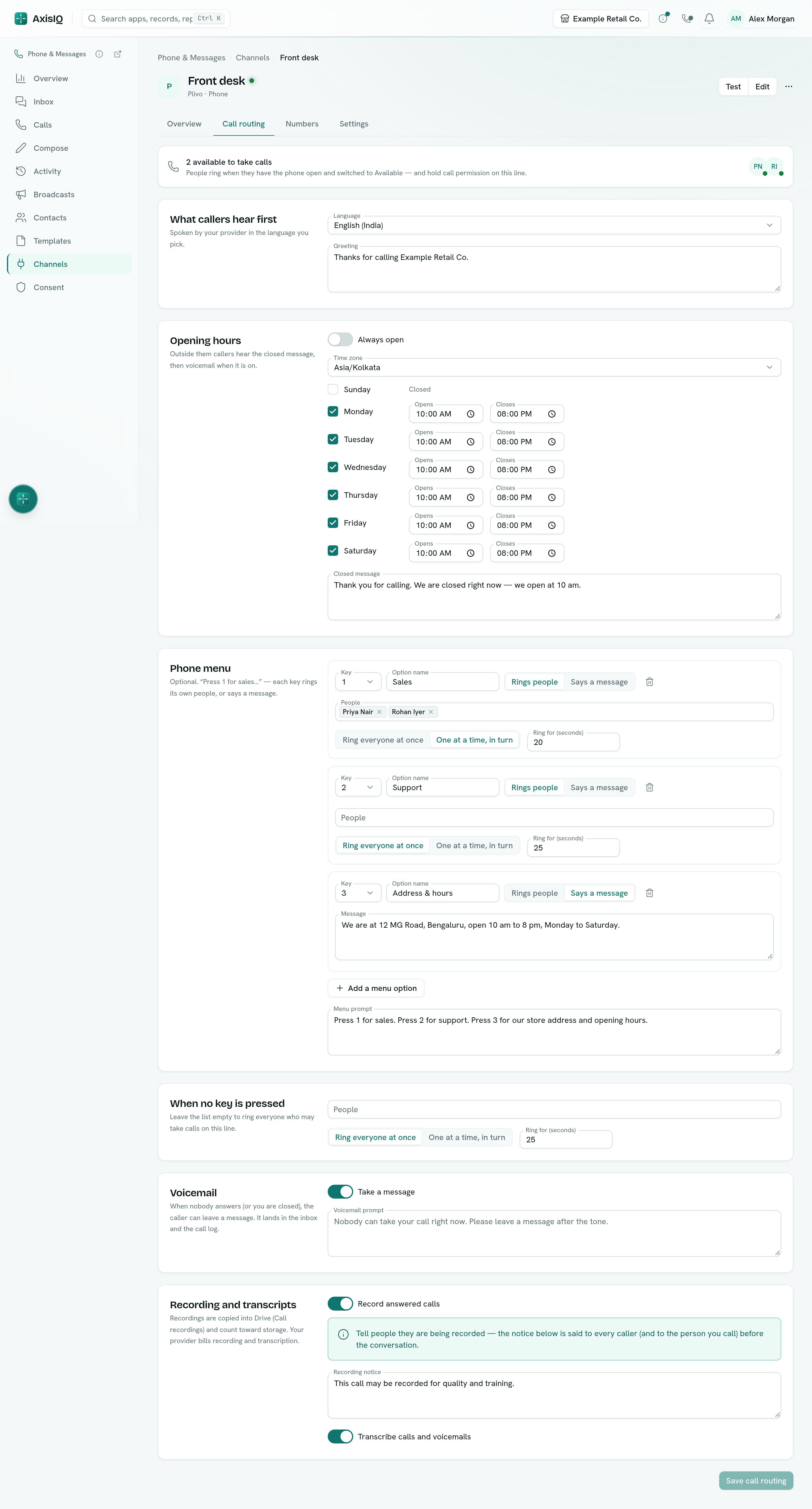
The top of the tab shows how many people are available to take calls on this line right now.
What callers hear first
- Language — the voice your provider uses for every prompt, for example English (India) or Hindi.
- Greeting — said when the call is answered, for example "Thanks for calling Example Retail Co."
Opening hours
Switch Always open off to set the hours per day in your time zone. Outside them, callers hear the Closed message and then voicemail if it is on — nobody is rung.
Phone menu
Add options to let callers choose, like "Press 1 for sales". Each option has a key (1–9), a name, and either:
- Rings people — its own people and ring style, or
- Says a message — for example your address and opening hours, and then the call ends.
The Menu prompt is what callers hear; Use "…" writes one from your options. A caller who presses a key that is not on the menu hears "Sorry, that is not an option" once. A caller who presses nothing goes to the people under When no key is pressed.
Who rings
For the line (and for each menu option):
- People — leave it empty to ring everyone who may take calls on the line, or pick people.
- Ring everyone at once — the first to answer takes the call.
- One at a time, in turn — the person who was rung longest ago goes first, then the next, and so on.
- Ring for (seconds) — how long each ring lasts, 10 to 60 seconds.
Only people who are Available on their phone, not already on a call, and still allowed to take calls are rung.
Voicemail
With Take a message on, a caller nobody answers (or who calls while you are closed) can leave a message of up to two minutes. It appears in the Inbox and the call log, and the people who were rung get a notification.
Recording and transcripts
- Record answered calls — both sides of the call are recorded. The Recording notice is said to every caller before they reach you, and to the person you call when they answer. Tell people when they are recorded: in many places it is the law.
- Transcribe calls and voicemails — your provider writes down what was said.
Recordings are copied into Drive, in Call recordings, and count toward your storage. Your provider bills recording and transcription.