Full and final settlement
Settle what a leaver is owed in one statement — final salary, leave encashment, gratuity, notice and loans — then finalize it as their last payslip.
When someone leaves, People works out their full and final settlement for you: the salary for the days they worked in their last month, unused leave paid out, gratuity, notice pay or recovery, any open loan or advance, and approved expense claims — in one statement you review, adjust and finalize.
Before you start: you need payroll access in People. You can't settle your own full and final — someone else with payroll access has to do it.
Set the rules once
- Open People → Rules & settings → Pay.
- Under Full and final settlement, set the Notice period (days) a resignation owes, whether notice pay is worked out on Gross pay or Basic + DA, and what the day rate divides by.
- Leave Pay gratuity on to pay gratuity after the qualifying years (5 by default: 15 days' basic + DA per year of service, divided by 26, capped at ₹20 lakh). Change the numbers if your company's policy differs.
- Optionally enter Leave encashment exempt up to — the tax-free ceiling for leave encashment. Leave it blank to treat encashment as fully taxable.
- Click Save payroll rules.
- Go to Leave types, open each leave type you pay out when someone leaves (usually Earned leave), and under When someone leaves tick Pay out the unused balance in the full and final settlement. Set Pay at most (days) if you cap it, and the day rate basis.
Settle a leaver
- On the employee's record, set their Date of exit — their last working day.
- Open People → Payroll → Full & final. They appear under Leavers to settle.
- Click Start settlement. The statement opens with every line already worked out.
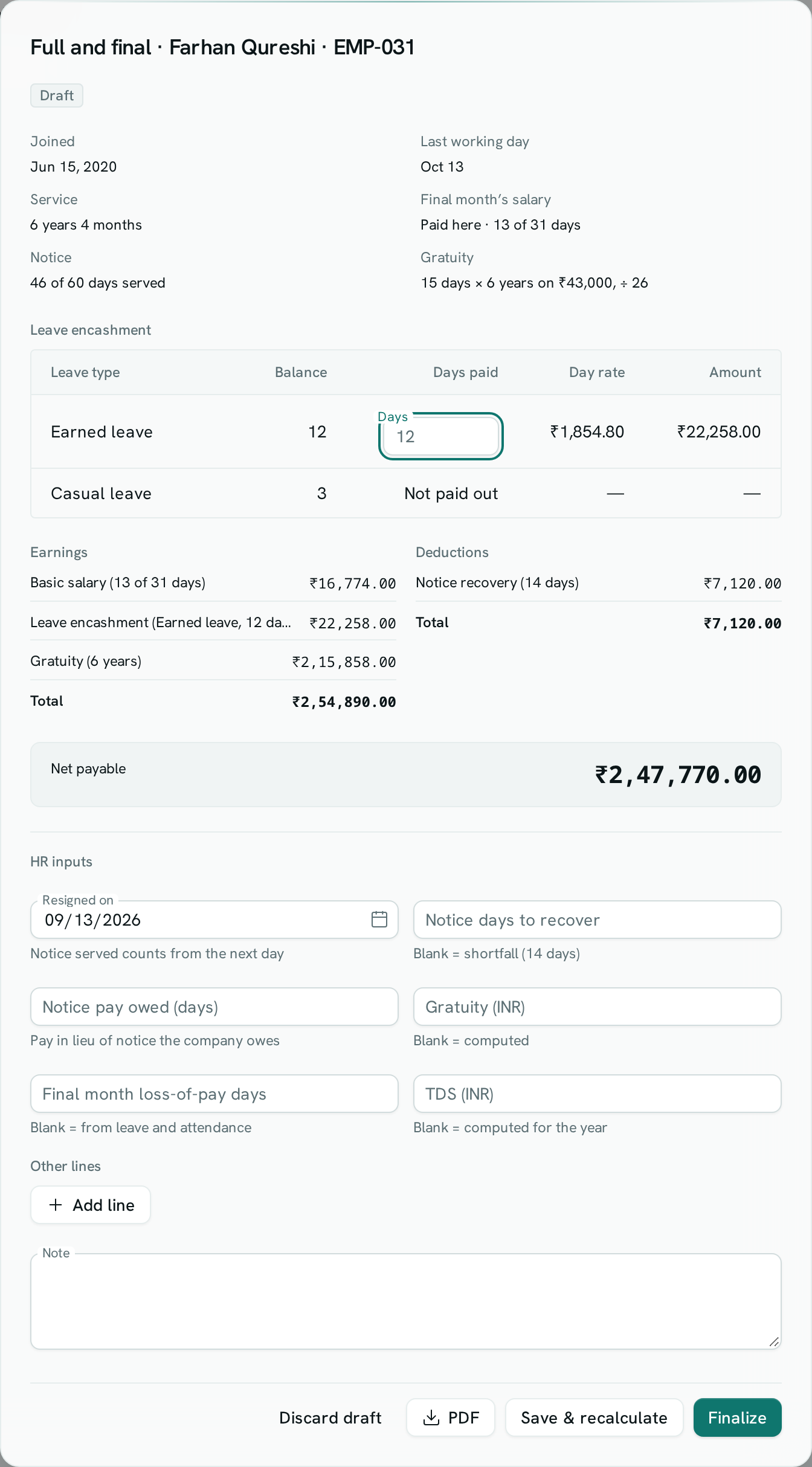
- Review the figures: service, the final month's paid days, the Leave encashment table (balance, days paid, day rate, amount), gratuity, and the totals.
- Under HR inputs, enter the Resigned on date so notice served is counted, and change anything you need to: days to encash per leave type, notice days to recover, Notice pay owed (days), gratuity, loss-of-pay days, TDS, or Other lines such as a bonus or a recovery for damaged equipment.
- Click Save & recalculate. Download the PDF if you want someone to check it.
- Click Finalize and confirm.
Once finalized, the statement becomes the employee's last payslip. Their leave balances close (what was paid out is recorded, the rest lapses), open loans are recovered, approved claims are marked reimbursed, and the settlement is posted to your books if payroll posting is set up. The employee is told, and can download the statement from My payslips.
Good to know
- A finalized settlement can't be changed. Until then you can Discard draft and start again.
- If that month's payroll run was already finalized before the settlement, the final salary stays on that payslip and the settlement covers everything else. Otherwise the payroll run for that month leaves the employee out, because the settlement pays it.
- Loans and advances are recovered only as far as the settlement can pay. Anything left stays outstanding, and the statement warns you.
- If the leaver owes more than the settlement pays, the statement says so — collect the difference outside payroll.
- Statutory returns count only the final salary as wages, not leave encashment or gratuity.
- Leave types that don't have payout turned on are shown as Not paid out; their balance lapses when you finalize.