Hold bills and split payments at the counter
Park a customer's bill while you serve the next one, resume it from any till on the same register, and take one bill in several payments — part cash, part card, part UPI.
A customer forgot their wallet in the car? Put the bill on hold, serve the next person, and pick it up again when they're back. When someone wants to pay part in cash and the rest by card or UPI, split the payment on the same bill.
Before you start: you need permission to sell on the register (the same permission you use to ring up sales). Holding and resuming bills needs an internet connection.
Hold a bill
- With items in the cart, press Hold bill under the charge button.
- Optionally type a Label (for example "Blue shirt, trial room") and a Customer name or phone number, so you can find it later.
- Press Hold bill. The cart empties and you can ring up the next customer.
Resume or discard a held bill
- Press Held bills at the top of the register. The number next to it shows how many bills are waiting.
- Find the bill by its label, customer, item count, total or the time it was held.
- Press Resume to put its items back in the cart, then charge it as usual. Prices and discounts come back exactly as they were.
- To drop a bill the customer no longer wants, press Discard and confirm.
Resume is only available when the cart is empty — hold or clear the current cart first.
Split one bill across several payments
- Ring up the items as usual.
- Under the payment method, press Split payment. One box appears for each payment method this register takes (Cash, Card, UPI QR).
- Type how much goes on each method. Press Rest next to a method to put the remaining amount on it.
- The line under the boxes tells you how much is still to collect. When the parts add up to the total, press Charge.
- If part of the bill is UPI, the customer scans a QR code for only the UPI part. The screen shows what you've already taken in cash or card.
To go back to a single payment method, press Pay one way.
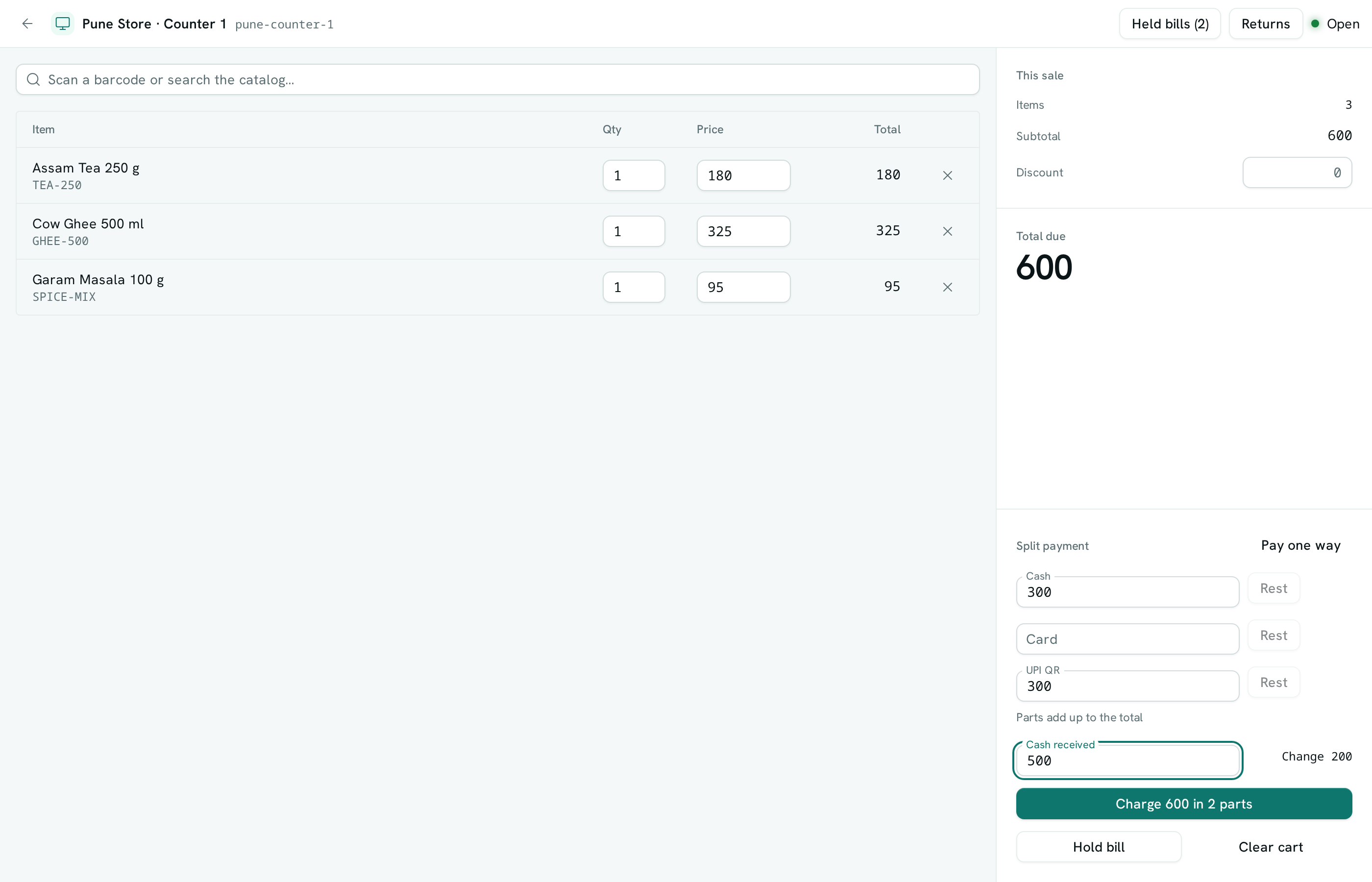
Work out change
When any part of the bill is cash, type the amount the customer handed you in Cash received. The register shows the change to give — worked out from the cash part only — and repeats it on the "Sale complete" screen.
Refunds on a split bill
When you return items from a bill that was paid several ways, the refund is suggested in the same proportions as the original payment. For example, a bill paid 300 in cash and 200 by UPI refunds 100 as 60 cash and 40 UPI. The UPI part goes back to the customer's account. You can change the split before refunding.
Good to know
- Held bills are shared by every till and device on the same register, and stay for 24 hours. After that they're removed automatically.
- Holds belong to one register. A bill held on another register doesn't appear on this one.
- A held bill isn't a sale: it doesn't reserve stock, doesn't get a sale number and doesn't show in your sales list until it's charged.
- If two tills try to resume the same bill at once, only one gets it; the other sees a message that it was already resumed.
- Holding and resuming need a connection. While the register is offline you can still sell for cash or card, but not hold bills.
- One bill can be split across up to five payments, with at most one UPI part. UPI isn't available while the register is offline.
- Change is shown on screen; the sale records what each payment method took.
- If you cancel a sale that's waiting for its UPI part, hand back any cash or card part you already took.
- A register holds up to 50 bills at a time.