Work Queues — the shop floor's system of record
Durable work queues driven by barcode scans: stations claim work safely, manifests reconcile missing vs unexpected, and every move is on the record.

Part of AxisIQ's single business model — The operational execution layer (Run the business). How the layers fit.
A floor runs on three questions: what is waiting, who has it right now, and did everything you expected actually turn up. Work Queues is the part of AxisIQ that answers all three — a queue is an ordered set of stages, an item is a row that stays exactly where you put it, and every barcode beep gets a verdict back. This page covers stages and items, the three verbs that move work, batch reconciliation and intake.
Most boards cannot answer the third question. A board assembled from a filter shows what matches right now and has no memory of what should have been there, so "the pallet is two cartons short" is something you discover later, by hand.
The board records reality instead of recalculating it
A queue is a sequence of stages mirroring what your floor already does: intake → pick → pack → dispatched, or received → tested → repaired → returned. An item is durable — it sits in the stage it was moved to until someone, or something, moves it again.
An item can point at a record but does not have to, which is what makes a queue usable where the work is physical:
- A carton can be booked in under its barcode before anybody has filed a purchase order for it.
- One record can sit in several queues at once — the same order in fulfilment and in a returns check — because priority, batch and stage live on the item rather than being written onto your order.
Three verbs move the work
Move is the only thing that changes an item's stage, and a stage may refuse it. A stage can declare which stages it accepts arrivals from, cap how many open items it will hold — a WIP limit, so picking cannot bury packing — and require a record update to succeed first. That update runs before the move, under the mover's own permissions: if they may not make the change, the item does not move, so record and board can never tell different stories. Complete, cancel and reopen are the same verb carrying a status.
Pick up is a pull, not an assignment. A station asks for the next item and holds it for a while, so two stations can hammer the same queue all shift and never be handed the same carton. If a station crashes or someone walks off mid-task, the hold runs out and the item can be picked up again. Assignment exists too, when a supervisor wants to hand work to a named person.
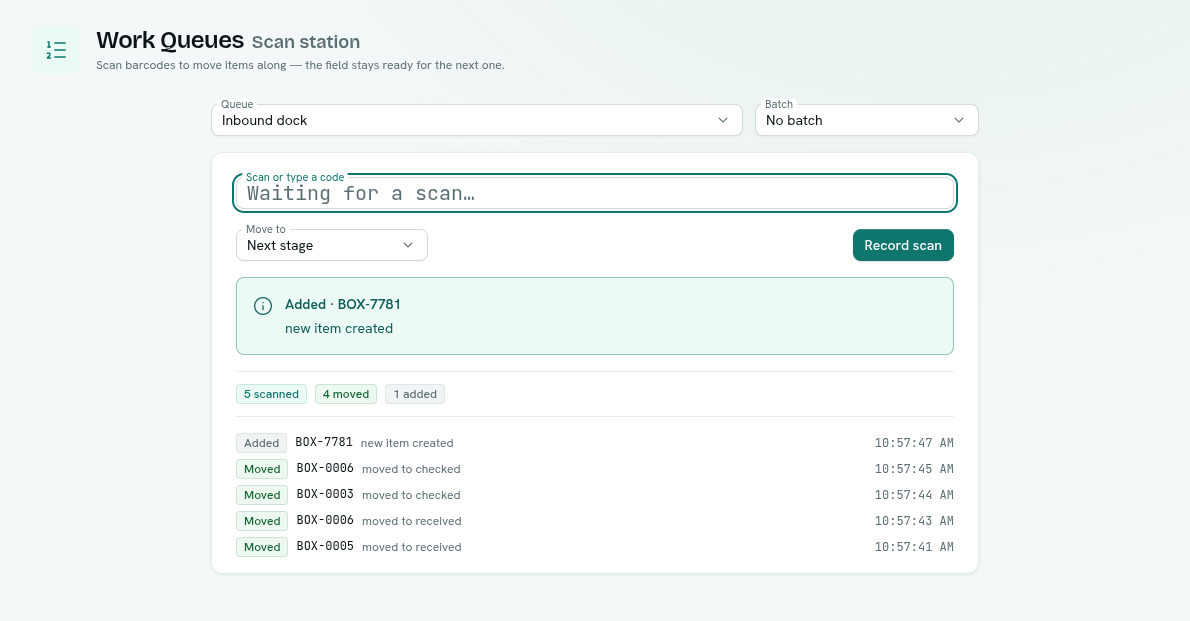
Scan is for the person holding a barcode gun who cannot read an ID off a screen. Beep a key and the system answers with a verdict, always:
| Verdict | What it means |
|---|---|
| Moved | Code found, item advanced. |
| Added | The code was not on the list and this queue is set to open items for unknown codes, so one was created. |
| Already scanned | The item is already at that stage. A second beep changes nothing. |
| Not on this list | The code is not in the queue, and this queue rejects codes it has never seen — the default, and the right setting for a verification run. |
| Can't move | A rule refused the move — wrong previous stage, WIP limit, or a failed record update. |
A verdict every time matters: an error page is useless to someone holding a scanner and a box. The scan station is a page of its own for exactly that person: pick the queue once, and the field stays ready for the next beep all shift, with a running log and counts of what moved, what was added and what was refused.
The manifest is the queue
Reconciliation is not a second feature bolted on the side. Paste the keys you expect — up to 500 in one go — and they become items seeded in the first stage under a batch name. Scan them forward as they arrive, then read the batch report:
- Whatever is still in the seeded stage never turned up: your missing list.
- Anything a scan had to create, because it was not on your list, arrived unannounced: your not on the list count.
The same shape covers a stock take, an inbound container check or an asset audit. You are not configuring a reconciliation tool — you are seeding a queue and reading what it remembers.
Work that arrives without anyone typing
Items can also be added by hand, in bulk from a pasted list, or automatically by the two mechanisms below.
Intake rules put records into a queue as they are saved. Write the condition once — paid orders above a value, repairs flagged under warranty — and matching records enter on their own. The condition decides who enters; it has no say over where they sit afterwards — the whole difference between this and a filter board.
Assignment rules hand each item that enters a stage to the next person — taking turns, or to whoever has the fewest open items — skipping anyone suspended or no longer allowed to work the queue.
Stage actions run one of your functions when an item lands in a stage — as the person who moved it, with their permissions, never as an elevated account nobody owns. It runs in the background, so a slow function never holds up a scan; a failure is logged rather than undoing the move. A final stage can push the same key into the next team's queue, so one pipeline feeds another with no coordinator in the middle. For a barcode-only queue it is the only automation available, and usually all it needs.
A console for the whole floor
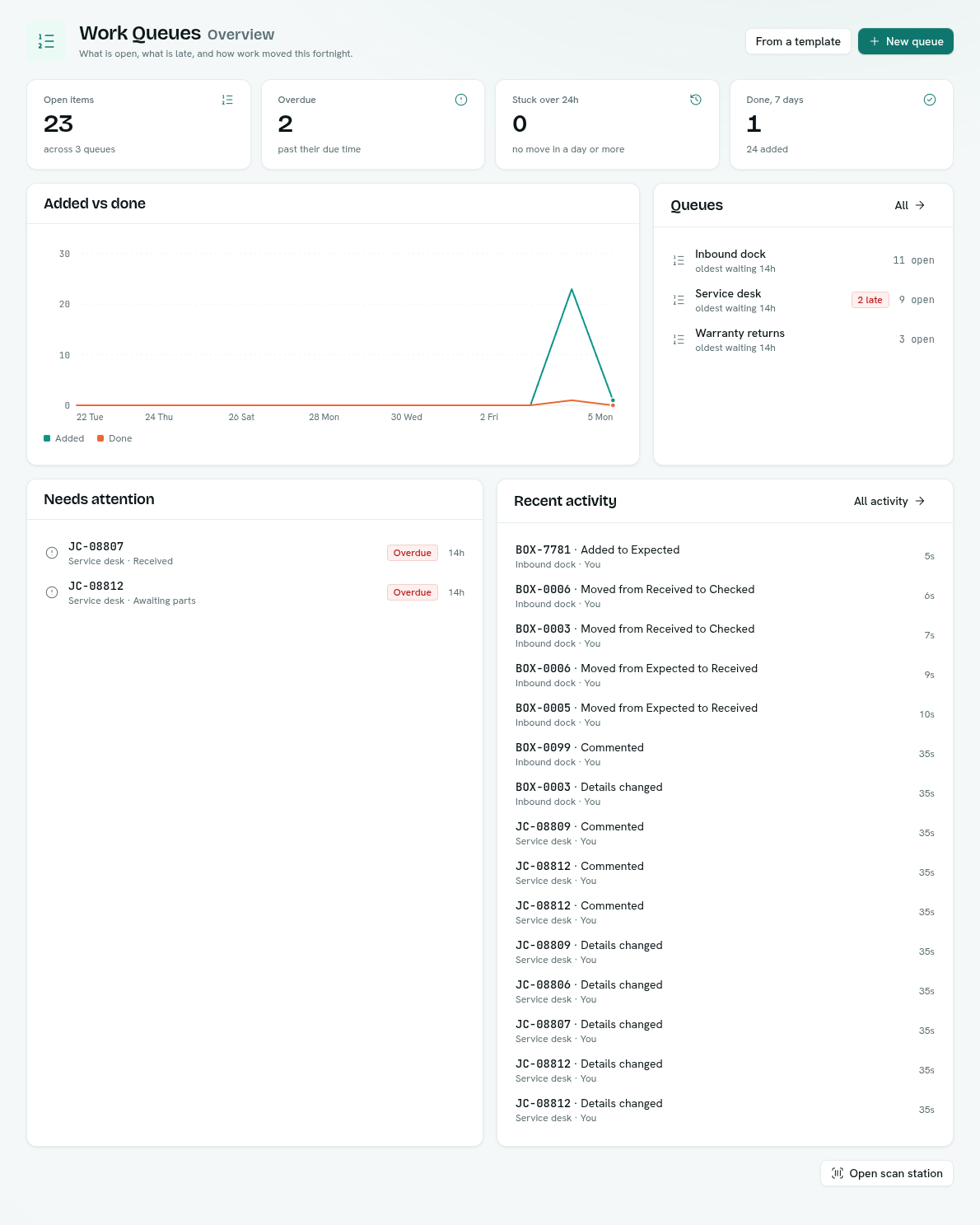
Work Queues opens on an overview of every queue you can see: what is open, what is past its due time, what has not moved in a day, how much was added and finished each day for the last two weeks, and the items most in need of a look. Beside it:
- My work — every open item assigned to you or picked up by you, across all queues, with why it is yours and when it is due.
- Activity — every move, pick-up, edit and comment across your queues, filterable by queue, kind of event and person.
- Templates — ready-made pipelines for receiving and dock checks, order fulfilment, returns, support triage, approvals and document review, opened in the queue editor for you to adjust.
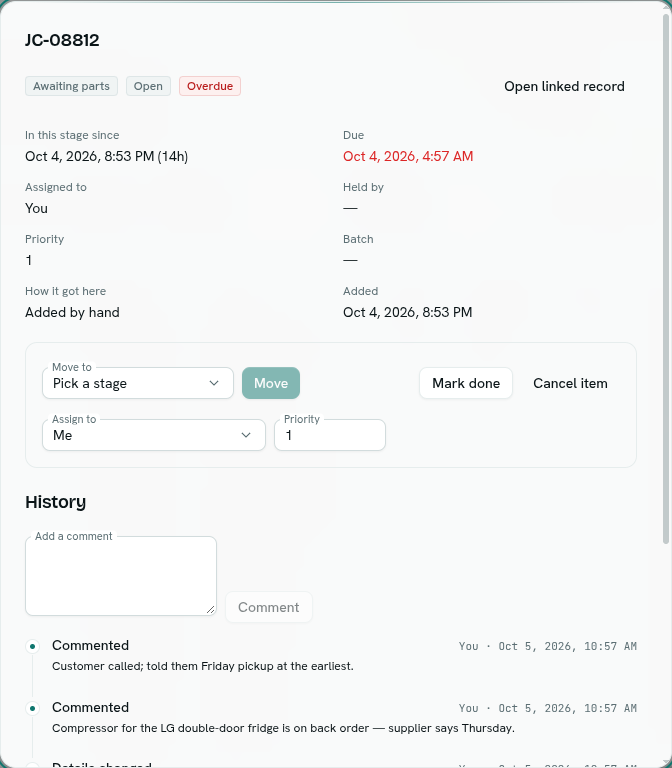
Inside a queue, an item opens to its full story: where it is and since when, who has it, its priority and due time, and a history of every move — with comments, so the next shift reads "compressor on back order, supplier says Thursday" instead of asking. Select a dozen items and move, assign, finish, cancel or reopen them in one go; each is checked on its own, so one refusal never sinks the rest. Export any filtered list to CSV.
Every movement is a fact you can query
Each move is appended to a permanent event log; nothing rewrites history when an item goes backwards. Every queue has an Insights view built from that log — typical time to done, the slow end of the range, how long items wait in each stage (the longest bar is your bottleneck), and added versus done per day over 7, 30 or 90 days. For anything beyond that, queue items and their events are available in Analytics as ordinary SQL tables — reading them there is a workspace-wide permission rather than a per-queue one. Throughput per stage per day, dwell time in packing joined to order value, missing counts by batch — those are queries you write, or ask for in plain English, on a dashboard with the rest of your numbers.
Adding work and advancing work are different rights
Permissions are set per queue, and putting work in is a separate right from moving it on. A station at the goods-in door can book cartons in all day without being able to mark one dispatched; a supervisor advances items without being able to invent them. That split lives in Team & Permissions, and it holds whoever moves the item — a person, an automation, or an API key issued to a station.
Why not just a saved filter
Worth being straight about: our first version was a filter-driven kanban, where a column was a condition and each card's position was recalculated on every load. We replaced it. A recomputed board forgets — it cannot hold a position when you edit the record underneath, cannot be pulled from with a lease, cannot hold a barcode that has no record yet, and has no idea what should have been in the batch.
The flip side deserves the same honesty: if all you want is a saved view of records — unpaid invoices, newest first — record search already does that, and a queue would only add a step. Queues earn their place when the movement itself is what you need to control, prove or measure.
How it fits the rest of the platform
Operations holds the orders, repairs and stock a queue points at, and automation can push items in or drain a stage on a schedule. Setting up a scanning line? Barcode workflows for a warehouse walks through one end to end.
FAQ
Can I scan a barcode before the order exists in AxisIQ? Yes. An item does not have to be linked to a record, so a carton can enter the queue under its own key and be attached to a record later, or never.
What stops two packing stations from grabbing the same item? Picking up holds each item for one station, so a second station asking at the same instant gets different work. If a station goes quiet, the hold expires and the item returns to the pool.
How do I check a delivery against its packing list? Seed the queue with the expected keys — up to 500 per batch — scan what arrives, then open the batch report. Items still in the seeded stage are missing; anything a scan had to create was never on the list.
Can I limit how much work sits in one stage? Yes. A stage can carry a WIP limit, and a move that would exceed it is refused with Can't move. Seeding a batch does not count against it: boxes you are still waiting for are not work in progress.