Your inbox
Read, open and mark notifications as read from the bell icon in the top bar.
Your inbox is the bell icon in the top bar. It lists notifications for you in the current workspace, newest first.
Before you start: No permission is needed. Every member reads only their own inbox. Your inbox is separate for each workspace.
Open your inbox
- Look at the bell at the top right of any page. A red badge shows how many notifications are unread (
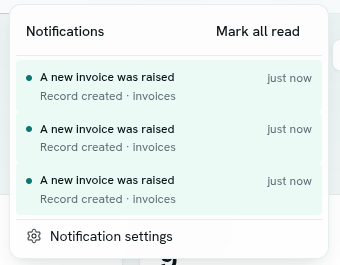
99+if more than 99). - Click the bell. A panel titled Notifications opens.
Read notifications
Each row shows:
- the title (unread titles are bold and have a dot and a tinted background),
- how long ago it arrived, for example
just nowor3h ago. After 6 days it shows the date, - a line below it: the event and the record type, for example
Record created · orders. Calendar notifications say Calendar.
The panel shows your 30 most recent notifications. When there are none you see "You're all caught up."
Mark as read
- Click a row to mark that notification read. If it belongs to a calendar event, it also opens the event in Calendar.
- Click Mark all read at the top of the panel to clear every unread notification. The button only shows when something is unread.
Notifications from a rule do not link anywhere. Open the app and find the record yourself.
Where notifications come from
- Notification rules your team created. See Notification rules.
- Calendar: invitations, reminders and booking notices for events you are part of.
Live updates
New notifications appear without reloading the page. If the live connection is not available, the bell checks again about once a minute.
Manage rules
Click Notification settings at the bottom of the panel to open the Notifications app.
Troubleshooting
I expected a notification and the bell is quiet Notifications go to the workspace you are in. Check you are in the right workspace, and that a rule exists and is Enabled. Rules post to the inbox only, not email.
The badge still shows a number after I read everything Click Mark all read, or reload the page.