Create a workspace
Create a workspace from scratch or from an industry template, with optional example data.
A workspace holds all your records, files, roles and settings. You can create it blank or start from a ready-made industry template.
Before you start: Any signed-in person can create a workspace. You become its owner. See Industry templates to choose a start.
Steps
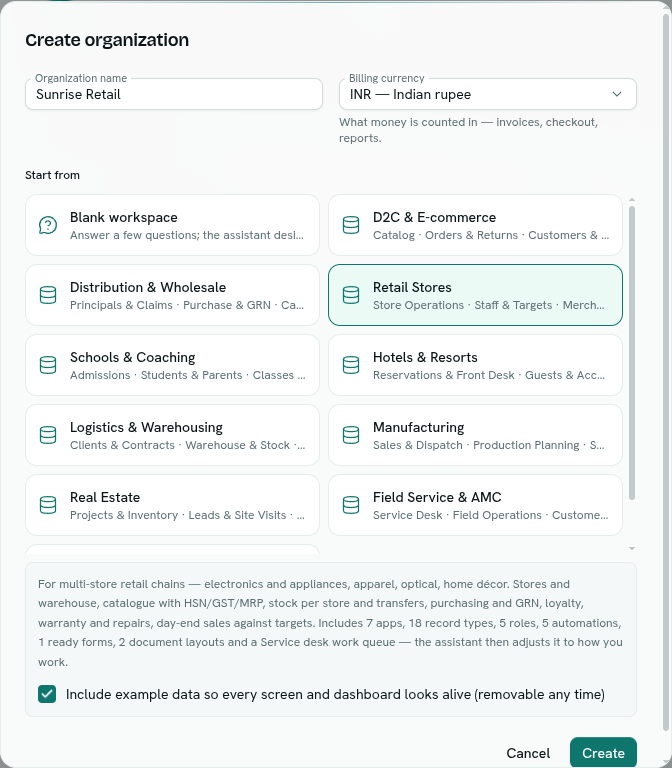
- Open the workspace chooser at Organizations. If you have no workspace yet, click Create organization. Otherwise click New organization.
- In the Create organization dialog, enter an Organization name. It must be 2 to 100 characters. For example,
Acme Traders. - Pick the Billing currency. It is pre-selected from your browser's time zone (INR for India). The choices are INR, USD, EUR, GBP, AED, SGD, AUD and CAD. It is "what money is counted in" for invoices, checkout and reports.
- Under Start from, choose one:
- Blank workspace: "Answer a few questions; the assistant designs it for you."
- An industry template card. Selecting one shows what it includes: the number of apps, record types, roles and automations, plus ready forms, document layouts and a work queue where it has them.
- For a template with example data, tick or untick Include example data so every screen and dashboard looks alive (removable any time). It is ticked by default.
- Click Create.
What happens next
- A message says "Building your workspace..." (or "Organization ... created — setting up...").
- You land in the setup assistant while the workspace is prepared. This takes a few seconds. If you open another page meanwhile you see Setting up your organization until it is ready.
- A workspace created from a template is already built when the assistant opens. A blank one is designed through the conversation.
- Your 14-day trial of the Intelligence plan allowances begins. See Plans and pricing.
Tips
- You can rename the workspace and change its default currency later in Workspace settings. Changing the currency does not re-price money already stored.
- Example data is removable at any time: Templates and example data.
- If you came from an industry page on the website, that industry is already selected.
Troubleshooting
Name must be at least 2 characters Type a longer name.
The organization shows "Setting up" in the chooser It is still being prepared. It opens by itself when ready.