Usage and allowances
How the monthly usage meters work, what happens at a limit, and what extra usage costs.
The Billing & usage page shows how much of each allowance you have used this month and what any extra usage will cost.
Before you start: Viewing needs Plan & invoices from AxisIQ at Can view on the Roles page. Without it the page says "No access to Billing".
Where to look
Open the workspace menu, then Billing & usage. The Current plan card shows three figures: Subscription, Usage so far and Projected total ("At this month's pace").
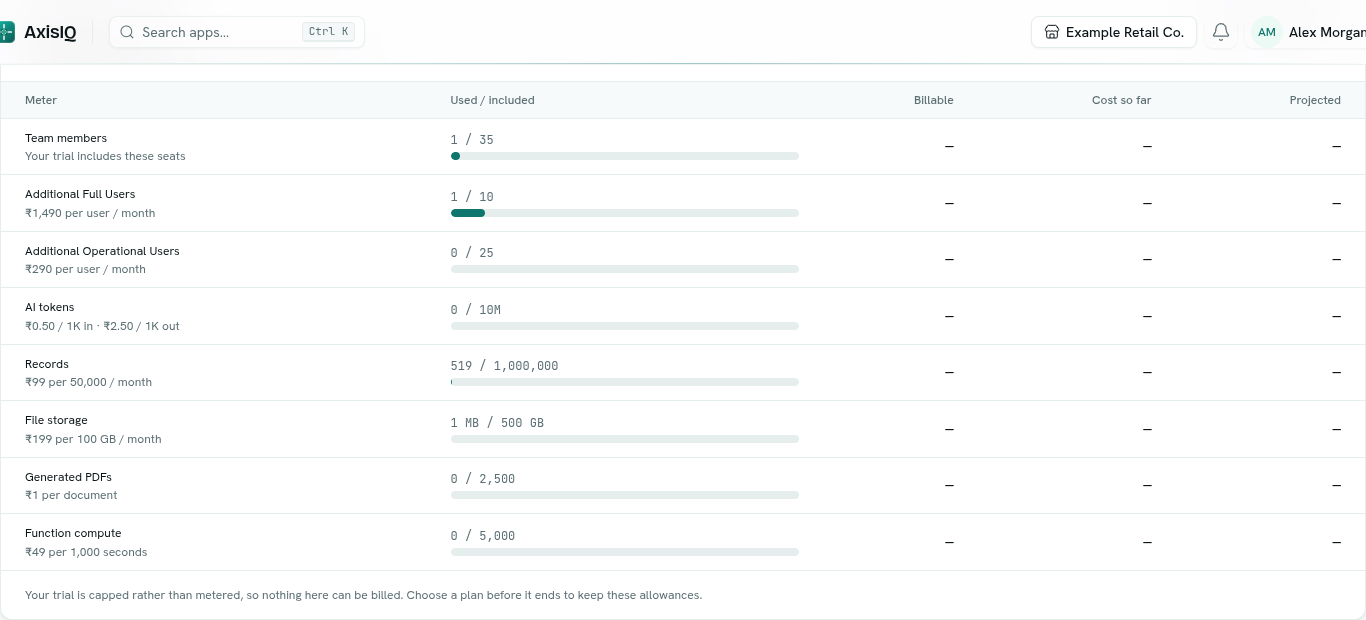
Usage this month
The table has these columns: Meter, Used / included, Billable, Cost so far and Projected. A bar shows how full each allowance is. It turns amber at 80% and red at 100%. Monthly meters reset on the 1st (UTC).
A badge tells you which rule applies:
- Metered · pay for overage: on a paid plan, going past an allowance is billed.
- Capped · nothing billable: on Free or a trial, going past an allowance is blocked, never billed.
Meters and extra-usage prices
| Meter | Extra price |
|---|---|
| Additional Full Users | ₹1,490 per user / month |
| Additional Operational Users | ₹290 per user / month |
| AI tokens | ₹0.50 per 1K in, ₹2.50 per 1K out |
| Records | ₹99 per 50,000 / month |
| File storage | ₹199 per 100 GB / month |
| Generated PDFs | ₹1 per document |
| Function compute | ₹49 per 1,000 seconds |
Extra usage is charged per whole block, so a partial block costs a full block. Prices exclude 18% GST. An Enterprise or unlimited allowance is never billed.
What happens at a limit
- Free and trial: the action is refused. Adding a record, uploading a file, chatting with Ask Axis or joining as a new member shows a message such as "free plan record limit reached (5000) — upgrade to add more".
- Paid plans: you are never blocked. Extra usage is added to your next scheduled payment automatically. There are no top-ups, no separate invoice and nothing to approve.
Past months
Once a month has closed, Past months lists each month's plan, Subscription, Usage and Total, with a charge status:
| Status | Meaning |
|---|---|
| Added to next debit | The usage charge will ride your next payment. |
| Within plan | Nothing extra to pay. |
| Not charged | No charge was made. |
| Closing | The month is still being closed. |
| Charge failed | The usage charge did not go through. |