People — HR and payroll inside your system of record
AxisIQ People runs HR in the same workspace as the rest of the company: employees, leave on your own rules, attendance, payroll with PF, ESI, PT and TDS, payslips, expense claims, your handbook and onboarding checklists.
Part of AxisIQ's single business model — The operations layer (Run the business). How the layers fit.
People is the HR app inside AxisIQ. Employees and departments, leave, attendance, monthly payroll with payslips, expense claims, your company handbook and joining and exit checklists — in the same workspace, under the same sign-in and the same permissions as the orders, stock and accounts your team already works on.
Most growing companies run HR from three places: a spreadsheet of employees, a leave register in someone's inbox, and a payroll tool that knows nothing about either. The month-end ritual is reconciling them by hand. People puts the employee, the leave they took, the days they worked and the salary they are paid in one place, so the payroll run reads what already happened instead of being told.
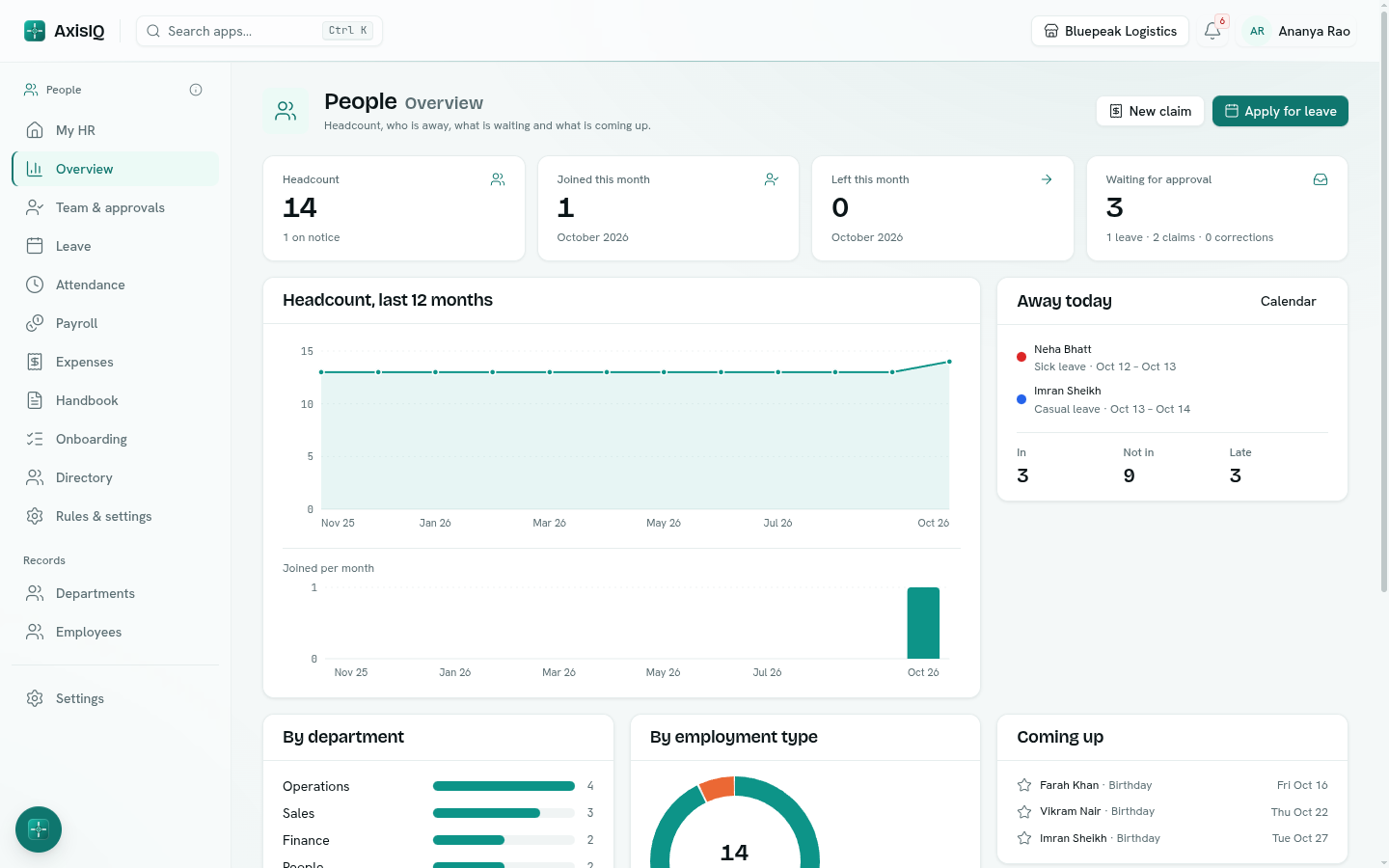
Your company's rules, not ours
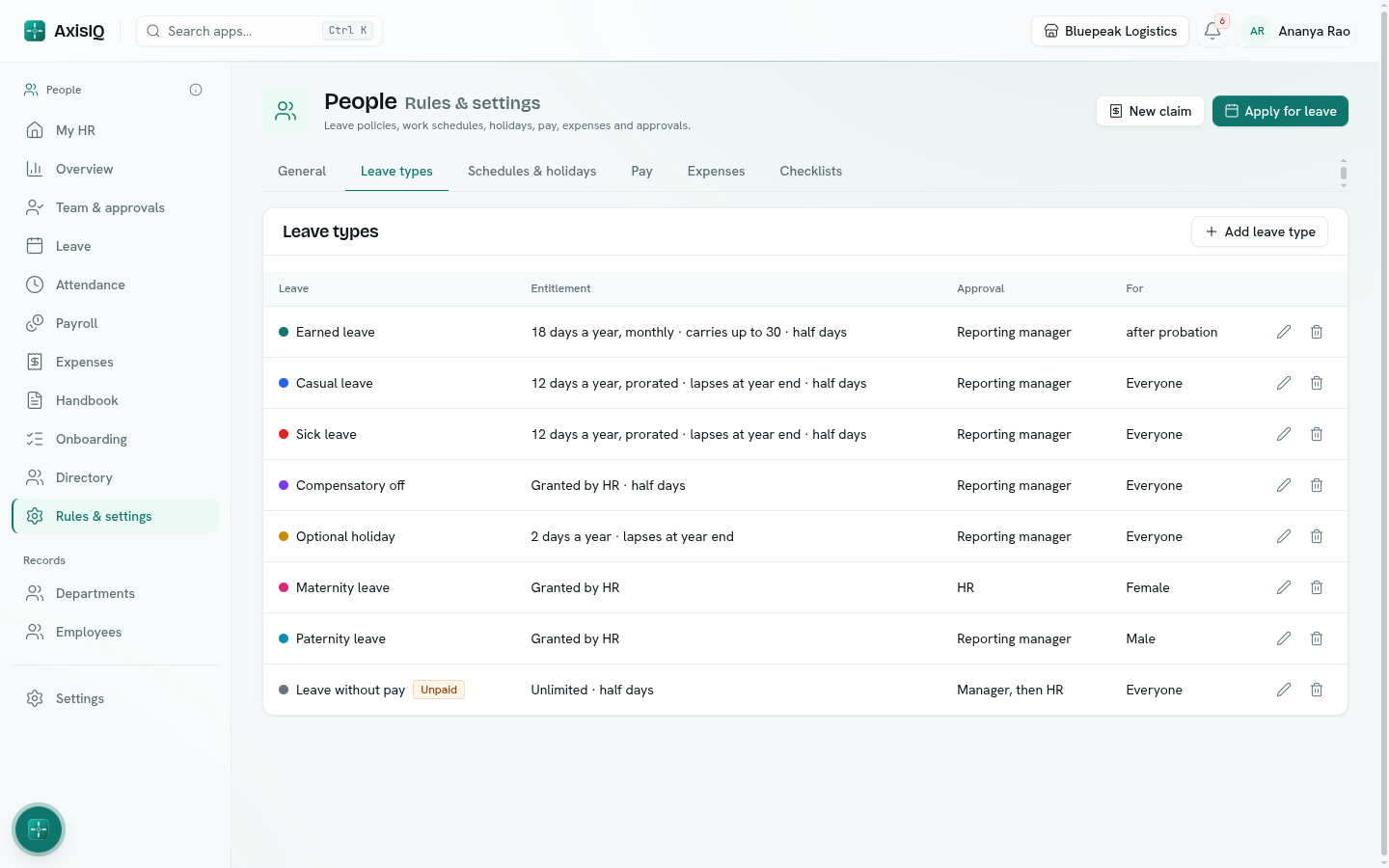
Every company says "we follow standard leave rules" and then describes something nobody else does. People is built for that. Each leave type is yours to define:
- How it is earned — the year's days up front, a share every month, granted by HR (comp-off), or unlimited and simply tracked (leave without pay).
- Proration and carry forward — joiners get the remaining months' share; carry all, carry up to a limit, or let it lapse at year end; cap the balance.
- Applying — notice days, how far back someone may apply, the most days at a time, when a document is needed, half days, and whether weekends inside a leave count (the sandwich rule).
- Who it is for — by employment type, gender, department, length of service or after probation.
- Who approves — the reporting manager, HR, the manager then HR, or nobody.
Work weeks follow the same idea: Monday to Friday, six days, or the 2nd and 4th Saturday off, with office hours, late grace and holiday lists per office. Your handbook holds your own policies — written, versioned, published to the people they apply to, and acknowledged — so "did everyone read the new leave policy?" has an answer.
Leave and attendance people actually use
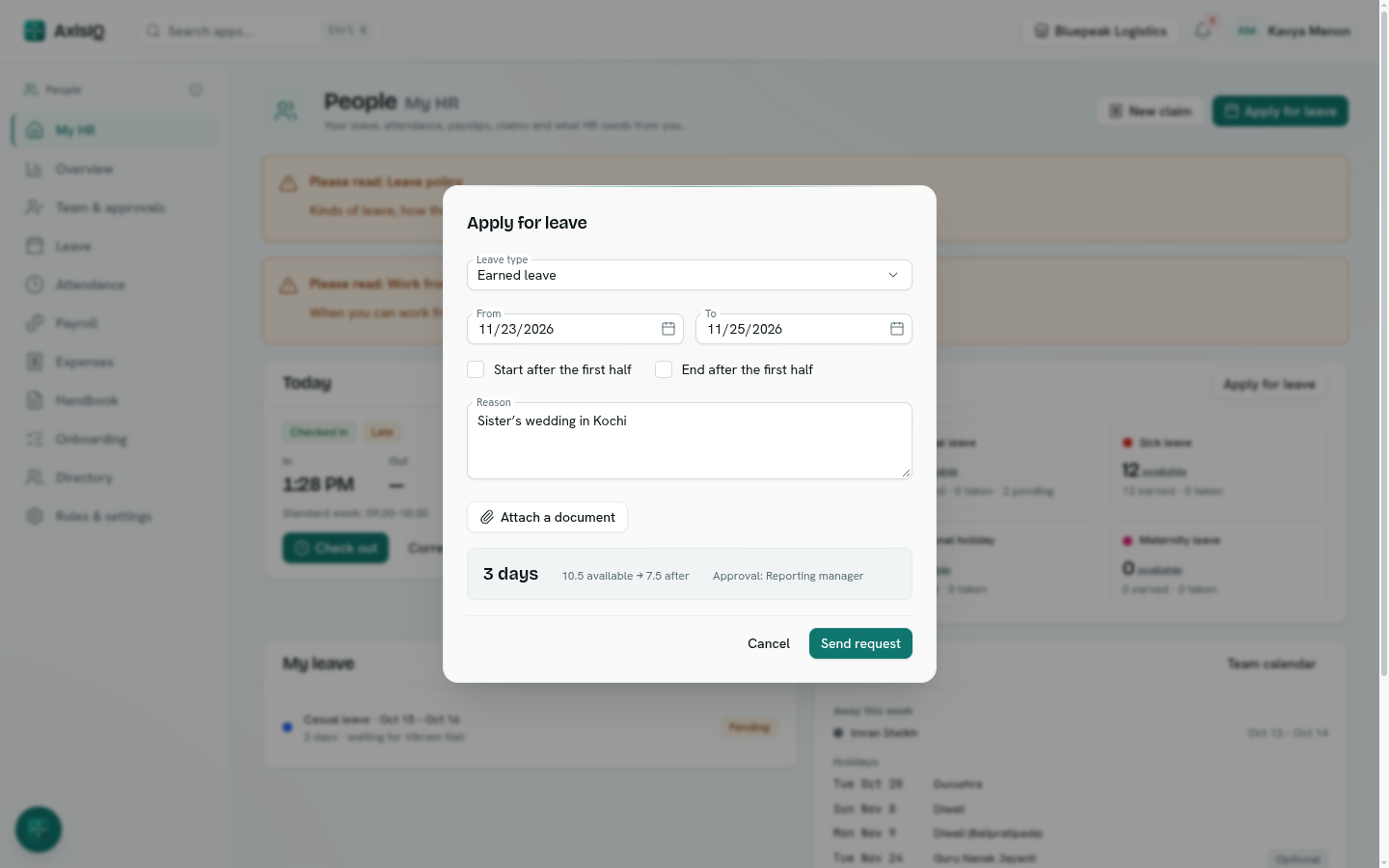
Applying for leave shows, before you press send, how many working days it takes, the balance after and who will approve it. Managers approve from one list, for their whole reporting line; the team calendar shows who is away. Everyone can check in and out from the browser, correct a missed day through the same approvals, and see their balances, payslips and tasks on one My HR page — without a separate employee portal or a second login.
Payroll that reads what already happened
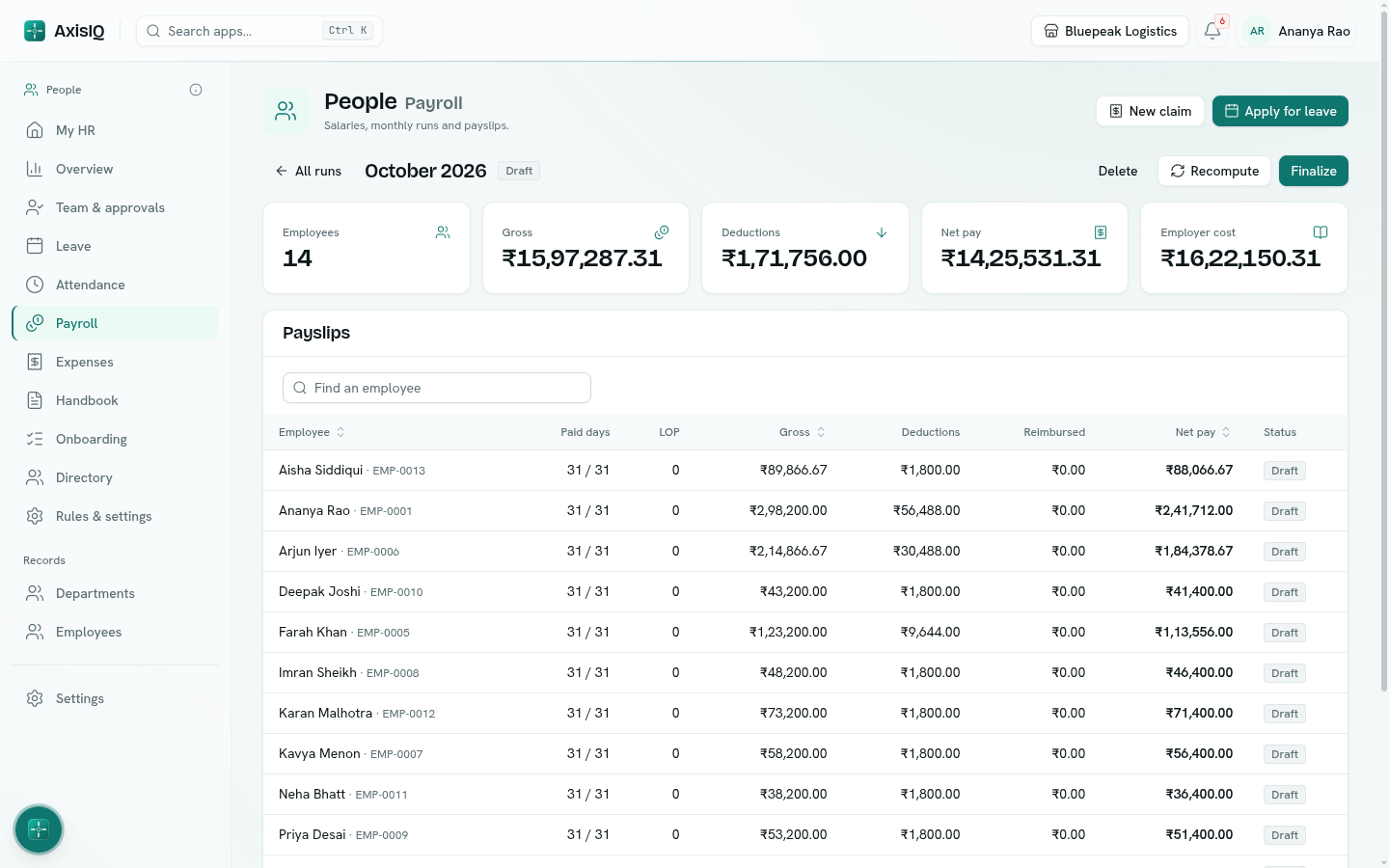
Salaries follow structures you define — basic as a share of CTC, HRA as a share of basic, the balance as special allowance, or any split you use. A monthly run takes everyone employed that month, counts paid days against unpaid leave (and, if you choose, unexcused absence), prorates joiners and leavers, and works out Provident Fund, ESI, professional tax and TDS with rates you can edit. Approved expense claims ride along as reimbursements.
You review the draft, change loss-of-pay days or add a one-off bonus or deduction on any payslip, and finalize. Payslips are released to employees as PDFs, the bank transfer file and payroll register download, and — if you map the accounts — one journal entry posts to the ledger, so salaries reach your books without re-typing. Money is computed exactly, never in floating point.
Joining and leaving, without the missed step
When an employee record is created, the joining checklist starts by itself: offer letter, documents, laptop, workspace access, handbook, welcome meeting, 30-day check-in — each task with an owner and a due date counted from the joining date. Put someone on notice and the exit checklist starts the same way. Offer, experience and relieving letters print from the employee record.
The same records as everything else
Employees and departments are ordinary AxisIQ records. Add the fields your company tracks, import from a spreadsheet, build reports in Analytics, automate with Flows, and ask Ask Axis "who is out next week?" or "apply for casual leave on Friday" — it answers from your data and asks before it acts. Permissions work the same way: everyone sees their own HR data, managers see their team, and HR roles see the rest, up to salaries and payroll, on the same Roles page as everything else.
Included, not an add-on
People comes with every AxisIQ plan at no extra cost, and every employee you add is a record — not a seat. Only people who sign in count as users.
The honest limits
People computes statutory deductions; it does not file them. PF ECR, ESI and professional-tax returns, TDS returns and Form 16 stay with your accountant or the government portals. TDS is projected from the current month's pay — there are no investment declarations or year-to-date true-up yet, so for anyone with significant declarations you set the monthly figure yourself. Full and final settlement and leave encashment are a checklist, not a calculation. There are no performance reviews or recruitment pipeline yet, attendance is browser check-in only (no biometric or geo-fenced devices, no shift rosters), and there is no mobile app.
FAQ
Is People a separate product? No. It is an app inside your AxisIQ workspace, with the same sign-in, people and permissions. There is nothing to install.
Can we set our own leave policy? Yes. Every leave type, entitlement, carry-forward rule, notice period, approver and holiday list is yours to define and change at any time.
Does it calculate PF, ESI, professional tax and TDS? Yes, on every payslip, with rates, ceilings and slabs you can edit. It does not file returns.
Do employees need a login? Only for self-service. An employee without a sign-in is still in the directory and on payroll; HR applies for leave and marks attendance for them.
Can managers approve leave? Yes. Requests go to the reporting manager, HR, or both, by leave type, and managers see their whole reporting line.
Does payroll post to our books? Yes, if you map the payroll accounts: a finalized run posts one journal entry to the AxisIQ ledger.
Does it cost extra? No. People is included in every plan.
Read the full guide in the People documentation.