Remind guests by WhatsApp, SMS or email
Send people who book you a WhatsApp, SMS or email reminder before their appointment to cut no-shows.
Send people who book you a reminder before their appointment by WhatsApp, SMS or email, so fewer of them forget to turn up.
Before you start: you need a booking page (see Booking pages) and an email, SMS or WhatsApp account connected in Messaging that you are allowed to send from (Can send on Messaging on the Roles page). See Connect an account.
Turn on reminders
- Open Calendar › Booking pages and click Edit booking page on the calendar's card.
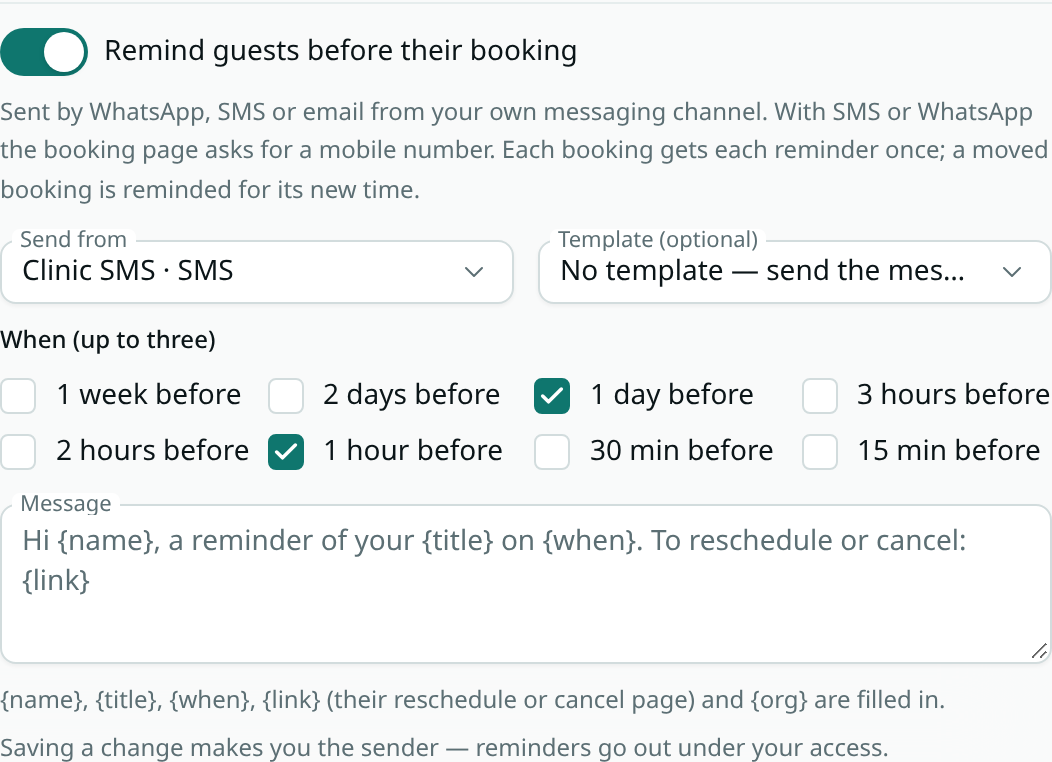
- In the Booking page tab, switch on Remind guests before their booking.
- Under Send from, pick the account to send from.
- Under When (up to three), tick when to remind them — from 1 week before to 15 min before. 1 day before and 1 hour before are ticked to start with.
- Write the Message, or leave it empty to use the standard one.
{name},{title},{when},{link}(their page to reschedule or cancel) and{org}are filled in for each booking. - Click Save booking page.
SMS and WhatsApp
- When reminders go by SMS or WhatsApp, your booking page asks guests for a Mobile number, and booking needs one. A 10-digit Indian number works as it is; numbers from other countries need the country code, such as +44.
- The number is also added to the booked event's description, so you can see it on your calendar.
- WhatsApp only delivers free text to people who messaged you in the last 24 hours, so WhatsApp reminders use an Approved template you pick. Its variables can use
{{.data.name}},{{.data.title}},{{.data.when}}and{{.data.link}}. For SMS you can pick a template too, or send the message above.
Who the reminder is from
Reminders are sent as the person who last switched them on or changed them, using their access to the account. If that person leaves the workspace or loses send access, reminders stop until someone with access saves the settings again.
When reminders go out
- Each booking gets each reminder once, within about a minute of its time.
- If a guest books late — say an hour before, with a one-day reminder set — reminders whose time has already passed are skipped, and at most the latest one is sent.
- A guest who moves their booking is reminded for the new time.
- Cancelled bookings, and pay-to-book bookings that are not yet paid, get no reminders.
- Opted-out numbers and addresses are skipped, like any message from Messaging. Sent reminders show in Messaging's activity log.
Good to know
- Bookings made before reminders were switched on to SMS or WhatsApp have no mobile number, so they are not reminded.
- If the template you picked does not suit the account (for example a WhatsApp template on an SMS account), the reminder fails and shows as failed in Messaging's activity log.