Month-end closing checklist: six steps from bank statement to CA pack
A printable month-end closing checklist for Indian businesses: bank reconciliation, GSTR-1/3B prep, TDS, period lock and one clean pack for your CA.

A month-end closing checklist for an Indian small business has six jobs: categorise bank lines, reconcile the bank, prepare GSTR-1 and GSTR-3B data, check TDS, lock the month, and send your CA one pack of reports. Do them in that order, from one set of books, and a filed month stays closed.
Why does month-end close drag on?
Because the work lives in too many places. The bank statement comes as an Excel file and someone retypes it into Tally line by line. Some entries need a WhatsApp message to ask "what was this ₹4,720 debit?". GSTR-1 is built in a separate spreadsheet. Then your CA emails asking for the day book, the ledgers and the trial balance, and you export each one by hand.
And if someone posts a backdated entry after GSTR-3B is filed, the books no longer match the return.
How does month-end close work in AxisIQ?
Everything below happens inside Accounting, on one ledger.
1. Let bank rules categorise the statement lines
Open Accounting, click Bank reconciliation, pick the bank account and click Upload statement. AxisIQ reads CSV and Excel files and understands Indian number formats such as 1,25,000.00 and Dr/Cr amounts.
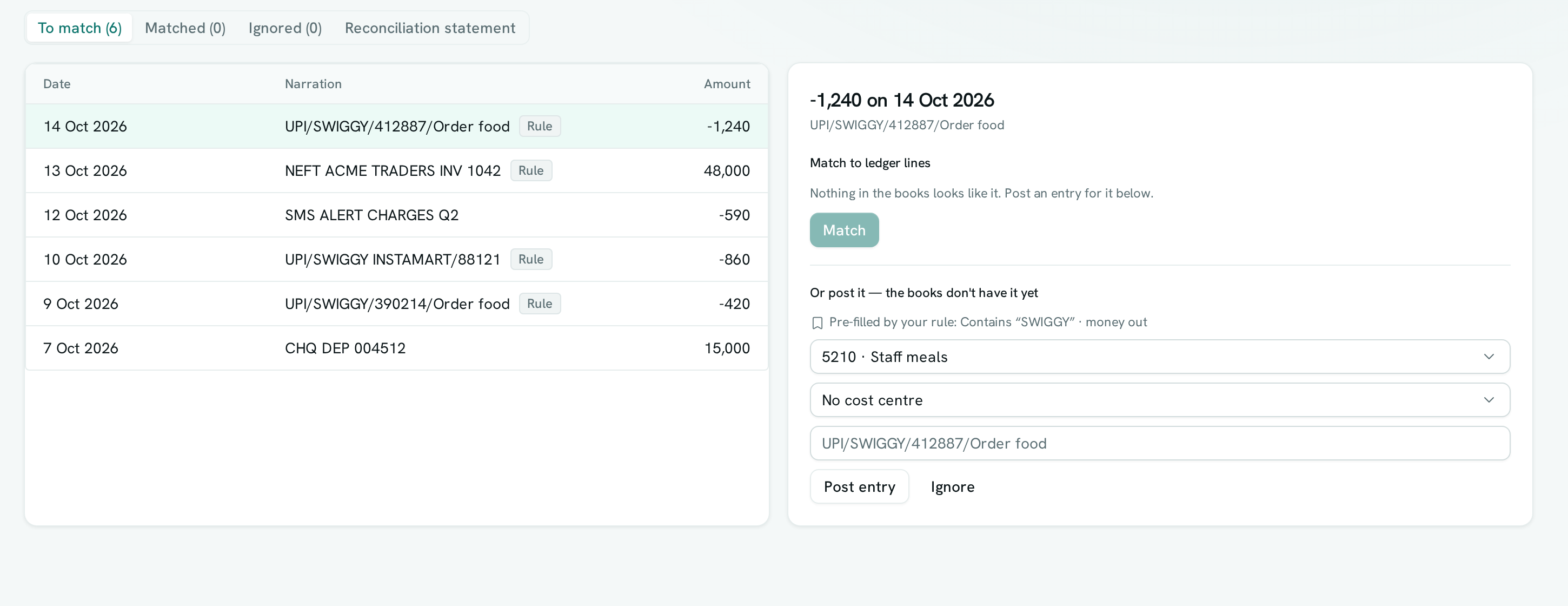
The first time you post a line the books don't have, say a Swiggy payment, choose the account under Or post it — the books don't have it yet and tick Remember this for lines like it. AxisIQ suggests a word from the narration, and you choose Contains or Starts with. From then on, any line whose narration matches that word, in the same direction (money in or money out), arrives with a Rule badge and the form already filled in. You still check it and click Post entry. Nothing posts on its own. See how bank rules work.
2. Automate bank reconciliation and sign off the BRS
This is where bank reconciliation automation for Indian statements actually saves time: for each line still under To match, AxisIQ looks for a ledger line with the same amount within three days, preferring one that shares words with the narration, such as a UTR or cheque number.
- Click Accept N exact matches to accept the clear ones in one go.
- Open each suggested match, check it and click Match. One deposit can match several entries.
- Post bank charges and interest the books are missing, and Ignore duplicates or opening-balance rows.
- Open Reconciliation statement, set As of to the last day of the month and enter the bank's closing balance.
- When Difference is zero, click Mark reconciled through 31 Oct 2026 (the button shows the date you chose).
Lines on or before that date are then frozen. The full flow is in the bank reconciliation guide.
3. Prepare GSTR-1 and GSTR-3B from your invoices
Go to Accounting › Reports › GST returns, pick GSTR-1 or GSTR-3B, and choose the Month. AxisIQ builds both from the invoices, credit notes, debit notes and purchase bills issued that month, read exactly as each document was issued.
On GSTR-1, open the Checks tab first and set Turnover last financial year (Up to ₹5 crore (4-digit HSN) or Above ₹5 crore (6-digit HSN)). It lists problems the portal would reject: a mistyped customer GSTIN, a B2B sale with no GSTIN, a missing place of supply, an HSN code too short for your turnover band. When it says No problems found, click Portal JSON.
AxisIQ prepares the return. You upload the JSON on the GST portal, review it and file it yourself. More in preparing GSTR-1 and GSTR-3B.
4. Check TDS and record challans
If you deduct TDS on supplier bills, open Accounting › Reports › TDS › Quarterly return (26Q). Click Add challan for each challan 281 you paid, with the BSR code, serial number and amount. The warnings at the top flag months with no challan, a challan smaller than the TDS booked to it, and suppliers with no PAN. See TDS returns.
5. Lock the period
Once GSTR-3B is filed, open Accounting › Overview, click Lock a period, set Locked through to the month end and click Lock. After that, nothing dated on or before that day can be posted by hand, by import, by bank reconciliation, by invoices or by payroll.
Mistakes can still be corrected: reversing an entry from a locked month posts the reversal today, so the filed month stays as filed. Locking needs the Can close periods permission, which is separate from Can post entries. Details in lock periods and close the year.
6. Send your CA one pack
Open Accounting › Reports › CA pack, pick the period and click Download pack or Save to Drive. One ZIP holds the trial balance, profit and loss, balance sheet, Schedule III (CSV and PDF), day book, every ledger with running balances, receivables and payables ageing, GSTR-1 and GSTR-3B for each month with GST invoices, and one Excel workbook with the main tables.
How do you send Tally data to your CA?
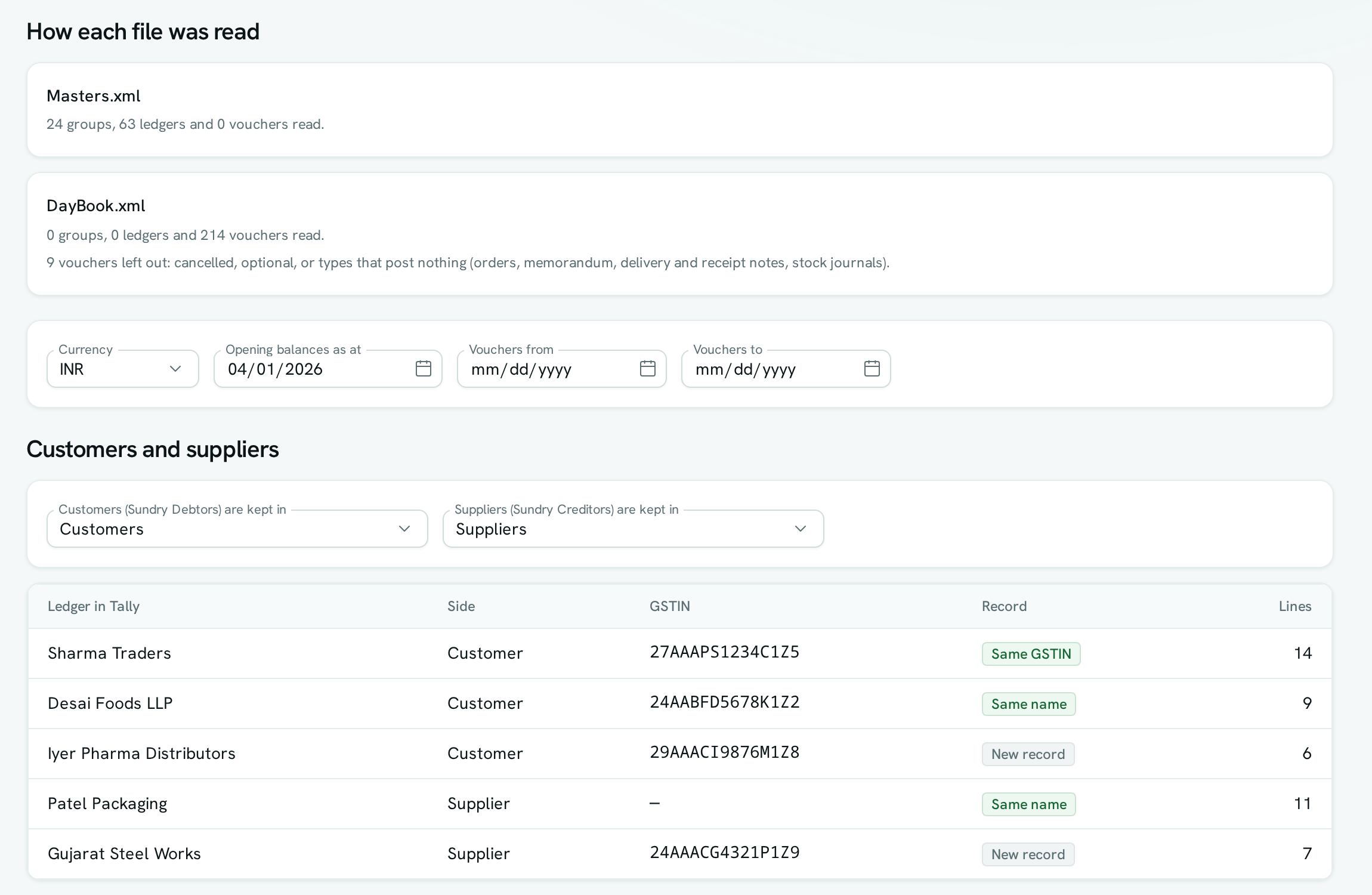
In Tally, go to Display More Reports › List of Accounts, press Export and choose XML (Data Interchange). Then do the same from Day Book for the period. Import both files into AxisIQ (one quarter at a time for large books), and from then on the CA gets one ZIP from CA pack. The Tally import and CA pack guide covers both.

A worked example: closing October for a hypothetical distributor
Take a made-up FMCG distributor in Nagpur with one HDFC current account, around 200 statement lines a month and 90 sales invoices.
- Bank rules. Rent, electricity, Swiggy and fuel debits arrive pre-filled by earlier rules. The accountant checks each and posts.
- Reconciliation. UPI and NEFT receipts match recorded payments. Two cheques deposited together for ₹48,000 match to both recorded receipts at once. A ₹590 bank charge is posted from the statement line. The BRS shows a difference of zero, and October is marked reconciled.
- GST. Checks flags one invoice with a 4-digit HSN where the turnover band needs 6. The item is fixed so future invoices are right. The invoice already issued can't be edited and the return reads it as issued, so the accountant raises it with the CA before uploading the JSON.
- TDS. October's challan is added. The warning about a transporter with no PAN gets a phone call.
- Lock and pack. After GSTR-3B is filed, books are locked through 31 Oct 2026 and the CA gets one ZIP from Drive.
This is an illustration, not a measured result.
Month-end closing checklist you can print
This works with any software, including Tally. The last column shows where each step lives in AxisIQ.
Typical monthly due dates: TDS deposit by the 7th, GSTR-1 by the 11th, GSTR-3B by the 20th. Confirm current GST dates on the GST portal.
| # | Task | Done when | In AxisIQ |
|---|---|---|---|
| 1 | Get statements for every bank account and wallet | All accounts covered to the last day | Bank reconciliation › Upload statement |
| 2 | Post every bank line the books don't have | Nothing left under To match | Bank rules + Post entry |
| 3 | Reconcile each bank account | BRS difference is zero | Reconciliation statement |
| 4 | Review receivables and payables | Overdue list chased, advances explained | Reports › Ageing |
| 5 | Issue every sales invoice, credit note and debit note for the month | Nothing for the month left unissued | Invoices |
| 6 | Post accruals, provisions, depreciation and payroll for the month | Expenses for the month are in the month | Journal entries; payroll posts to the ledger |
| 7 | Fix GST errors at the source | GSTIN, place of supply and HSN all valid | GST returns › Checks |
| 8 | Match purchase bills with GSTR-2B | Missing supplier invoices chased, ITC only on what 2B shows | On the GST portal (not in AxisIQ) |
| 9 | Prepare and file GSTR-1 and GSTR-3B | Filed on the portal before the due date | Portal JSON, then upload yourself |
| 10 | Record TDS challans and fix missing PANs | No warnings on the 26Q page | TDS › Quarterly return (26Q) |
| 11 | Check the trial balance and balance sheet | Trial balance In balance, balance sheet Balances | Reports |
| 12 | Lock the month | Books locked through the month end | Lock a period |
| 13 | Send the CA one pack | CA confirms receipt | CA pack |
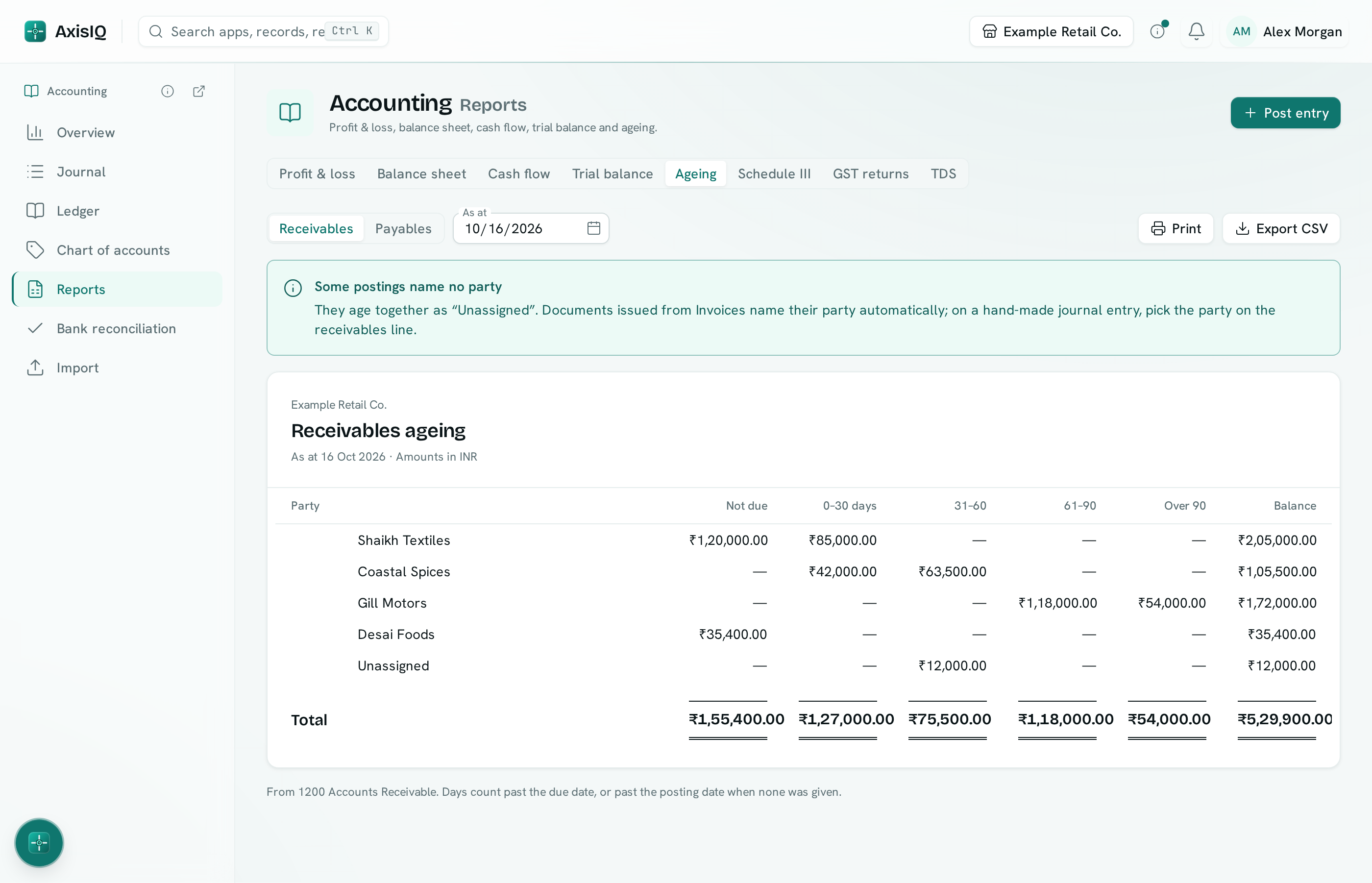
At step 4, the ageing report shows who owes you by how long it has been due.
Want to run this checklist on your own October books? Book a free demo and we'll walk through bank rules, GST checks and the CA pack with you, or start a 30-day free trial, no card needed.
What AxisIQ doesn't do at month-end
- No GSTR-2B matching. Compare your purchase bills with GSTR-2B on the portal before you file GSTR-3B.
- Return preparation only. AxisIQ prepares GSTR-1 and GSTR-3B; you file them on the GST portal. E-invoice IRNs and e-way bills are generated on the government portals.
- Monthly returns only. Quarterly (QRMP) filing and amendments to earlier periods are not produced. Quarterly filers can build each month and combine them on the portal.
- TDS stops at the data. You validate the 26Q data and generate the upload file in the Return Preparation Utility. Form 16A comes from TRACES.
- A person posts every bank line. You upload CSV or Excel, and a rule only fills in the form.
- The CA pack has limits. One currency at a time and up to 50,000 entries. Schedule III has no notes to accounts, so have your CA check the line mapping before filing.
FAQ
What should a month-end closing checklist include?
Bank reconciliation, receivables and payables, accruals and payroll, GST checks, GSTR-2B matching and returns, TDS, a trial balance check, a period lock and a CA pack. The table above lists them in order.
How do I send Tally data to my CA?
Export the List of Accounts and the Day Book from Tally as XML, import both into AxisIQ, then download one CA pack ZIP or save it to Drive to share.
Can bank reconciliation be automated in India?
Partly. AxisIQ reads Indian bank statements in CSV or Excel, accepts exact matches in bulk, suggests the rest, and pre-fills recurring lines with bank rules. A person still reviews and posts each entry.
Does AxisIQ file my GST returns?
No. AxisIQ builds GSTR-1 and GSTR-3B from your issued documents, flags errors, and gives you the portal JSON. You upload it and file on the GST portal yourself.
What if someone posts into a month that's already filed?
Once you lock the period, AxisIQ refuses any entry dated on or before the lock date. Corrections are posted as reversals dated today, so the filed month stays exactly as filed.
Close next month from one set of books
Pick one bank account and one month, and run the six steps once. Plans are on the pricing page. Book a free demo to see your own month-end in AxisIQ, or start a 30-day free trial with no card needed.