Set up People
Turn on People with one screen: your work week, when the leave year starts and which payroll rules apply, plus starting leave types, salary structure, checklists and handbook drafts.
The first time someone who can set it up opens People, it asks a few questions on one screen. Everything you choose here can be changed later under Rules & settings.
Before you start: you need Runs HR or Full control on People (HR) (the workspace owner has both), and permission to create record types.
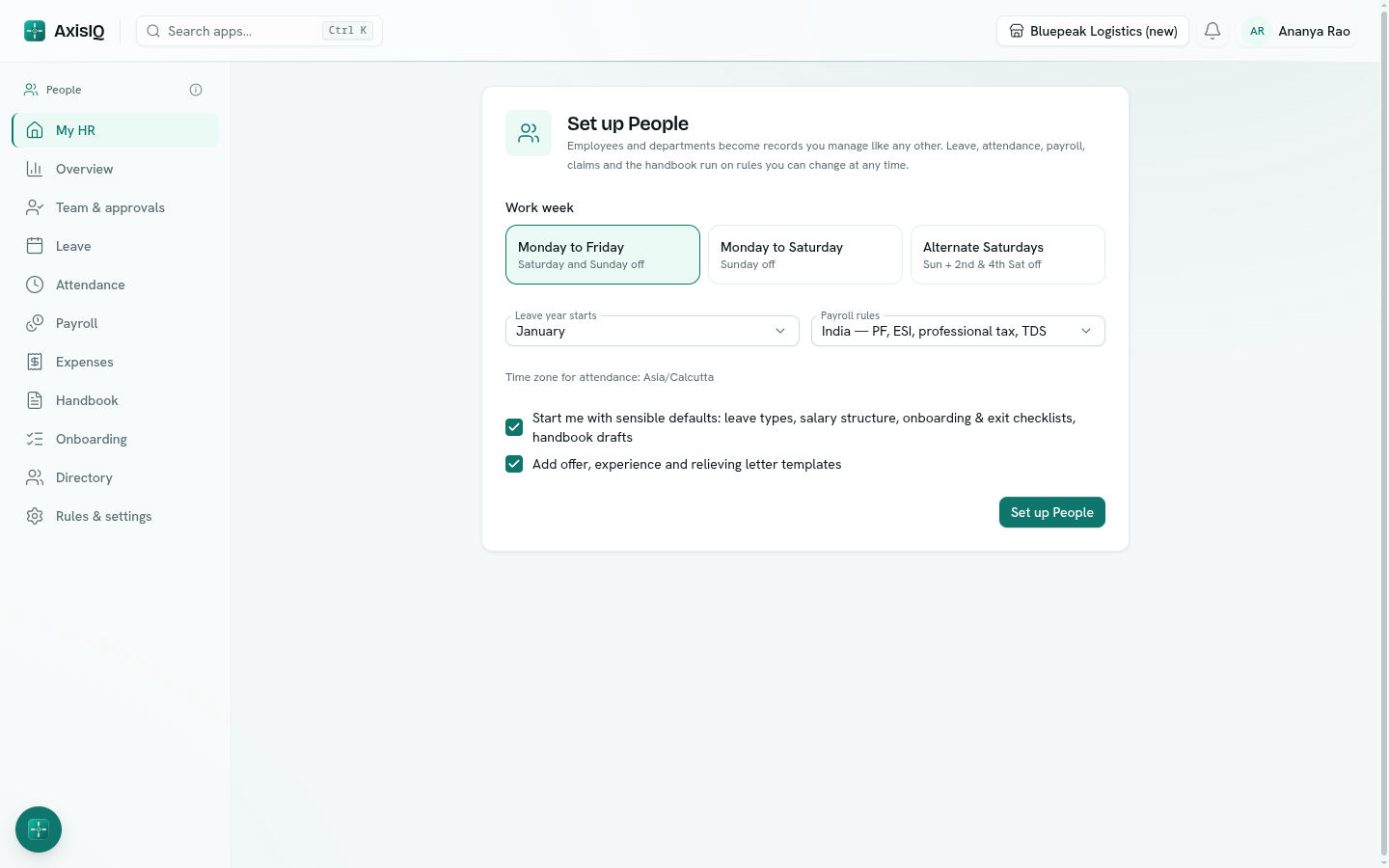
Steps
- Open People from the launcher. The setup appears in place of the app.
- Work week — choose Monday to Friday, Monday to Saturday, or Alternate Saturdays (2nd and 4th Saturday and every Sunday off).
- Leave year starts — the month balances reset. Most Indian companies use April; pick January for a calendar year.
- Payroll rules — India — PF, ESI, professional tax, TDS fills in the statutory deductions with the current rates, or No statutory deductions to set them up later.
- Leave Start me with sensible defaults ticked to get leave types, a salary structure, onboarding and exit checklists and handbook drafts. Tick Add offer, experience and relieving letter templates for printable letters.
- Click Set up People.
What setup creates
| What | Details |
|---|---|
| Employees and Departments | Record types in the People app. If your workspace already has lists with these names, setup uses them and only adds the fields it needs — nothing you have is renamed or removed. |
| A work schedule | Standard week, 09:30–18:30 with 15 minutes' grace, following the work week you picked. |
| Leave types | Earned, casual, sick, compensatory off, optional holiday, maternity, paternity and leave without pay. See Leave types and balances. |
| Pay | Basic, house rent allowance, special allowance and bonus, the statutory deductions, and a Standard structure: basic 40% of CTC, HRA 50% of basic, special allowance the balance. |
| Expense categories | Travel, meals & entertainment, internet & phone, office supplies and other. |
| Checklists | New joiner and Exit, both starting by themselves. |
| Handbook drafts | Code of conduct, leave policy, working hours and attendance, and expense reimbursement — as drafts for you to edit and publish. |
| Letters | Offer, experience and relieving letter layouts in Templates, filled from the employee record. |
Employee IDs are numbered for you (EMP-0001, EMP-0002…) unless your list already numbers them.
Next steps
- Add your departments and employees — or import them. Employees and departments
- Add this year's holidays. Work schedules and holidays
- Read through the leave types and change anything that differs from your policy.
- Set salaries before your first payroll run. Payroll and payslips
- Edit and publish the handbook drafts. Handbook and policies
Troubleshooting
I don't see People in the launcher It is switched off in Settings › Apps, or your workspace needs the pending update in Settings › Workspace (owner only).
Setup says a field already exists on another list A field with the same name is used elsewhere. Setup leaves it alone and tells you; the rest is still set up.