Payment reminders on WhatsApp and UPI links: get invoices paid sooner
Add a UPI payment link to every invoice, automate payment reminders on WhatsApp, SMS or email, and see who still owes. Free schedule and messages inside.

The quickest way to collect payments faster from customers is to make paying a two-minute job and make following up nobody's job. Put a UPI payment link on every invoice, send payment reminders on WhatsApp, SMS or email on a fixed schedule, and let each payment settle its invoice so ageing shows who still owes.
Below: the flow in AxisIQ, what WhatsApp allows, and reminder messages you can copy.
Why do customers pay late even when they mean to pay?
Most late payments in a small business are not disputes. They are friction.
The invoice PDF went out on WhatsApp three weeks ago and is now buried under forty other chats. To pay, the customer has to find your bank details, type the amount and send a screenshot, which your accountant then matches by hand.
On your side, follow-up depends on someone remembering. The customer who pays only when chased learns that waiting costs nothing.
How do UPI payment links and reminders work in AxisIQ?
Here is the flow, step by step. The money never touches AxisIQ: customers pay into your own Razorpay account and payouts reach your bank on Razorpay's usual schedule.
- Connect Razorpay once. In Invoices & Payments, add a connection with your Razorpay key id, key secret and webhook secret, then point Razorpay's webhook at the URL the connection shows you. The guide to collecting payments online covers it.
- Create a link from the invoice. Click Collect a payment, pick the invoice under Invoice (optional) and leave Amount blank to use the invoice amount. Click Create link, then Copy link and send it on WhatsApp or anywhere else. If you fill in the customer's Email or Phone, Razorpay also sends the link by email and SMS. Full details are in payment links.
- Let the customer pay by UPI. The Razorpay page offers the methods your account has enabled, which for Indian customers usually means UPI first, with cards, netbanking and wallets alongside.
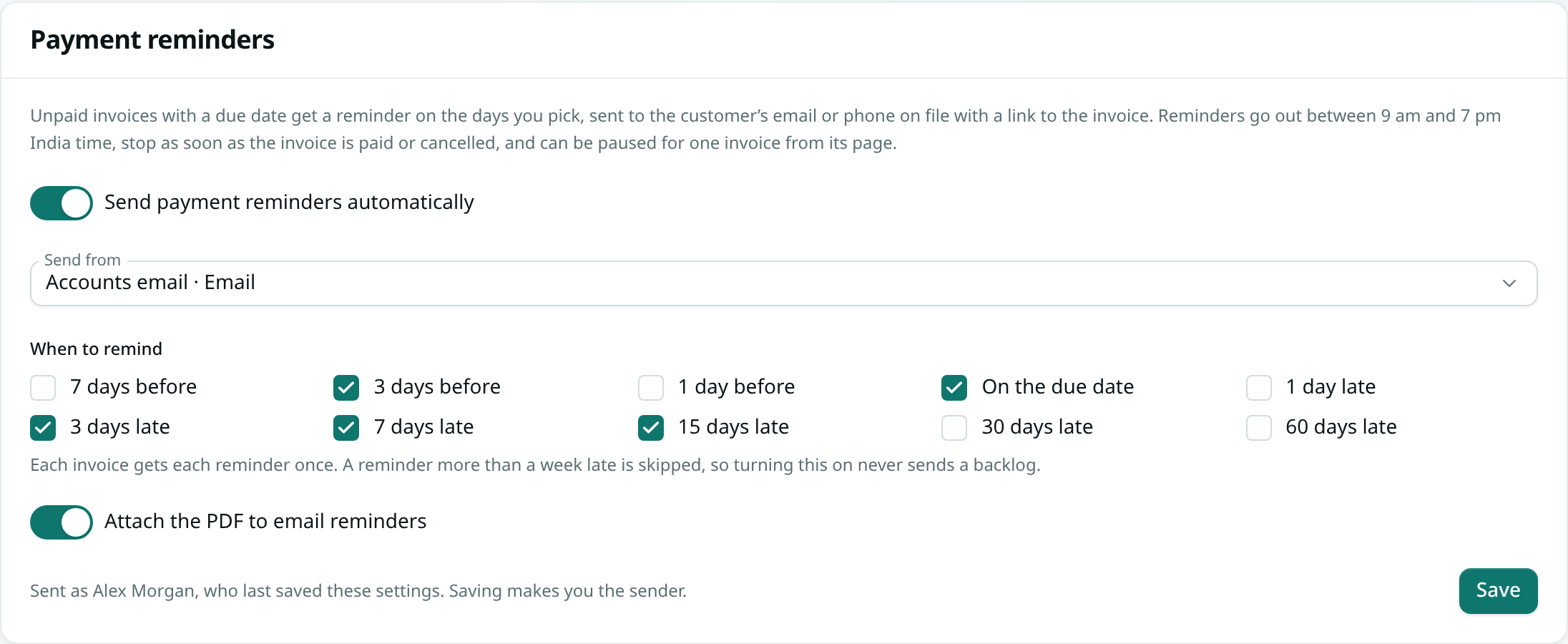
- Switch on the reminder schedule. Open Invoices & Payments › Invoice settings › Payment reminders. Leave Send payment reminders automatically on, choose a channel under Send from, and tick days under When to remind. The default is 3 days before, on the due date, then 3, 7 and 15 days late. Click Save.
- Let the payment settle the invoice. When Razorpay confirms the link as paid, AxisIQ creates a payment record with the amount, the date and the method (such as upi), linked to the invoice. The invoice's paid and due amounts update and it moves to partially paid or paid. Reminders for it stop once it is paid in full. Money that arrives another way, by NEFT or a UPI QR scan, is entered with Record payment on the invoice (recording a payment).
- Check ageing for who still owes. Open Accounting › Reports › Ageing and pick Receivables. Each customer gets one row, split into Not due, 0–30 days, 31–60, 61–90 and Over 90. Ageing reads the ledger, so a payment shows here only when the invoice's document type has ledger posting switched on.
What the reminders say
Before or on the due date, the customer gets a message like "Reminder: INV/26-27/0042 is due on 30 Oct 2026" with the amount due. After it, the message says the invoice is overdue, how many days late it is, and "If you have already paid, please ignore this message."
The automatic reminder links to the invoice page, not the Razorpay link. There the customer can download the PDF and, if your business profile has a UPI id, pay by UPI QR. So add your UPI id to your business profile. For the Razorpay link, fill in the customer's phone or email when you create it so Razorpay sends it too.
Reminders go out between 9 am and 7 pm India time, and a partly paid invoice is reminded only for what is left.
When a customer asks for more time
Open the invoice and click Pause in the Payment reminders panel. Reminders stop for that invoice only, and Resume starts them again. The panel also lists every reminder sent, and why any failed. More in automatic payment reminders.
Can payment reminders go out on WhatsApp automatically?
You can pick a WhatsApp account as the reminder channel, but WhatsApp only delivers free text within 24 hours of the customer's last message, so most automatic reminders on WhatsApp are refused by WhatsApp itself. This is a WhatsApp rule, not an AxisIQ setting.
Business software can message outside that 24-hour window only with pre-approved WhatsApp message templates. AxisIQ's reminders are free text, so they are refused there.
The practical setup for most businesses:
- Automatic reminders by SMS or email. These are the reliable channels. Every reminder appears in Phone & Messages with its delivery status, so you can see what landed.
- WhatsApp for the personal nudge. Copy the payment link and send it in the chat you already have with the customer. A customer who has just replied to you is inside WhatsApp's 24-hour window anyway.
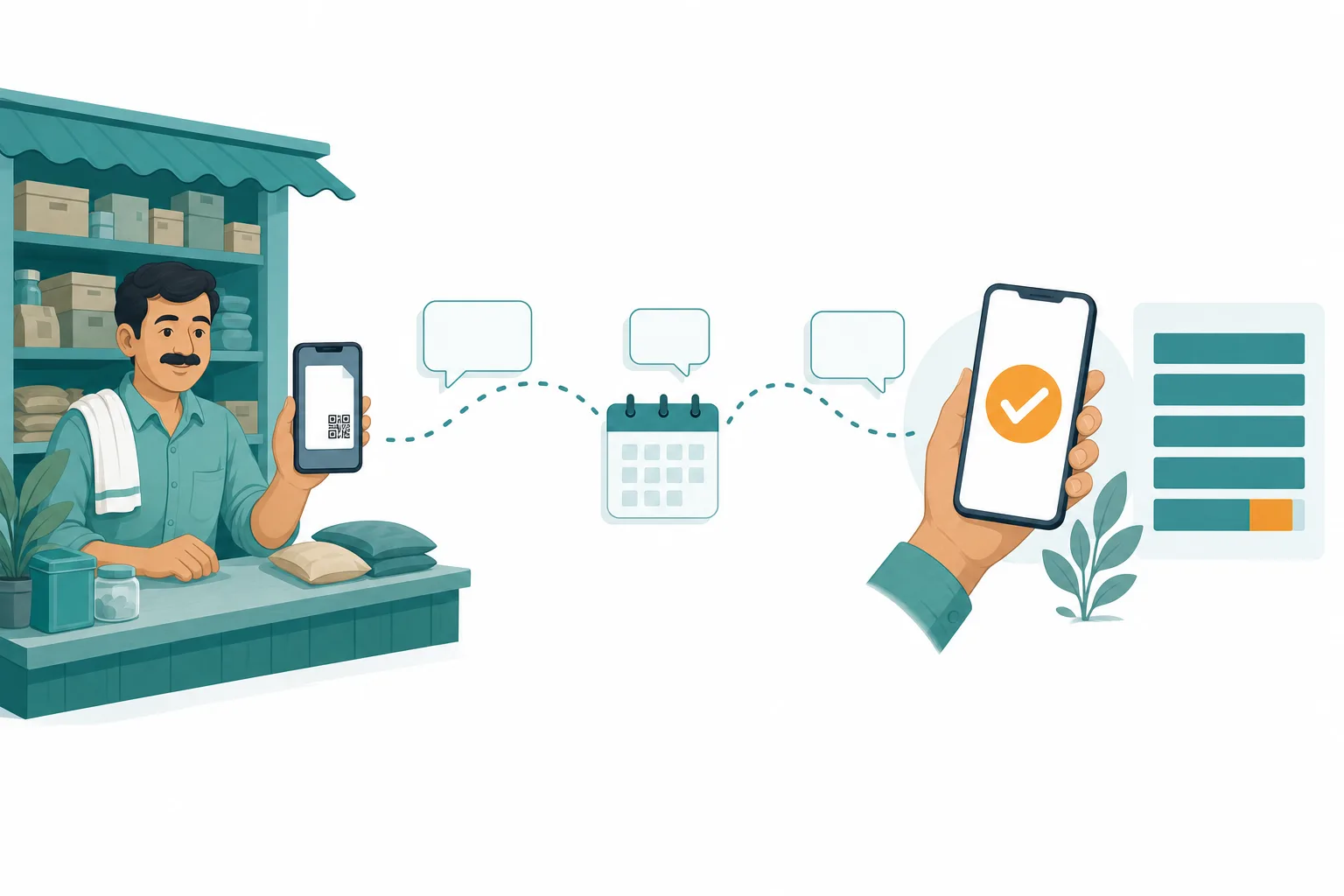
A worked example: one month of dues
Take a hypothetical electrical goods distributor in Pune with 40 open invoices worth ₹18,40,000 in total, on 30-day terms. With the flow above:
- Every new invoice gets a payment link created from it, shared on WhatsApp along with the PDF.
- Reminders go by SMS on the default days: 3 days before, on the due date, and 3, 7 and 15 days late.
- A retailer who owes ₹62,500 pays by UPI from the payment link you shared on WhatsApp, two days after the due date. Razorpay confirms it, a payment record appears against that invoice with method upi, the balance due drops to zero and the remaining reminders never go out.
- Another retailer sends ₹40,000 of a ₹1,00,000 invoice by NEFT. The accountant clicks Record payment on the invoice and changes the Amount to ₹40,000. The invoice moves to partially paid and the next reminder asks only for the remaining ₹60,000.
- A third has agreed to pay after a festival order clears. The accountant pauses reminders on that one invoice.
Every Monday, the owner opens the receivables ageing report instead of scrolling through chats. Suppose it shows ₹4,10,000 still open, of which ₹1,25,000 sits in 31–60 with two customers who have already had all five reminders. Those two get a phone call. Everyone else is being handled by the schedule.
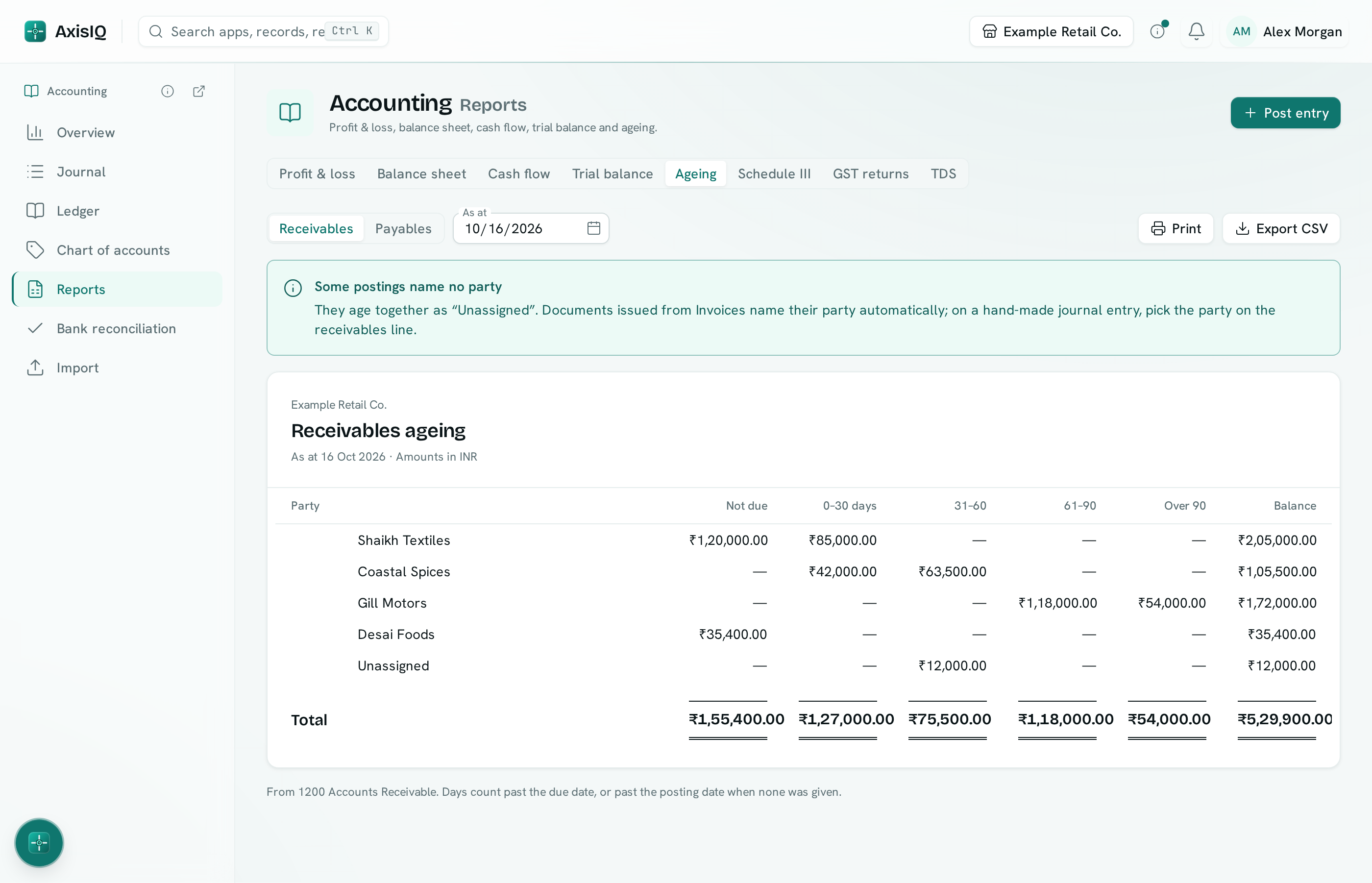
Clicking a row opens that customer's statement in the ledger. To send one before the call, download a customer statement PDF from Invoices & Payments › Overview. See receivables and payables ageing for how the buckets work.
How to collect payments faster from customers: a checklist you can use today
Run this with any software, or by hand with a calendar. What matters is that it is fixed and the same for every customer.
| When | What to send | Channel | Tone |
|---|---|---|---|
| With the invoice | Invoice PDF plus a UPI link or QR | WhatsApp chat you already have | Thank you for the order |
| 3 days before due | Invoice number, amount, due date, payment link or UPI QR | SMS or email | Friendly heads-up |
| On the due date | Same details, "due today" | SMS or email | Plain reminder |
| 3 days late | Days overdue, payment link or UPI QR, "ignore if paid" | SMS or email | Still polite |
| 7 days late | Same, plus offer of a statement | SMS or email, then a WhatsApp message | Firm |
| 15 days late | Statement of account | Phone call from the owner | Direct conversation |
Reminder messages you can copy
- Before due: "Hi {name}, a reminder that invoice {no.} for ₹{amount} is due on {date}. Pay by UPI here: {link}. Thank you."
- Overdue: "Hi {name}, invoice {no.} for ₹{amount} is now {n} days overdue. Pay here: {link}. If you have already paid, please ignore this message."
- 15 days late: "Hi {name}, invoice {no.} for ₹{amount} is 15 days overdue. I am attaching your statement of account so we can match our records. Could you confirm a payment date?"
A few habits that make the table work:
- Put a due date on every invoice. No due date means nothing is overdue, and nothing gets chased.
- Always include a way to pay in the same message. A reminder without a link or QR sends the customer off to find your bank details.
- Review ageing weekly, not monthly. Call the 31–60 bucket before it becomes the over-90 bucket.
See your own overdue list in AxisIQ: book a free demo to walk through links and reminders on invoices like yours, or start a 30-day free trial with no card needed.
What AxisIQ doesn't do
- Razorpay only. Payment links run through your own Razorpay account. Reminders and ageing still work with payments you record by hand.
- No recurring collection. Every link is a single payment. There is no mandate or auto-debit, so a monthly retainer needs a new link each month.
- Not for quotations or bills. Reminders apply to issued sales invoices with a due date, not quotations, credit notes or supplier bills.
- Reminders run under one person's permissions. If the person who last saved the settings leaves or loses access, reminders stop until someone saves them again.
FAQ
Can I send a UPI payment link for an invoice on WhatsApp?
Yes. Create the link from the invoice, click Copy link and paste it into the customer's WhatsApp chat. The customer pays on Razorpay's page by UPI or any other method your Razorpay account has enabled.
Will AxisIQ send payment reminders on WhatsApp automatically?
It can use a connected WhatsApp account, but WhatsApp only delivers free text within 24 hours of the customer's last message, so most automatic WhatsApp reminders are refused. Use SMS or email for the automatic schedule and WhatsApp for personal follow-ups.
What happens if a customer pays but the link still shows as unpaid?
Open links are re-checked with Razorpay in the background every few minutes at first, less often as a link gets older, for up to 30 days, so a paid link settles even if the webhook was missed. You can also use Refresh status on the link to check straight away.
Will switching on reminders spam customers about old invoices?
No. Each invoice gets each reminder once, and any reminder day more than a week in the past is skipped. Reminders also stop when an invoice is paid in full or cancelled.
How much does AxisIQ cost?
The Core plan is ₹4,999 a month, GST extra, and there is a 30-day free trial with no card needed. See pricing for what is included.
Get paid without chasing
Late payments rarely need a harder conversation. They need an easier way to pay and a schedule nobody has to remember.
Book a free demo to see your own invoices with payment links and reminders, or start a 30-day free trial, no card needed.