Daily sales report on WhatsApp: ask your business, skip the dashboard
Get sales, dues and stock on WhatsApp each morning, then ask follow-ups in plain words. 14 example questions, a digest checklist and honest limits.

You can get a daily sales report on WhatsApp without opening a single dashboard. In AxisIQ you set up a digest, a question Ask Axis answers on a schedule, and it arrives on WhatsApp each morning. Then you message Ask Axis in the same WhatsApp chat, for example "who owes us more than ₹50,000?", and it answers from live data under your permissions.
Why do owners stop checking dashboards?
Dashboards assume you are sitting at a laptop. Most owners are at the counter, in the godown or on the road, whether you run a shop in Surat or a distributorship in Pune. So the numbers come in pieces. Someone screenshots a Tally report. Someone else sends a photo of the stock register. By evening you have a rough idea of the day's sales and no clear idea of who owes what.
The fix is not another login. It is sales, dues and stock sent to where you already read messages, with the next question one message away.
How does a daily sales report on WhatsApp work in AxisIQ?
There are two parts: a scheduled digest that comes to you, and a WhatsApp conversation where you ask follow-ups. Both run through Ask Axis, the AI assistant inside AxisIQ.
Step 1: Connect WhatsApp to your account
- Open your name menu in the top bar, click Your account, then Ask Axis on WhatsApp in the left rail.
- The Ask Axis on WhatsApp card shows the AxisIQ WhatsApp number to message.
- Click Open WhatsApp and send a message from your verified mobile number.
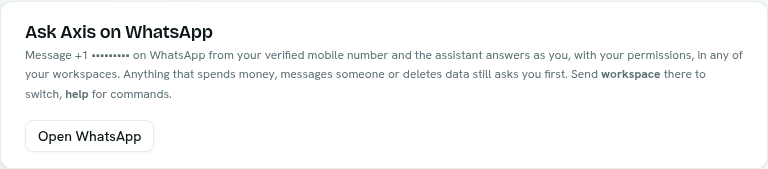
There is nothing to switch on. Your verified mobile number is what identifies you, so always write from that number (belong to several workspaces? you pick from a numbered list, and send workspace to switch). If you don't see the Ask Axis on WhatsApp card at all, WhatsApp is not set up for your platform yet; ask your administrator. If the card says to add a mobile number first, add one under Sign-in methods. Full details are in Ask Axis on WhatsApp.
Step 2: Schedule the digest
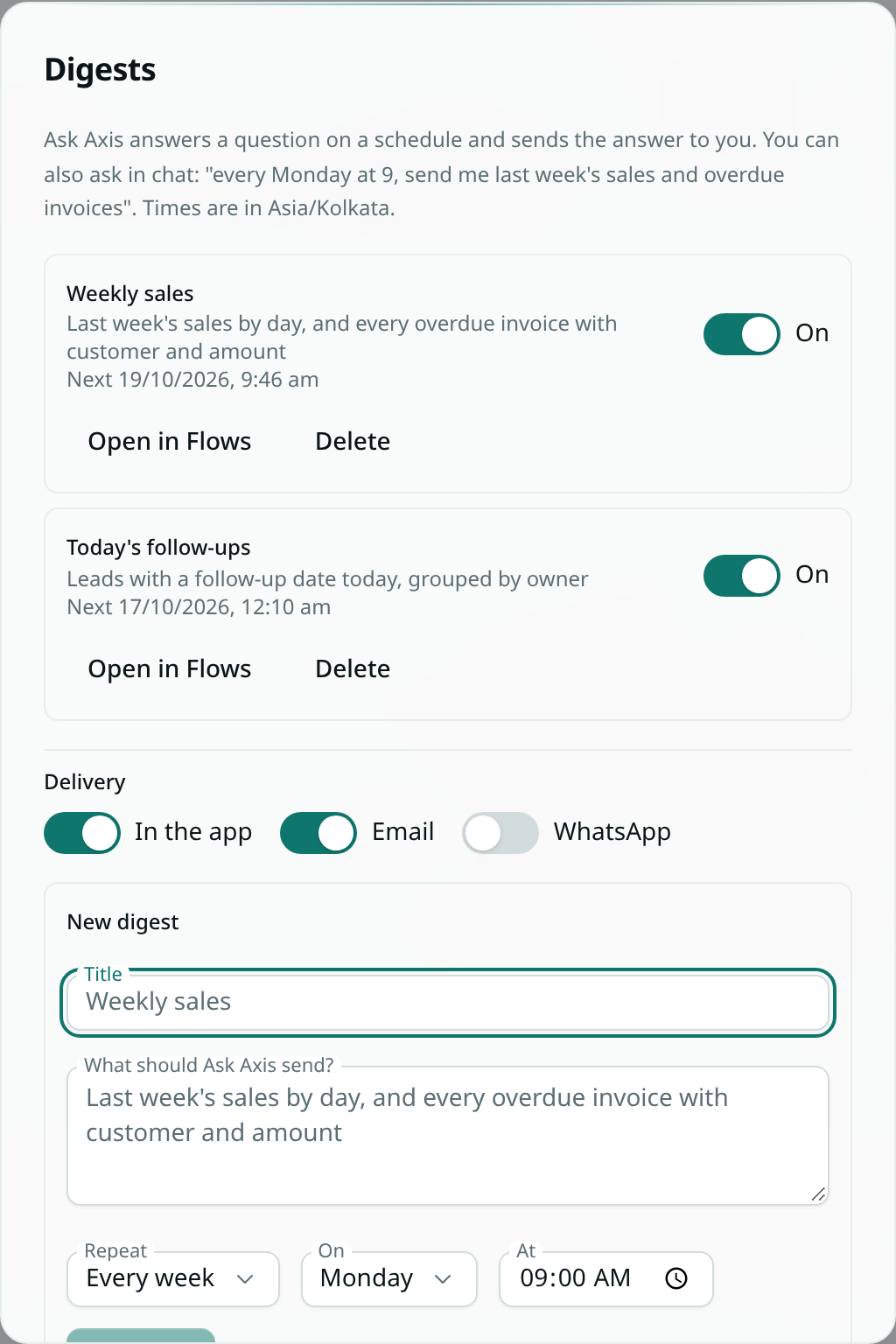
You need Can use on Ask Axis assistant and Full control on Automations, because digests are flows. The quickest way is to ask Ask Axis in plain words: "Every weekday at 8:30, send me yesterday's sales, every overdue invoice with customer and amount, and items below reorder level." Ask Axis sets it up in your own time zone and tells you when the first one arrives.
To set it up by hand:
- Open Ask Axis (the full page) and click Digests.
- Under New digest, give it a Title, for example
Morning numbers. - In What should Ask Axis send?, write the question.
- Pick Repeat (Every day, Weekdays (Mon–Fri) or Every week), the day under On for weekly ones, and the time under At.
- Click Schedule. You see
Digest scheduled.
Monthly digests ("on the 1st of every month, summarise last month's expenses by category") are set up through chat. More in the digests guide.
Step 3: Turn on WhatsApp delivery
Each digest lands in the bell, and by email and WhatsApp if you have them switched on, under Delivery in the Digests window or the Ask Axis digests row of your notification settings. Email is on to start with, so switch WhatsApp on yourself. The WhatsApp message carries the full answer.
Step 4: Ask your next question on WhatsApp
Message Ask Axis on WhatsApp the way you would message your accountant. Make the first question complete ("overdue invoices over ₹50,000, with customer and amount"). After that, short follow-ups like "now just Mumbai" or "split that by month" work in the same conversation, which is the same on every device and on WhatsApp.
Step 5: Approve anything that changes things
Reading and searching need no approval. Anything that spends money, messages someone or deletes data stops and asks you first. On WhatsApp the options arrive as a numbered list; reply with the number, or reply "yes" to a confirmation. See Confirmations and questions.
What business questions can I ask in plain English?
You do not need the exact names of your record types or fields. Ask in business words; Ask Axis looks up the right record type first. Questions with a clear measure, grouping and time range get the best answers.
Here are 14 questions an owner might send, assuming the data is in your workspace:
- "What were yesterday's total sales?"
- "Compare this week's sales with last week's."
- "Total order value by city this month, highest first."
- "Who owes us more than ₹50,000?"
- "Invoices more than 30 days past due, with customer and amount."
- "Which customers ordered last quarter but not this quarter?"
- "Top 10 stock items by quantity sold in the last 30 days."
- "Which items are below reorder level right now?"
- "How many orders are in each status right now?"
- "What has been sitting in packing since Tuesday?"
- "Which suppliers have more than three late deliveries since April?"
- "Average days from order to dispatch, by warehouse, for the last 90 days."
- "Why is invoice 1042 still open?"
- "Now just Mumbai" or "split that by month", sent after any question you have asked in the chat.
A worked example: one morning for a distributor
This is a hypothetical example. Say you run a hardware distribution business in Pune with 40 open invoices and two godowns.
At 8:30 on a weekday, your digest arrives on WhatsApp: yesterday's sales, the overdue invoices with customer and amount, and the items below reorder level. For example (figures made up):
Sales yesterday: ₹3,42,500 (same day last week ₹2,98,000) Overdue: 11 invoices, ₹6,80,000 Over 30 days: Sharma Traders ₹1,20,000, Patil Hardware ₹74,000 Below reorder level: 6 items
You are driving to a dealer, so at a signal you message Ask Axis: "who owes us more than ₹50,000?" Ask Axis runs a read-only query on your invoices and replies with the customers and amounts. Say it lists four dealers, with one at ₹1,20,000 overdue for 45 days.
You reply: "send the payment reminder to these 4 customers." This sends messages to real people, so Ask Axis does not act on it yet. It replies with a numbered list of the four messages and asks you to confirm. You check the list and reply "yes". Each message is sent exactly once, with exactly the details in the list. If anything about the list would change, it asks you again.
Two caveats: sending needs a connected email, SMS or WhatsApp account in your workspace, and a sent message cannot be undone, which is why it asks first.
Later, at your desk, you open What Axis did and see each action it took for you, when, and whether it worked. See what Ask Axis did for you. Changes to records can be undone there; sent messages cannot.
Checklist: what should a daily owner digest contain?
Use this table with any tool: a message from your accountant, a billing software report, or an AxisIQ digest.
| Include | Ask it this way | Why it matters |
|---|---|---|
| Yesterday's sales | "Yesterday's total sales, and the same day last week" | A number without a comparison tells you little |
| Collections | "Payments received yesterday, by customer" | Sales are not cash until collected |
| Overdue dues | "Invoices more than 30 days past due, with customer and amount" | Your follow-up list for the day |
| Big dues | "Customers who owe more than ₹50,000" | Where one phone call recovers the most |
| Low stock | "Items below reorder level" | Avoids telling a customer "out of stock" |
| Slow stock | "Items with no sales in the last 60 days" | Cash sitting on godown shelves |
See your own morning numbers on WhatsApp. Book a demo, or start a 30-day free trial with no card needed.
Is an AI assistant safe for a small business's data?
Yes, if it runs under each person's permissions. Ask Axis runs as the person who sent the message, never as a superuser. Every lookup is checked against your role at the moment it runs. A digest only ever contains what you could look up yourself.
Say your sales manager also uses it. If cost price is masked for their role, that column comes back empty, and the masked value is never sent to the AI model. If something is outside their permissions, Ask Axis says it was refused instead of pretending. See Permissions.
What AxisIQ doesn't do
- It only replies. On WhatsApp, Ask Axis answers when you write first. It does not start conversations.
- WhatsApp digests need a recent message. WhatsApp delivers within 24 hours of your last message to Ask Axis there, so a quick message keeps digests arriving.
- Text only. It reads text messages. Send a photo or file and it asks you to type instead.
- Digests only read. A digest can look up records, run analytics and summarise. It never sends messages to anyone else, takes payments or deletes anything.
- Big lists get cut. A query returns at most 1,000 rows. Ask for totals and top 10s rather than every row.
- It can misread a question. The numbers come from the database, but the model can pick the wrong date field or status. In the app you can see the query behind each answer; check a new question once before you rely on it.
- AI use is metered. Your plan's AI allowance applies, and each digest counts toward it like any other question. If you reach it, the reply says so.
- It reads data in AxisIQ. If dues live in a notebook or a separate billing system, Ask Axis cannot see them. Export them as CSV and bring them in with the CSV import guide.
For more on asking good questions, read how to ask questions of your business data in plain English.
FAQ
Can I get a daily sales report on WhatsApp automatically?
Yes. Set up a digest in Ask Axis with Every day or Weekdays (Mon–Fri) and switch on WhatsApp under Delivery. WhatsApp delivers within 24 hours of your last message to Ask Axis there, so message it at least once a day.
Can I ask about my business data in plain English on WhatsApp?
Yes. Message Ask Axis from your verified mobile number and ask in business words, such as "invoices more than 30 days past due". It answers from your live records under your permissions.
Can Ask Axis change anything from WhatsApp?
Yes, within your permissions. Anything that spends money, messages someone or deletes data arrives as a confirmation first, and you reply with the number or "yes" to approve it.
Does it work with my existing billing software?
Ask Axis answers from data in AxisIQ. If your sales and dues are in another system, export them as CSV and import them as record types; see the CSV import guide.
How much does AxisIQ cost?
You can try it with a 30-day free trial, no card needed. See pricing for current plans.
Get tomorrow's numbers on your phone
Pick the three things you check every morning, write them as one question and schedule it. Start a 30-day free trial with no card needed, or book a demo to see a digest built on data shaped like yours.