Triggers
The four ways a flow can start: a record change, a schedule in UTC, a manual Run, or a calendar event.
Every flow has exactly one trigger. It is the block the flow starts from. You cannot connect anything into a trigger.
Overview
| Trigger | Starts when | Needs |
|---|---|---|
| Record event | A record of a chosen type is created, updated or deleted. | A record type |
| Schedule | The clock matches a cron schedule. Times are UTC. | A cron expression |
| Manual | Someone presses Run. | Nothing |
| Calendar event | A calendar event is created, changed, cancelled, or is about to start. | Optional: a calendar |
A flow that is Off never starts from a trigger. It still starts when you press Run.
Record event
Runs after a record is saved.
| Setting | Options |
|---|---|
| Object type | Pick a record type. It is shown as "Label (key)". |
| Event | Created, Updated or Deleted. Default Created. |
What the flow can use from this trigger (all in the Insert value menu under Trigger):
- Record id and Event.
- Record · for every field of the record type.
For a Deleted event only the record id and event are available, because the record itself is gone. For created and updated events the record's values are read with the permissions of the person the flow runs as. See Who a flow runs as.
Schedule
| Setting | Notes |
|---|---|
| Cron (UTC) | Standard 5-field cron: minute, hour, day of month, month, day of week. Example: 0 9 * * *. Times are UTC, not your local time. |
| Preset | Fills the cron for you. |
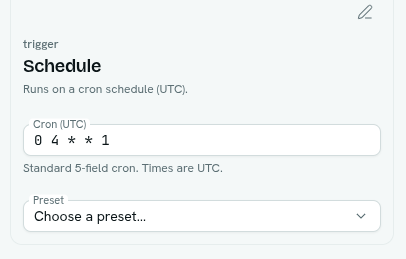
Presets:
| Preset | Cron |
|---|---|
| Every 15 minutes | */15 * * * * |
| Hourly | 0 * * * * |
| Daily at 09:00 UTC | 0 9 * * * |
| Weekly (Mon 09:00 UTC) | 0 9 * * 1 |
| Monthly (1st 00:00 UTC) | 0 0 1 * * |
A new Schedule block starts with 0 9 * * *. The flow can use Scheduled time from the Insert value menu. An invalid cron is refused when you save an enabled flow. The next five scheduled runs of enabled flows show on the Overview under Coming up.
Tip: India Standard Time is UTC+5:30. For 09:00 IST, use
30 3 * * *.
Manual
Nothing to configure. The flow runs when you press Run in the builder, or choose Run now from the flow's menu in the list. You need the Can run level (or higher) of the Automations app. The canvas summary reads "on demand".
Calendar event
| Setting | Options |
|---|---|
| Calendar | Any calendar I can see, or one calendar by name. Calendars that only mirror records are not listed. |
| When an event | Is about to start, Is created, Is changed, Is cancelled. Default Is about to start. |
| Minutes before it starts | Only for Is about to start. A number from 0 to 10080. 0 means at the start. Default 15. Fires once for each occurrence of a repeating event. |
What the flow can use (under Trigger): Occurrence start, and Event · id, title, start, end, location, description, calendar key, attendees (list) and linked record id.
The event is read with the permissions of the person the flow runs as. If they cannot read that event, the flow does not run for it. See Calendar.