Blocks reference
Every block in the Add a block palette: what it does, its settings, and what later blocks can use from it.
The Add a block panel in the builder lists these blocks, in this order. Triggers are on their own page. Conditions, filters and loops are covered in Conditions and lists.
At a glance
| Block | Kind | What it does |
|---|---|---|
| Record event | Trigger | Runs when a record is created, updated or deleted. |
| Schedule | Trigger | Runs on a cron schedule (UTC). |
| Manual | Trigger | Runs only when you press Run. |
| Calendar event | Trigger | Runs when an event is created, changed, cancelled, or a set time before it starts. |
| Condition | Logic | Branches true / false on the data. |
| Update record | Action | Sets fields on a record. |
| Create record | Action | Creates a new record. |
| Run function | Action | Runs one of your JavaScript functions. |
| HTTP request | Action | Calls an external API and lets you use the response later. |
| Create event | Action | Puts an event on a calendar, optionally inviting people. |
| Filter list | Logic | Keeps the items of a list that match. |
| Summarize | Logic | Folds a list to one value (sum, count and so on). |
| For each | Logic | Runs the next blocks once for each item in a list. |
Update record
Changes fields on an existing record.
| Setting | Notes |
|---|---|
| Object type | The record type. Required. |
| Record to update | The id of the record. Defaults to {{trigger.record_id}}, the record that started the flow. Required. |
| Set fields | One row per field. Required: at least one field. |
In Set fields, click Add field, pick the field, then give its value. For a field with a fixed list of choices, or a yes/no field, you get a dropdown. For anything else you type a value or insert a reference. Click the {} button on a dropdown row to type a reference instead, and click it again to go back to the picker.
Fields filled in automatically (auto-numbered) and computed (formula) fields are not offered, because the system owns them.
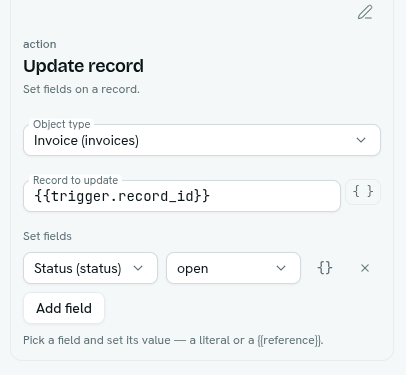
Later blocks can use Update record · saved id.
Create record
Creates a record.
| Setting | Notes |
|---|---|
| Object type | Required. |
| Field values | Same editor as Set fields. |
Later blocks can use Create record · saved id, which is handy for linking the new record to something else.
Both record blocks run with the permissions of the person the flow runs as, including field-level hiding. A field that person cannot change cannot be set by the flow. See Who a flow runs as.
Run function
Runs one of your functions.
| Setting | Notes |
|---|---|
| Function | Pick from your functions. Required. |
| Input | Name/value rows passed to the function as its input object. Values can be literals or references. |
Later blocks can use Run function · result. The step fails if the function throws an error, times out, or the person the flow runs as is not allowed to run functions (Can run on Custom code). Function rules that apply to flows are on Limits and permissions.
HTTP request
Makes one web request to another system.
| Setting | Notes |
|---|---|
| Method | GET, POST, PUT, PATCH or DELETE. Default GET. |
| URL | Required. Must start with http or https. |
| Headers | Name/value rows. Values can be references. |
| Body | Free text, usually JSON. You can put references inside it, for example {"text": "{{trigger.record.name}}"}. |
- Only public addresses work. Addresses inside private networks, and local addresses, are refused.
- Each request has a 10 second time limit and a 1 MB response limit.
- A response that is not a success (for example 404 or 500) is not a failed step. It is data you can branch on. A connection error or timeout does fail the step.
- Later blocks can use HTTP request · status and HTTP request · body. If the response is JSON, you can reach inside it, for example
{{node.<id>.output.body.<field>}}. The output also holdsok(true for a 2xx status) andheaders.
Create event
Adds an event to a calendar.
| Setting | Notes |
|---|---|
| Calendar | My own calendar or one you can see. |
| Title | Text or reference. |
| Starts (date or date-time) | Text or reference. |
| Ends (optional) | Leave empty and use the length below. |
| Or length in minutes | Default 60. |
| Location, Description | Optional. |
| Invite (comma-separated emails) | Optional guests. |
| Link to record id (optional) | If set, also choose Linked record type. |
| All day | No — timed or Yes — whole day(s). |
Later blocks can use Create event · event id and Create event · start.
Logic blocks
- Condition, Filter list, Summarize and For each are described in Conditions and lists.
When a block fails
- A failed block stops its own branch. Branches that do not depend on it carry on.
- The run is marked Failed if any block failed. The failing block shows its error under Detail on the run. See Runs and overview.
- A failed block is not retried automatically.
- Each run records at most 2000 steps.