Ask Axis
Ask Axis is the built-in assistant that looks things up and does the clicking for you, using only what your own role allows.
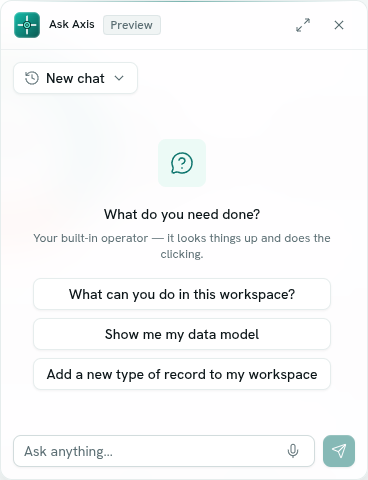
Ask Axis is the assistant built into your workspace. You type what you need in plain words, and it looks up records, runs analytics, drafts functions and flows, generates documents and more, then tells you what it did. It works with your permissions only: it can never do something you could not do yourself.
What you can do
- Chat from any page — open the floating chat with
Ctrl + J. Chat with Ask Axis - See what it can do — records, functions, analytics, flows, roles, documents, calendar and more. What Ask Axis can do
- Stay in control — risky actions always ask you first, and it asks a short question when your request is unclear. Confirmations and questions
- Ask about what you are looking at — open a record and ask about "this record". Page context
- Add outside tools — connect external tool servers for the assistant to use. Connectors
- Use it from your phone — message it on WhatsApp. Ask Axis on WhatsApp
Before you start
- Who can use it: the Ask Axis assistant app on the Roles page. Can use lets you chat. Use & see AI spend also allows reading what the workspace spends on AI. Full control also lets you manage shared connectors.
- Ask Axis cannot be switched off in Settings › Apps; it is always on.
- If the assistant has not been turned on for the platform, the chat answers: "Ask Axis isn't switched on yet — an admin needs to add an assistant API key on the server."
- Your plan can limit AI use. When you reach the limit the chat says: "You've reached your plan's AI allowance — choose a plan in Settings → Billing to continue."
- The chat is labelled Preview.
Where to find it
- The floating Ask Axis button at the bottom right of every signed-in page.
- Launcher category Intelligence › Ask Axis (the full page).
- The Connectors button on the full page manages outside tools.
Key ideas
| Term | What it means |
|---|---|
| Chat (conversation) | A saved thread of messages. Your chats are private to you and follow you across devices. |
| Step | One action Ask Axis took, shown as a small badge above its answer, such as "Searched invoices". |
| Confirmation | A "go ahead?" question shown before money, messages, invitations or deletions. |
| Page context | A hint about the record or app on your screen, so "this" means the right thing. |
| Connector | An outside tool server the assistant can call, added by you or shared with the workspace. |