Relay
Team chat inside your workspace: channels, direct messages, threads, files, reminders, search and channels shared with other organizations.
Relay is team chat built into your workspace. Talk in channels, send direct messages, reply in threads, share files and keep track of what needs your attention — next to the records, flows and reports your team already works in. With Relay Connect you can also share a channel with a customer, supplier or partner who uses AxisIQ in their own workspace.
What you can do
- Talk in channels — public channels anyone can join, private channels for a smaller group, and
#generalfor everyone. Channels - Send direct messages — one-to-one, to a small group, or a note to yourself. Direct messages
- Write messages — formatting, @mentions, files, editing, forwarding and scheduled sends. Write messages
- Reply in threads, react and pin — keep side conversations tidy and mark what matters. Threads, reactions and pins
- Stay on top of what needs you — unread counts, Activity, and per-channel notification settings. Activity and notifications
- Save messages and set reminders. Saved, reminders and scheduled
- Find anything — search every conversation you can see, or jump to one with
Ctrl + K. Search and quick switcher - Set a status and pause notifications. Status and do not disturb
- Work with other organizations — share a channel with another AxisIQ workspace and message their people. Relay Connect
- Work faster with the keyboard. Keyboard shortcuts
- Know the limits. Limits
Before you start
- Every member can chat: channels, direct messages, threads, files and reactions need no role.
- Relay on the Roles page adds two more levels. Can moderate archives any channel, removes people and deletes anyone's message. Full control also shares channels with other organizations and messages their people.
- Relay can be switched off in Settings › Apps. It must be on to appear.
- A workspace created before Relay existed gets it when the owner takes the pending update in Settings.
Where to find it
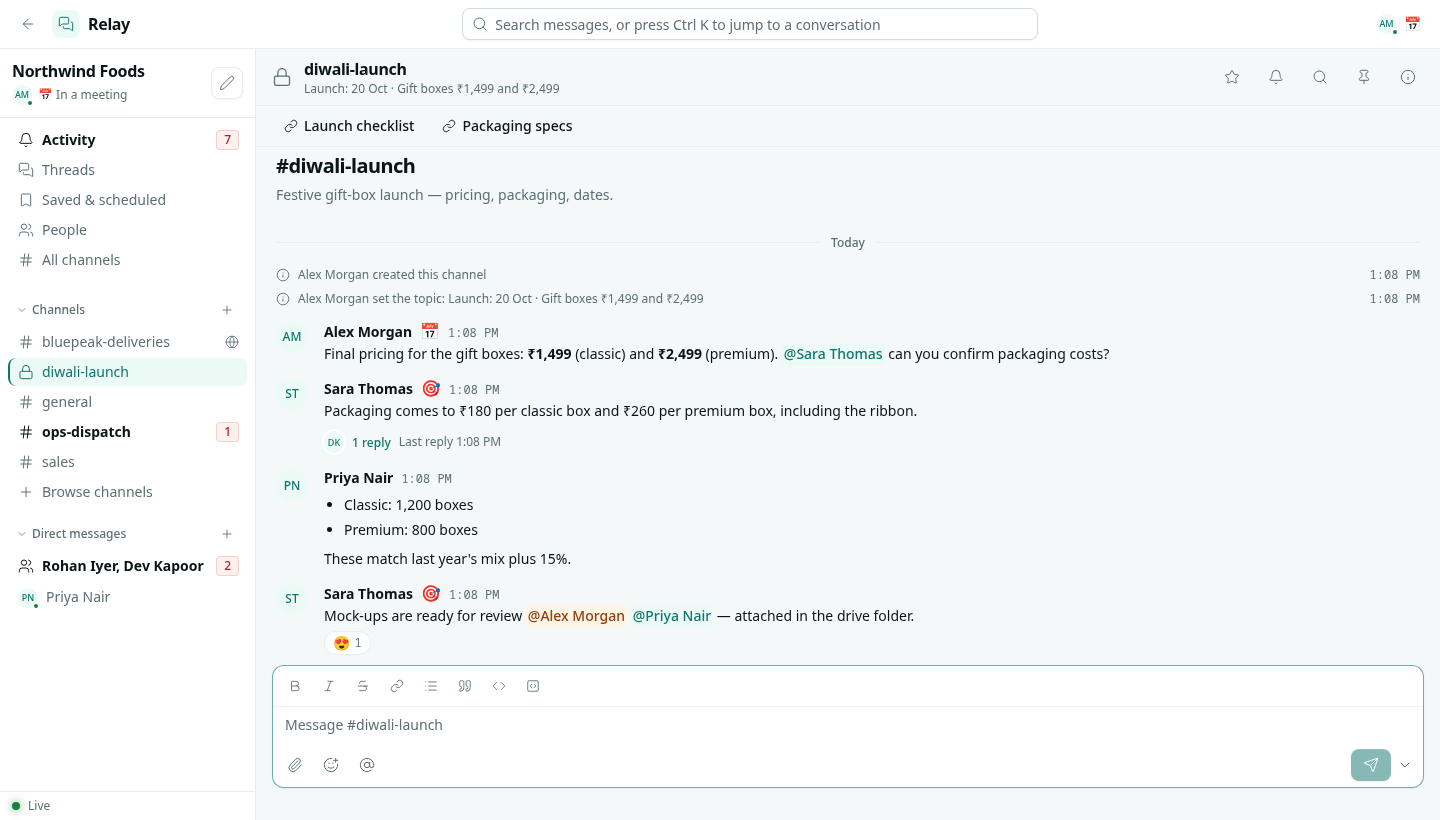
Communications category in the launcher › Relay. Relay opens full screen.
| Area | What it shows |
|---|---|
| Top bar | Search, which also opens the quick switcher, and your own status. |
| Left sidebar | Your workspace name and status, then Activity, Threads, Saved & scheduled, People and All channels, then your Channels and Direct messages with unread counts. |
| Conversation | The channel header (name, topic, star, notifications, search, pins and details), the bookmark bar, the messages and the message box. |
| Side panel | A thread you opened, or the channel details: About, Members, Pins, Files, Settings and Connect. |
The dot in the bottom-left corner shows Live while Relay is connected. New messages, reactions and typing appear as they happen.
Key ideas
| Term | What it means |
|---|---|
| Channel | A named conversation for a team, project or topic. Public or private. |
| Direct message | A private conversation with one person or a small group, with no name. |
| Thread | Replies to one message, kept beside the channel instead of in it. |
| Mention | @name, @channel, @here or @role in a message. It notifies the people it names. |
| Activity | Your list of mentions, replies, direct messages, reactions and reminders. |
| Shared channel | A channel that people from another organization have joined through Relay Connect. It shows Shared and a globe icon. |
| Host | The organization that created a shared channel. Its messages and files live with the host. |
Related
- Notifications
- Team & Permissions
- Messaging — email, SMS and WhatsApp to your customers